
Understanding Payment and Enrollment Flows
In Yuno SDKs, payment flows and enrollment flows are separate. Payment is the process of completing a transaction; enrollment is the process of saving a payment method (e.g. a card) to a customer account for future use. This page explains both flows at a high level with diagrams and step sequences. Use the Quickstart guide and platform flow pages for implementation details.
Payment flow
The SDK provides a unified payment experience: customers complete transactions using multiple payment methods within a single integration. The diagram below illustrates the main payment workflow.
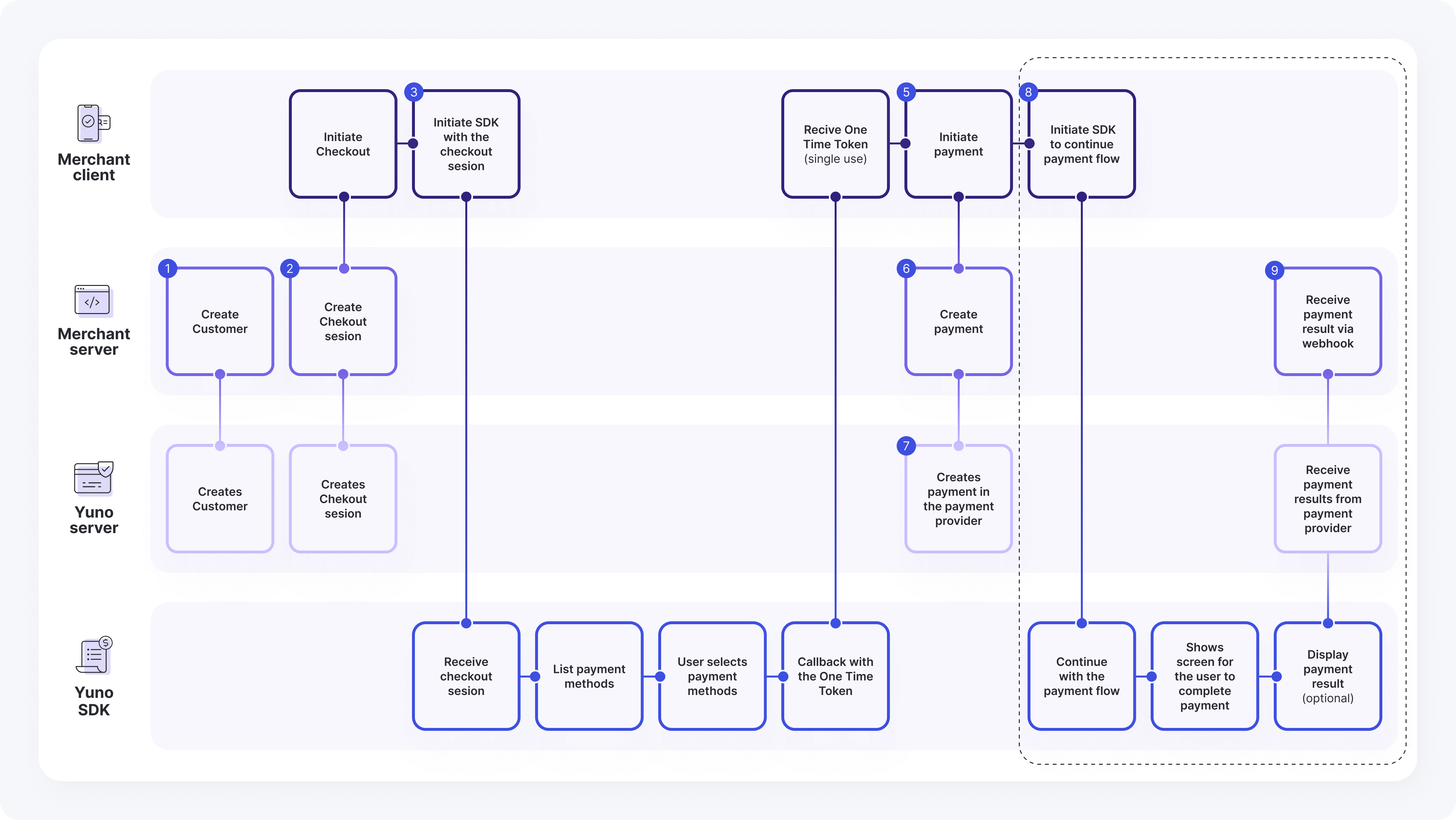
Payment flow steps
- Merchant Server: Create Customer → Yuno Server: Creates Customer
- Merchant Client: Initiate Checkout → Merchant Server: Create Checkout session
- Merchant Server: Create Checkout session → Yuno Server: Creates Checkout session
- Merchant Client: Initiate Checkout → Initiate SDK to continue payment flow
- Merchant Client: Initiate SDK to continue payment flow → Yuno SDK: Receive checkout session
- Yuno SDK: Receive checkout session → List payment methods
- Yuno SDK: List payment methods → User selects payment methods
- Yuno SDK: User selects payment methods → Callback with the one-time token
- Yuno SDK: Callback with the one-time token → Merchant Client: Receive one-time token (single use)
- Merchant Client: Receive one-time token (single use) → Initiate payment
- Merchant Client: Initiate payment → Initiate SDK to continue payment flow
- Merchant Client: Initiate SDK to continue payment flow → Yuno SDK: Continue with the payment flow
- Yuno SDK: Continue with the payment flow → Show screen for the user to complete payment
- Yuno SDK: Show screen for the user to complete payment → Display payment result (optional)
- Merchant Client: Initiate payment → Merchant Server: Create payment
- Merchant Server: Create payment → Yuno Server: Creates payment in the payment provider
Payment flow using a vaulted token
If a customer has an enrolled payment method, they can use a vaulted token to pay without entering payment details again.
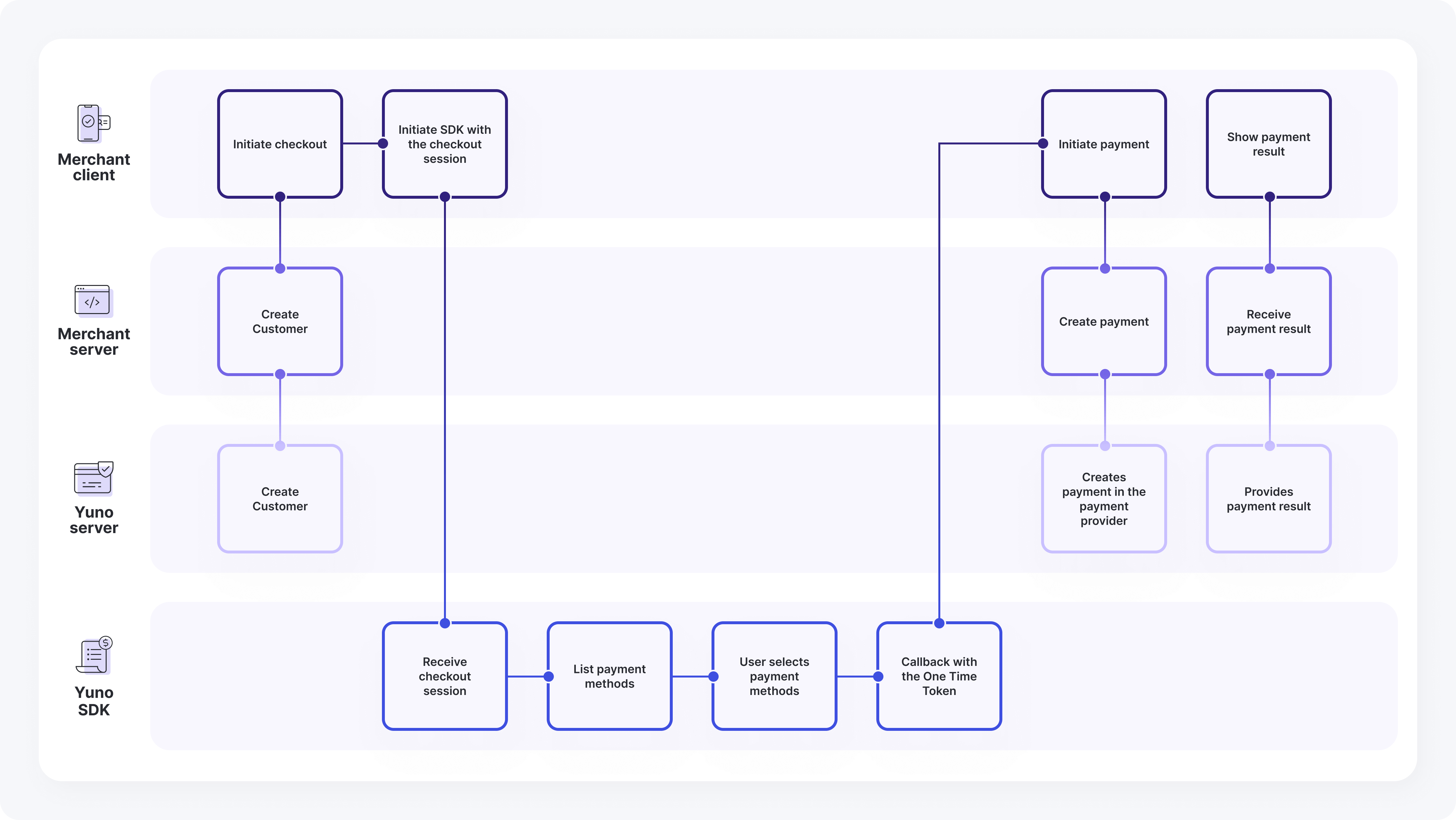
Vaulted token flow steps
- Merchant Client: Initiate checkout → Merchant Server: Create Customer
- Merchant Server: Create Customer → Yuno Server: Create Customer
- Merchant Client: Initiate SDK with the checkout session → Yuno SDK: Receive checkout session
- Yuno SDK: Receive checkout session → List payment methods
- Yuno SDK: List payment methods → User selects payment methods
- Yuno SDK: User selects payment method → Callback with the one-time token
- Yuno SDK: Callback with the one-time token → Merchant Client: Initiate payment
- Merchant Client: Initiate payment → Merchant Server: Create payment
- Merchant Server: Create payment → Yuno Server: Creates payment in the payment provider
- Merchant Client: Show payment result → Merchant Server: Receive payment result
- Merchant Server: Receive payment result → Yuno Server: Provides payment result
Enrollment flow
Enrollment is the process of saving a payment method (e.g. a card) to a customer’s account so it can be used later (e.g. with a vaulted token). Lite and Full support enrollment; the diagram below describes the enrollment workflow.
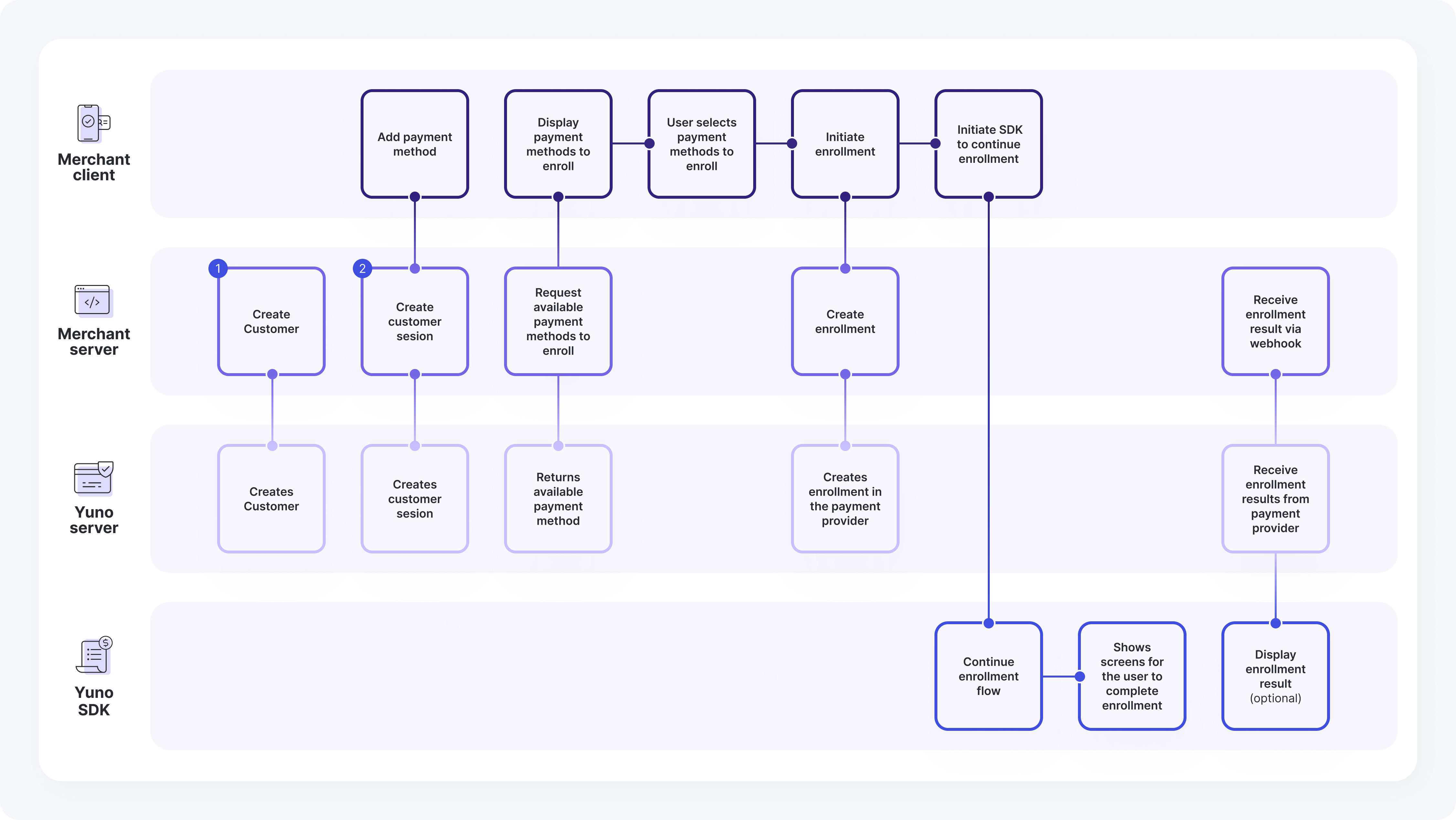
Enrollment flow steps
- Merchant Server: Create Customer → Yuno Server: Creates Customer
- Merchant Client: Add payment method → Merchant Server: Create customer session
- Merchant Server: Create customer session → Yuno Server: Creates customer session
- Merchant Client: Display payment methods to enroll → Merchant Server: Request available payment methods to enroll
- Merchant Server: Request available payment methods to enroll → Yuno Server: Returns available payment method
- Merchant Client: Display payment methods to enroll → Merchant Client: User selects payment method to enroll
- Merchant Client: User selects payment method to enroll → Merchant Client: Initiate enrollment
- Merchant Client: Initiate enrollment → Merchant Client: Initiate SDK to continue enrollment
- Merchant Client: Initiate SDK to continue enrollment → Yuno SDK: Continue enrollment flow
- Yuno SDK: Continue enrollment flow → Yuno SDK: Shows screens for the user to complete enrollment
- Merchant Server: Receive enrollment result via webhook → Yuno Server: Receive enrollment results from payment provider
- Yuno Server: Receive enrollment results from payment provider → Yuno SDK: Display enrollment result (optional)
Updated about 1 month ago