
What are co-badged cards?
Co-badged cards are payment cards that carry multiple network logos and can be processed through different payment networks. Common examples include:- Cards that support both a domestic network (e.g., Cartes Bancaires in France) and an international network (e.g., Visa or Mastercard)
- Cards that support multiple international networks
When is compliance required?
Compliance with EU IFR Regulation 2015/751 Article 8 is required when:- A merchant accepts both domestic and international networks (e.g., Cartes Bancaires and Visa)
- The customer’s card supports multiple networks that the merchant accepts
- The transaction is processed within the European Economic Area (EEA)
EU IFR Regulation 2015/751 Article 8
Regulation (EU) 2015/751, also known as the Interchange Fee Regulation (IFR), is a European Union regulation on interchange fees for card-based payment transactions. Article 8 specifically addresses co-badged cards and requires that merchants in the EEA allow customers to choose their preferred card network when using co-badged cards.Key Requirements
Article 8 requires that when a merchant accepts both domestic and international networks (e.g., Cartes Bancaires and Visa), the merchant must display a choice to EEA consumers allowing them to select which network to use. If a merchant only accepts one of the networks supported by the card, no network selection is required.Regulation Scope and Timeline
Regulation (EU) 2015/751 applies to all Member States of the European Union and the European Economic Area (EEA). The regulation entered into force on 8 June 2015, with Article 8 and related provisions applying from 9 June 2016.Yuno Solution
Yuno simplifies co-badged card compliance by providing built-in support through our SDKs, so merchants meet regulatory requirements without extra development.Automatic ComplianceWhen using Yuno SDKs, merchants are compliant with co-badged card regulations out-of-the-box. The SDK automatically handles network detection and selection, ensuring compliance without additional merchant configuration.
Supported SDK Versions
Co-badged card compliance is supported in specific versions of each Yuno SDK:- Web SDK: Version 1.1.0 and later
- iOS SDK: Version 2.0.0 and later
- Android SDK: Version 2.0.0 and later
- React Native SDK: Version 1.0.16 and later
How It Works
The SDK automatically handles compliance with no configuration required. Compliance is enabled by default as soon as a merchant accepts both networks of a co-badged card. The SDK automatically:- Detects which networks are supported by the customer’s card based on the card IIN (Issuer Identification Number)
- Displays network selection options to customers when multiple networks are available
- Handles the Mastercard-required phrase “Select card brand (optional)” automatically
- Stores the selected network for use in recurring payments
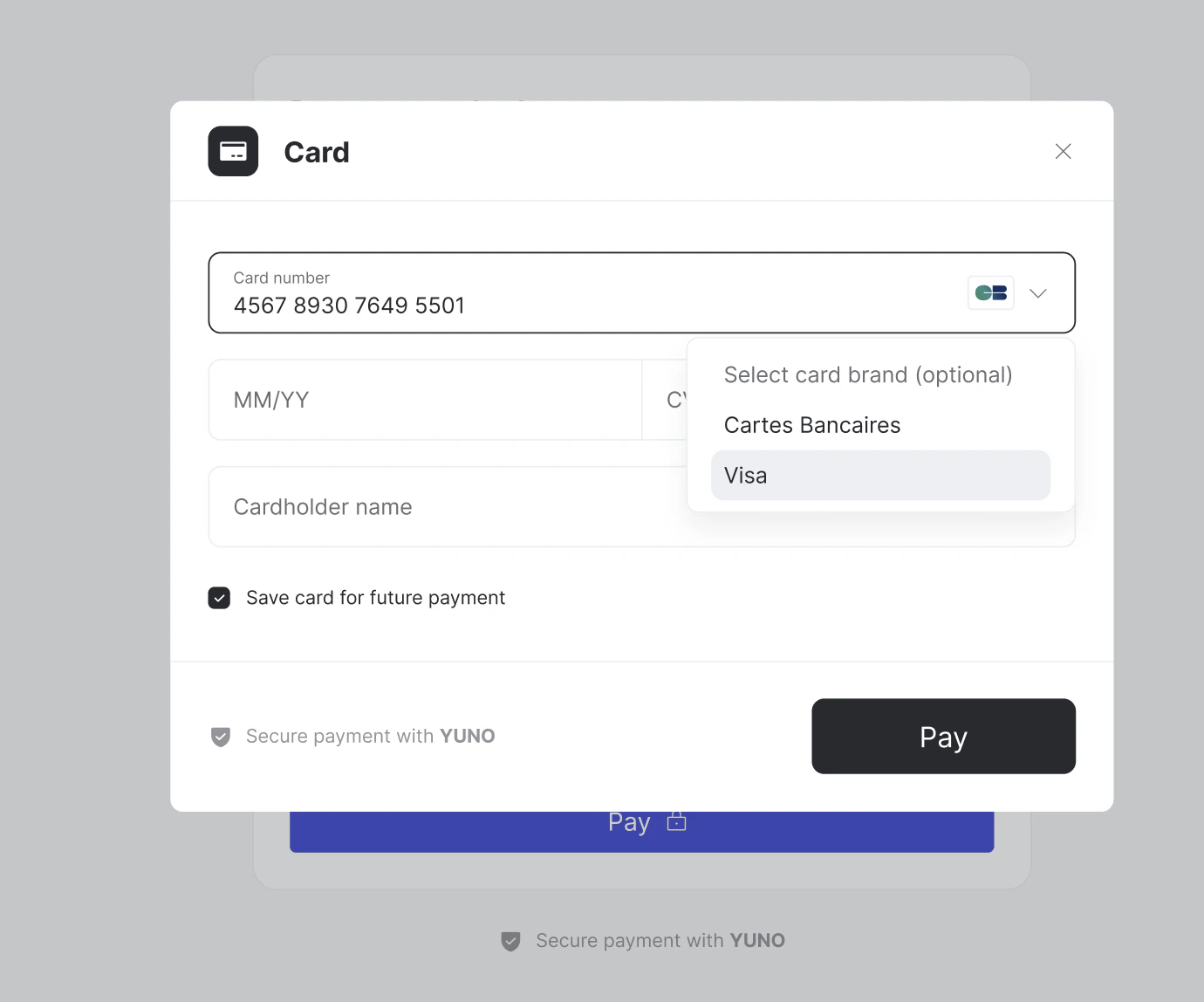
Recurring Payments
When a customer selects a network for their first payment, the SDK automatically stores this preference. For all subsequent recurring payments with the same card, the SDK automatically uses the initially selected network, ensuring compliance with the regulation requirement that all subsequent purchases be processed through the same network. The SDK tracks and uses the selected network automatically—no additional merchant configuration is required.Direct Integration
Direct API integrations require merchants to handle co-badged card compliance themselves. See below for required steps.Manual Implementation RequiredFor merchants using direct API integrations (not SDKs), additional steps are required to ensure compliance with co-badged card regulations. Merchants must implement network detection, selection UI, and network storage themselves.
Merchant Requirements
Merchants using direct API integrations must implement compliance measures themselves. To be compliant with EU IFR Regulation 2015/751 Article 8, merchants using direct integrations must:- Detect which networks are supported by the customer’s card
- Present network selection options to customers when multiple networks are available
- Include the selected network in payment requests
- Store the selected network for recurring payments
- Display the Mastercard-required phrase “Select card brand (optional)” when applicable
Card IIN Detection
Yuno provides methods to detect which networks are supported by a card based on the card IIN (Issuer Identification Number). The card IIN is the first 6-8 digits of the card number and identifies the card issuer and supported networks.API Requirements
To process payments with the selected network, merchants must include the network selection in their payment API requests. When creating a payment, merchants must include the selected network in the payment request. The following parameters are used:Network Selection UI Implementation
Merchants must implement their own UI for network selection. The UI must display all available networks for the customer’s card, allow customers to select their preferred network, and display the Mastercard-required phrase “Select card brand (optional)” when applicable. This phrase must be clearly visible and displayed before or alongside network selection options. The network selection UI shown in the SDK section above provides a reference for how network selection should be presented to customers.Recurring Payments
For recurring payments, merchants must ensure that the initially selected network is used for all subsequent payments with the same card. This requires:- Storing the selected network when the payment method is first used
- Including the stored network in all subsequent payment requests for that payment method
- Maintaining this preference across all recurring transactions
Examples
Example: Network Selection Required
A French customer uses a co-badged card that supports both Cartes Bancaires and Visa. The merchant accepts both networks. The system detects both networks, presents a selection to the customer, and processes the payment through the selected network. For future recurring payments, the initially selected network is automatically used.Example: No Selection Required
A merchant only accepts Visa, and a customer uses a co-badged card that supports both Cartes Bancaires and Visa. Since the merchant only accepts Visa, no network selection is required and the payment is processed through Visa.Summary
- SDK Integration: Merchants using Yuno SDKs are compliant out-of-the-box. No additional configuration required.
- Direct Integration: Merchants must implement network detection, selection UI, and network storage for recurring payments.
- Regulatory Requirement: EU IFR Regulation 2015/751 Article 8 requires network selection for co-badged cards in the EEA. The regulation entered into force on 8 June 2015, with Article 8 applying from 9 June 2016.
- Mastercard Requirement: The phrase “Select card brand (optional)” must be displayed when applicable.
- Recurring Payments: The initially selected network must be used for all subsequent payments with the same card.