
Connecting with Yuno
No API keys or credentials are required to connect the Yuno Test Payment Gateway.General information
Integration configuration
To connect the Yuno Test Payment Gateway from the dashboard:- Log in to dashboard.y.uno.
- Go to Connections and select Yuno Test Payment Gateway.
- Click Connect.
- Enter a Name for the connection.
- Click Connect.
Production environment
This connection is available for sandbox testing only and cannot be used in production.Set up the Yuno Test Payment Gateway
- Complete the Test Payment Gateway Integration configuration.
- After establishing the connection, you must designate the Yuno Test Payment Gateway as your card payment provider in your routing section. Access Routing on the Yuno Dashboard, select Not published, find the Card option, and click Set Up.
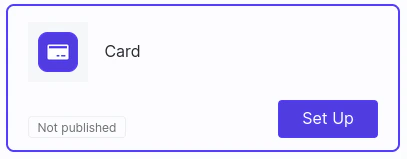
- Create a new route for Card. If you are unsure how to create it, check the Configure dynamic routing.
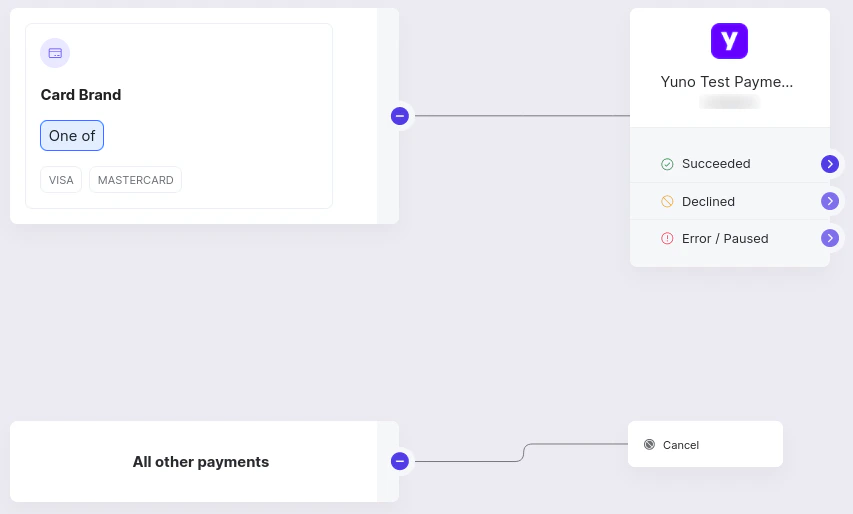
- On the Routing dashboard, add conditions to trigger the card payment. You can use card brand or country as trigger conditions, for example.
- For the created condition, add the Yuno Test Payment Gateway.
- For the All other payments options, select the Cancel option. The below image presents an example of a routing configuration where the card brand condition was used, accepting payments with Visa and Mastercard brands.
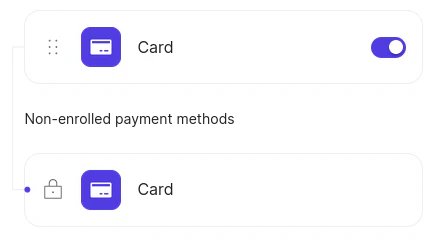
- Now you need to make the cards available for testing. Access Checkout builder on the Yuno Dashboard. Activate the toggle button for Card and publish the checkout using the Publish button.
Test card payments with Yuno Testing Gateway
On this page, you will find a walk-through guide on creating a card payment using the Yuno Testing Gateway. Yuno Testing Gateway is a Yuno solution to test card payment in general. It works as a connection. However, it is only available in the sandbox environment.Requirements
Before starting following the steps described in this guide, you need to:- Access your API credentials on the Yuno Dashboard, which are composed of:
public-api-keyprivate-secret-keyaccount_id
- Set up the Yuno Testing Gateway connection on your Yuno Dashboard account. You find a step-by-step guide on connecting it in the Integration configuration section.
- Build a route for the Yuno Testing Gateway to define it as your card payment provider. You find a step-by-step guide on how to do it in the Set up the Yuno Testing Gateway section.
- Configure the checkout builder to make the Yuno Testing Gateway available.
Create a payment
1. Create a customer
Use the Create Customer to register the customer info. You will need to provide personal customer information. In addition, you also need to supply themerchant_customer_id, a unique identifier for the customer used on your system.
Customer Complementary InformationWhen creating a Customer, certain information is not required but can improve the user’s payment experience if provided. Phone, billing address, and shipping address are examples of non-mandatory data you can provide. If you add optional information, be aware of the required mandatory fields.
id, which identifies the user within the Yuno system. Use the id to initialize the checkout.
If you are creating a payment for an existing user who was previously created and already has an id, you can skip this step.
2. Create a payment
You will create a payment using the Create Payment endpoint. Below you find a deeper description of how to create a payment. Provide customer-related information, including thecustomer_payer object that contains the id from Step 1.
Certain objects are not mandatory when creating a payment. However, if you provide this information, the user’s payment experience will be enhanced. Be aware of the mandatory fields if you wish to provide this information.
2.1 Choose the capture type
Yuno provides two options for payment capture:- Single-step: Authorization and capture are performed simultaneously. You only need to create the payment. The authorization and capture are performed automatically. For the single-step option, you need to send the
captureattribute astrueon the request. - Two steps: Authorization and capture are performed at different moments. If you wish to process the payment in Two Steps, send
captureasfalsewhen you create the payment, then use the Capture Authorization request to complete the process.
2.2 Define the payment workflow
When creating the payment, you need to inform which integration from Yuno you are using. When creating a payment, you must inform it through theworkflow attribute, which can be:
CHECKOUT: If you are using the Yuno SDK to create the payment.DIRECT: If you are using a back-to-back integration. To use this workflow, you need to be PCI compliant.REDIRECT: If you are using a back-to-back integration and provider redirection.
payment_method. Select the payment type equal to CARD based on the Payment type list. In addition, you need to add the card information on the object detail.card.
You can use the payment description or specific card data to get the desired result when you test payment with Yuno Test Payment Gateway. The following sections describe in detail each approach.
Yuno System ProcessYuno system follows a sequential process, initially examining card data and subsequently evaluating the provided description. Consequently, if there is a disparity in the status indicated by the card data and the description for a testing payment, Yuno will prioritize and reflect the status associated with the card data.
2.2.1 - Payment Description
To get the desired payment result using the payment description, you need to define the expected result as the description of the payment you create. For example, if you are testing a payment and expect a successful result, the payment description should be “SUCCEEDED”. You will find all available options in the Transaction Codes section.Simulate a chargeback
In sandbox, you can simulate a chargeback after a successful purchase by setting the payment description. The trigger is the description field, not the amount or the card number. Use this format as the paymentdescription:
<outcome> with one of the values in the table below. The purchase succeeds first. About two minutes later, Yuno creates a CHARGEBACK transaction on that payment and emits the related webhook events.
Examples:
SUCCEEDED+CHARGEBACK action_requiredSUCCEEDED+CHARGEBACK reviewSUCCEEDED+CHARGEBACK wonSUCCEEDED+CHARGEBACK lost
CHARGEBACK is missing or not recognized, Yuno falls back to action_required.
In testing, the chargeback reason observed is REQUESTED_BY_CUSTOMER.
Card data is evaluated firstYuno evaluates card data before the payment description, so the card decides the initial authorization result. The card does not stop the chargeback simulation: about one minute later the description takes over, the payment moves to
SUCCEEDED, and the chargeback still lands about one minute after that. Pair the SUCCEEDED+CHARGEBACK <outcome> description with a SUCCEEDED test card (or an equivalent SUCCEEDED card prefix) so the payment status is stable throughout the flow.2.2.2 - Card detail
Another option to get the expected payment results is to use one of the testing cards provided by Yuno. In the tables below, you find a list of cards and their data details to use when using the Yuno Testing Gateway. The Transaction Response Code column defines the returned payment status when you use the corresponding card.Visa
Visa
| Number | Expiration Date | Security Code | Cardholder Name | Transaction Response Code |
|---|---|---|---|---|
| 4507990000000002 | 11/28 | 123 | John Doe | SUCCEEDED |
| 4507990000000010 | 11/28 | 123 | John Doe | INSUFFICIENT_FUNDS |
| 4507990000000028 | 11/28 | 123 | John Doe | DECLINED_BY_BANK |
| 4507990000000036 | 11/28 | 123 | John Doe | DO_NOT_HONOR |
| 4507990000000044 | 11/28 | 123 | John Doe | INVALID_SECURITY_CODE |
| 4507990000000051 | 11/28 | 123 | John Doe | INVALID_CARD_DATA |
| 4507990000000069 | 11/28 | 123 | John Doe | REPORTED_STOLEN |
| 4507990000000077 | 11/28 | 123 | John Doe | ERROR |
Mastercard (test data)
Mastercard (test data)
| Number | Expiration Date | Security Code | Cardholder Name | Transaction Response Code |
|---|---|---|---|---|
| 5252440000000002 | 11/28 | 123 | John Doe | SUCCEEDED |
| 5252440000000010 | 11/28 | 123 | John Doe | INSUFFICIENT_FUNDS |
| 5252440000000028 | 11/28 | 123 | John Doe | DECLINED_BY_BANK |
| 5252440000000036 | 11/28 | 123 | John Doe | DO_NOT_HONOR |
| 5252440000000044 | 11/28 | 123 | John Doe | INVALID_SECURITY_CODE |
| 5252440000000051 | 11/28 | 123 | John Doe | INVALID_CARD_DATA |
| 5252440000000069 | 11/28 | 123 | John Doe | REPORTED_STOLEN |
| 5252440000000077 | 11/28 | 123 | John Doe | ERROR |
American Express
American Express
| Number | Expiration Date | Security Code | Cardholder Name | Transaction Response Code |
|---|---|---|---|---|
| 370000000000002 | 11/28 | 1234 | John Doe | SUCCEEDED |
| 370000000000010 | 11/28 | 1234 | John Doe | INSUFFICIENT_FUNDS |
| 370000000000028 | 11/28 | 1234 | John Doe | DECLINED_BY_BANK |
| 370000000000036 | 11/28 | 1234 | John Doe | DO_NOT_HONOR |
| 370000000000044 | 11/28 | 1234 | John Doe | INVALID_SECURITY_CODE |
| 370000000000051 | 11/28 | 1234 | John Doe | INVALID_CARD_DATA |
| 370000000000069 | 11/28 | 1234 | John Doe | REPORTED_STOLEN |
| 370000000000077 | 11/28 | 1234 | John Doe | ERROR |
Diners
Diners
| Number | Expiration Date | Security Code | Cardholder Name | Transaction Response Code |
|---|---|---|---|---|
| 3647166000000002 | 11/28 | 123 | John Doe | SUCCEEDED |
| 3647166000000010 | 11/28 | 123 | John Doe | INSUFFICIENT_FUNDS |
| 3647166000000028 | 11/28 | 123 | John Doe | DECLINED_BY_BANK |
| 3647166000000036 | 11/28 | 123 | John Doe | DO_NOT_HONOR |
| 3647166000000044 | 11/28 | 123 | John Doe | INVALID_SECURITY_CODE |
| 3647166000000051 | 11/28 | 123 | John Doe | INVALID_CARD_DATA |
| 3647166000000069 | 11/28 | 123 | John Doe | REPORTED_STOLEN |
| 3647166000000077 | 11/28 | 123 | John Doe | ERROR |
UATP
UATP
| Number | Expiration Date | Security Code | Cardholder Name | Transaction Response Code |
|---|---|---|---|---|
| 1139000000000002 | 11/28 | 123 | John Doe | SUCCEEDED |
| 1139000000000010 | 11/28 | 123 | John Doe | INSUFFICIENT_FUNDS |
| 1139000000000028 | 11/28 | 123 | John Doe | DECLINED_BY_BANK |
| 1139000000000036 | 11/28 | 123 | John Doe | DO_NOT_HONOR |
| 1139000000000044 | 11/28 | 123 | John Doe | INVALID_SECURITY_CODE |
| 1139000000000051 | 11/28 | 123 | John Doe | INVALID_CARD_DATA |
| 1139000000000069 | 11/28 | 123 | John Doe | REPORTED_STOLEN |
| 1139000000000077 | 11/28 | 123 | John Doe | ERROR |
2.2.3 - 3DS Test Cards
Use these cards and OTP codes to test 3DS flows through our preview environment using a Netcetera Demo Merchant (NDM) Simulator, which is configured to mock a Directory Server and/or ACS with predefined schemes and testing card numbers. It does not reach external test DS/ACS, it only helps complete 3DS flows for testing purposes.Amex
Amex
| Card Number | Expected Response 3DS 2.x | Expected Response 3DS 1.x DS (VERes) | Expected Response 3DS 1.x ACS (PARes) |
|---|---|---|---|
| 341502098634895 | AUTHENTICATED_APPLICATION_FRICTIONLESS | ENROLLED_Y | TRANSACTION_STATUS_Y |
| 348638267931507 | BROWSER_CHALLENGE | ENROLLED_Y | TRANSACTION_CHALLENGE_OTP |
| 345695399207589 | NOT_AUTHENTICATED_APPLICATION_FRICTIONLESS | ENROLLED_Y | TRANSACTION_STATUS_N |
| 349531373081938 | APPLICATION_CHALLENGE | ENROLLED_Y | TRANSACTION_STATUS_N |
| 342316317472410 | APPLICATION_CHALLENGE_SDK_TRANS_ID_INVALID_FORMAT | ENROLLED_Y | TRANSACTION_STATUS_N |
| 347899129656655 | AUTHENTICATED_BROWSER_FRICTIONLESS | ENROLLED_Y | TRANSACTION_STATUS_Y |
| 345197771649926 | NOT_AUTHENTICATED_BROWSER_FRICTIONLESS | ENROLLED_Y | TRANSACTION_STATUS_N |
| 372021106351394 | BROWSER_CHALLENGE | ENROLLED_Y | TRANSACTION_CHALLENGE_OTP |
| 3734123412340000 | NOT_AUTHENTICATED_BROWSER_FRICTIONLESS | ENROLLED_Y | TRANSACTION_STATUS_N |
| 3434567891111005 | BROWSER_CHALLENGE | ENROLLED_Y | TRANSACTION_CHALLENGE_OTP |
| 3794521996036850 | BROWSER_CHALLENGE | ENROLLED_Y | TRANSACTION_CHALLENGE_OTP |
Mastercard (3DS)
Mastercard (3DS)
| Card Number | Expected Response 3DS 2.x | Expected Response 3DS 1.x DS (VERes) | Expected Response 3DS 1.x ACS (PARes) |
|---|---|---|---|
| 5333259155643223 | AUTHENTICATED_APPLICATION_FRICTIONLESS | ENROLLED_Y | TRANSACTION_STATUS_Y |
| 5306889942833340 | BROWSER_CHALLENGE | ENROLLED_Y | TRANSACTION_CHALLENGE_OTP |
| 5328720384582224 | NOT_AUTHENTICATED_APPLICATION_FRICTIONLESS | ENROLLED_Y | TRANSACTION_STATUS_N |
| 5267648608924299 | APPLICATION_CHALLENGE | ENROLLED_Y | TRANSACTION_STATUS_N |
| 5187434643593002 | APPLICATION_CHALLENGE_SDK_TRANS_ID_INVALID_FORMAT | ENROLLED_Y | TRANSACTION_STATUS_N |
| 5512459816707531 | AUTHENTICATED_BROWSER_FRICTIONLESS | ENROLLED_Y | TRANSACTION_STATUS_Y |
| 5487971631330522 | NOT_AUTHENTICATED_BROWSER_FRICTIONLESS | ENROLLED_Y | TRANSACTION_STATUS_N |
| 5424184049821670 | BROWSER_CHALLENGE | ENROLLED_Y | TRANSACTION_CHALLENGE_OTP |
| 5204240438720050123 | BROWSER_CHALLENGE | ENROLLED_Y | TRANSACTION_CHALLENGE_OTP |
| 5250548692069390 | BROWSER_CHALLENGE | ENROLLED_Y | TRANSACTION_CHALLENGE_OTP |
| 5641523891636636 | BROWSER_CHALLENGE | ENROLLED_Y | TRANSACTION_CHALLENGE_OTP |
Visa
Visa
| Card Number | Expected Response 3DS 2.x | Expected Response 3DS 1.x DS (VERes) | Expected Response 3DS 1.x ACS (PARes) |
|---|---|---|---|
| 4556557955726624 | AUTHENTICATED_APPLICATION_FRICTIONLESS | ENROLLED_Y | TRANSACTION_STATUS_Y |
| 4916994064252017 | BROWSER_CHALLENGE | ENROLLED_Y | TRANSACTION_CHALLENGE_OTP |
| 4556104160382032 | NOT_AUTHENTICATED_APPLICATION_FRICTIONLESS | ENROLLED_Y | TRANSACTION_STATUS_N |
| 4024007189449340 | APPLICATION_CHALLENGE | ENROLLED_Y | TRANSACTION_STATUS_N |
| 4024007179872394 | APPLICATION_CHALLENGE_SDK_TRANS_ID_INVALID_FORMAT | ENROLLED_Y | TRANSACTION_STATUS_N |
| 4929251897047956 | AUTHENTICATED_BROWSER_FRICTIONLESS | ENROLLED_Y | TRANSACTION_STATUS_Y |
| 4716429323842524 | NOT_AUTHENTICATED_BROWSER_FRICTIONLESS | ENROLLED_Y | TRANSACTION_STATUS_N |
| 4234123412340003 | BROWSER_CHALLENGE | ENROLLED_Y | TRANSACTION_CHALLENGE_OTP |
| 4604633194219929 | BROWSER_CHALLENGE | ENROLLED_Y | TRANSACTION_CHALLENGE_OTP |
| 4485436455354151 | BROWSER_FRICTIONLESS_MISSING_DS_TRANS_ID | ||
| 4556962659911995 | APPLICATION_FRICTIONLESS_MISSING_SDK_TRANS_ID | ENROLLED_Y | TRANSACTION_STATUS_N |
| 4539837572943550 | BROWSER_FRICTIONLESS_MISSING_DS_TRANS_ID | ENROLLED_Y | TRANSACTION_STATUS_N |
| 4024007176265022 | BROWSER_CHALLENGE_MISSING_ACS_URL | ENROLLED_Y | TRANSACTION_STATUS_N |
| 4716125059847899 | THREE_RI | ENROLLED_Y | TRANSACTION_STATUS_N |
| 4556362626719763 | PROTOCOL_ERROR | ENROLLED_Y | TRANSACTION_STATUS_N |
| 4234123412340000 | AUTHENTICATED_BROWSER_FRICTIONLESS | ENROLLED_Y | TRANSACTION_STATUS_Y |
| 4234123412340006 | UNAVAILABLE_BROWSER_FRICTIONLESS | ENROLLED_Y | TRANSACTION_STATUS_U |
| 4234123412340007 | ATTEMPTED_BROWSER_FRICTIONLESS | ENROLLED_Y | TRANSACTION_STATUS_A |
| 4234123412340001 | NOT_ENROLLED | ENROLLED_N | |
| 4234123412340002 | NOT ENROLLED (VeRes is error 404 “Card account number not found in card ranges from Directory Server”) | ENROLLED_N (NOT APPLICABLE) | |
| 4234123412340100 | MISSING_ROOT | ||
| 4234123412340101 | MISSING_MESSAGE | ||
| 4234123412340102 | INVALID_MESSAGE | ||
| 4234123412340103 | MISSING_VERSION | ||
| 4234123412340104 | ILLEGAL_VERSION | ||
| 4234123412340105 | MISSING_URL | ||
| 4234123412340106 | ILLEGAL_URL | ||
| 4234123412340107 | MISSING_ENROLLED | ||
| 4234123412340108 | ILLEGAL_ENROLLED | ||
| 4234123412340109 | ILLEGAL_EXTENSION | ||
| 4234123412340200 | ERROR_CUSTOM | ||
| 4234123412340201 | ERROR_1 | ||
| 4234123412340202 | ERROR_2 | ||
| 4234123412340203 | ERROR_3 | ||
| 4234123412340204 | ERROR_4 | ||
| 4234123412340205 | ERROR_5 | ||
| 4234123412340206 | ERROR_6 | ||
| 4234123412340220 | ERROR_CUSTOM_WITH_DIFFERENT_MESSAGE_ID | ||
| 4234123412340250 | ERROR_50 | ||
| 4234123412340251 | ERROR_51 | ||
| 4234123412340252 | ERROR_52 | ||
| 4234123412340253 | ERROR_53 | ||
| 4234123412340258 | ERROR_58 | ||
| 4234123412340298 | ERROR_98 | ||
| 4234123412340299 | ERROR_99 | ||
| 4234123412340300 | IREQ_CUSTOM | ||
| 4234123412340301 | IREQ_ENROLLED_Y | ||
| 4234123412340350 | IREQ_50 | ||
| 4234123412340351 | IREQ_51 | ||
| 4234123412340352 | IREQ_52 | ||
| 4234123412340353 | IREQ_53 | ||
| 4234123412340354 | IREQ_54 | ||
| 4234123412340355 | IREQ_55 | ||
| 4234123412340356 | IREQ_56 | ||
| 4234123412340358 | IREQ_58 | ||
| 4234123412340398 | IREQ_98 | ||
| 4234123412340399 | IREQ_99 | ||
| 4234123412340400 | UNSUPPORTED_VERSION | ||
| 4234123412340401 | UNRECOGNIZED_CRITICAL_EXTENSION | ||
| 4234123412340402 | SERVER_ERROR | ||
| 4234123412340403 | TIMEOUT |
Diners
Diners
| Card Number | Expected Response 3DS 2.x | Expected Response 3DS 1.x DS (VERes) | Expected Response 3DS 1.x ACS (PARes) |
|---|---|---|---|
| 3095000000000000 | AUTHENTICATED_APPLICATION_FRICTIONLESS | ENROLLED_Y | TRANSACTION_STATUS_Y |
| 3095000000000001 | BROWSER_CHALLENGE | ENROLLED_Y | TRANSACTION_CHALLENGE_OTP |
| 3095000000000002 | NOT_AUTHENTICATED_APPLICATION_FRICTIONLESS | ENROLLED_Y | TRANSACTION_STATUS_N |
| 3095000000000005 | AUTHENTICATED_BROWSER_FRICTIONLESS | ENROLLED_Y | TRANSACTION_STATUS_Y |
| 3095000000000006 | NOT_AUTHENTICATED_BROWSER_FRICTIONLESS | ENROLLED_Y | TRANSACTION_STATUS_N |
JCB
JCB
| Card Number | Expected Response 3DS 2.x | Expected Response 3DS 1.x DS (VERes) | Expected Response 3DS 1.x ACS (PARes) |
|---|---|---|---|
| 3528000000000000 | AUTHENTICATED_APPLICATION_FRICTIONLESS | ENROLLED_Y | TRANSACTION_STATUS_Y |
| 3528000000000001 | BROWSER_CHALLENGE | ENROLLED_Y | TRANSACTION_CHALLENGE_OTP |
| 3528000000000002 | NOT_AUTHENTICATED_APPLICATION_FRICTIONLESS | ENROLLED_Y | TRANSACTION_STATUS_N |
| 3528000000000005 | AUTHENTICATED_BROWSER_FRICTIONLESS | ENROLLED_Y | TRANSACTION_STATUS_Y |
| 3528000000000006 | NOT_AUTHENTICATED_BROWSER_FRICTIONLESS | ENROLLED_Y | TRANSACTION_STATUS_N |
Ranges
Ranges
| Start range | End range | Scheme |
|---|---|---|
| 340000000000000 | 349999999999999 | Amex |
| 370000000000000 | 379999999999999 | Amex |
| 2221000000000000 | 2223000000000022 | Mastercard |
| 2223000000000024 | 2720999999999999 | Mastercard |
| 5100000000000000 | 5111111111111117 | Mastercard |
| 5111111111111119 | 5599999999999999 | Mastercard |
| 4000000000000000 | 4111110000000210 | Visa |
| 4111110000000212 | 4234123412339999 | Visa |
| 4234123412340000 | 4234123412349999 | Visa |
| 4234123412350000 | 4999999999999999 | Visa |
| 3000000000000000 | 3099999999999999 | Diners |
| 3528000000000000 | 3589009999999999 | JCB |
3DS2 OTP Codes
3DS2 OTP Codes
| OTP Code | Transaction Status | Transaction Status reason | ECI | authenticationValue |
|---|---|---|---|---|
| 1234 | Y | / | 01 | JAmi21makAifmwqo2120cjq1AAA= |
| 1111 | N | 01 | 01 | / |
| 2222 | R | 01 | 01 | / |
| 3333 | U | 01 | 01 | / |
| 4444 | A | 01 | 01 | Qm181okmdyqh6yQmYuq1890QAAA= |
3DS1 OTP Codes
3DS1 OTP Codes
| OTP Code | Transaction Status | CAVV | CAVV Algorithm | ECI |
|---|---|---|---|---|
| 1234 | Y | VGhpcyBpcyBhIHRlc3QgYmFzZTY= | 7 | 05 |
| 1111 | N | / | / | / |
3. Check the payment status
After performing the request to the Create Payment, you can check the payment status by analyzing thestatus and sub_status from the response. Check the Payment Status page to see all the options you can receive in response to the payment creation request.
Depending on the processor and payment method, the status may take some time to update. Therefore, you may need to use endpoints to recover the payment status. To perform this task, you can use the Retrieve Payment by ID or Retrieve Payment by merchant_order_id endpoints. Another option is to use webhooks to receive notifications after each event. Yuno recommends you use webhooks to monitor asynchronous payments better. Check the Webhooks guide to learn how to configure the webhooks solution provided by Yuno.