
Monitoring process operation
The monitoring process consists of four key steps that help identify and restore payment routes:1
Anomaly detection
The system continuously monitors approval rates. When rates drop below your defined threshold, it triggers alerts through your configured channels like email or Opsgenie.
2
Alert notification
If approval rates fall below the threshold, Yuno immediately notifies you through your chosen alert channels.
3
Traffic redirection
Upon detecting low approval rates, Yuno automatically redirects payments to your fallback providers. A small portion of transactions continues through the original provider to monitor for service recovery.
4
Route recovery
When the primary provider’s approval rate rises above the threshold again, traffic automatically returns to the original route.
Additional monitoring scenarios
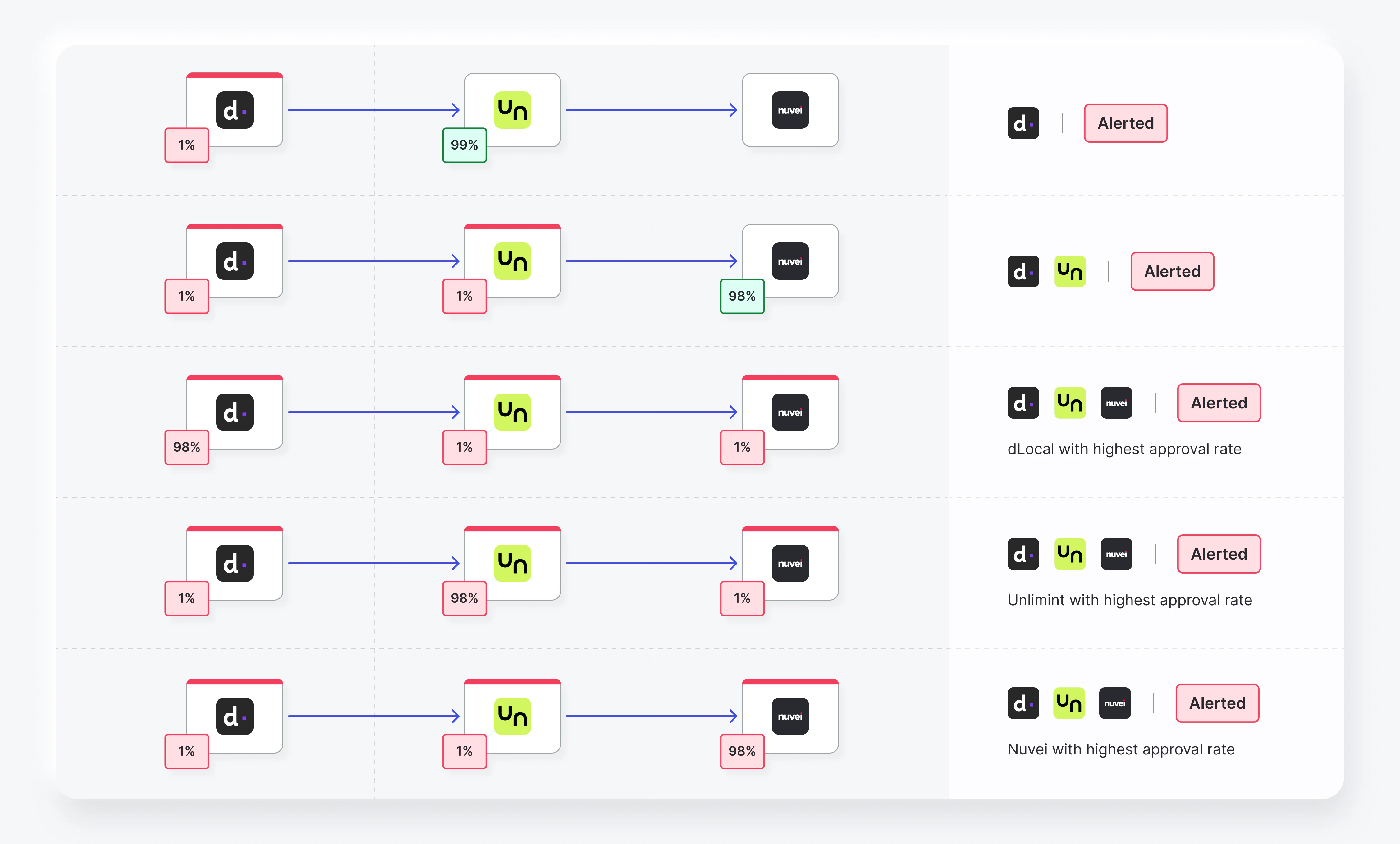
The monitor feature handles various payment route scenarios to maintain optimal processing. Here’s how it manages specific situations: Provider interruptions:- When a provider has interruptions, traffic automatically redirects to the configured fallback provider
- If the fallback provider experiences issues, traffic moves to a second fallback provider (if configured)
- When all providers are unavailable, traffic routes to the provider with the highest recent approval rate
- The system continuously monitors providers and dynamically adjusts traffic for optimal approval rates
- Provider status (down/recovered) is determined by your configuration settings
- When a provider drops below the approval threshold, traffic redirects to the fallback provider
- If the fallback provider also drops below threshold, traffic moves to the second fallback (if available)
- If all providers are below threshold, traffic routes to whichever provider has the highest approval rate
Configure a monitor
To configure a monitor for your payment routes:- Go to the Routing tab in your dashboard and open an existing route. You can set up different approval rate monitors for each condition.
- Customize your payment route with your preferred settings.
- Add the necessary conditions and payment providers for each set.
-
Click the Monitors icon (bell) and configure these settings:
- Time frame: Set how long to measure the approval rate
- Approval rate limit: Set the threshold that triggers alerts and actions
- Number of payments: Set minimum, maximum, or range of payments needed to trigger the condition. This prevents redirects from anomalies during low payment volumes
- Alert channels: Choose email or Opsgenie notifications
- Automatic traffic redistribution: Enable automatic redirection when alerts trigger. Requires a fallback provider for Error and Pause conditions
- Percentage of traffic: Set how much traffic stays with the original provider for monitoring
- Save the monitor changes, or save it as a template for future usage.
Monitor RestrictionMonitors cannot be created for routes that are already published.