
How to tell which version you have. The new version shows one row per payment method with an Edit button, and the header button reads Review & publish. The current version shows two lists (Enrolled and Non-enrolled payment methods), a three dots (⋯) menu on each row, and a Publish settings button. If you see the second one, nothing on this page applies to you yet: keep using the Checkout Builder page.
What changed at a glance
One list for every payment method
Enrolled and non-enrolled methods now share a single list. Each row has an enable switch, a drag handle and an Edit button.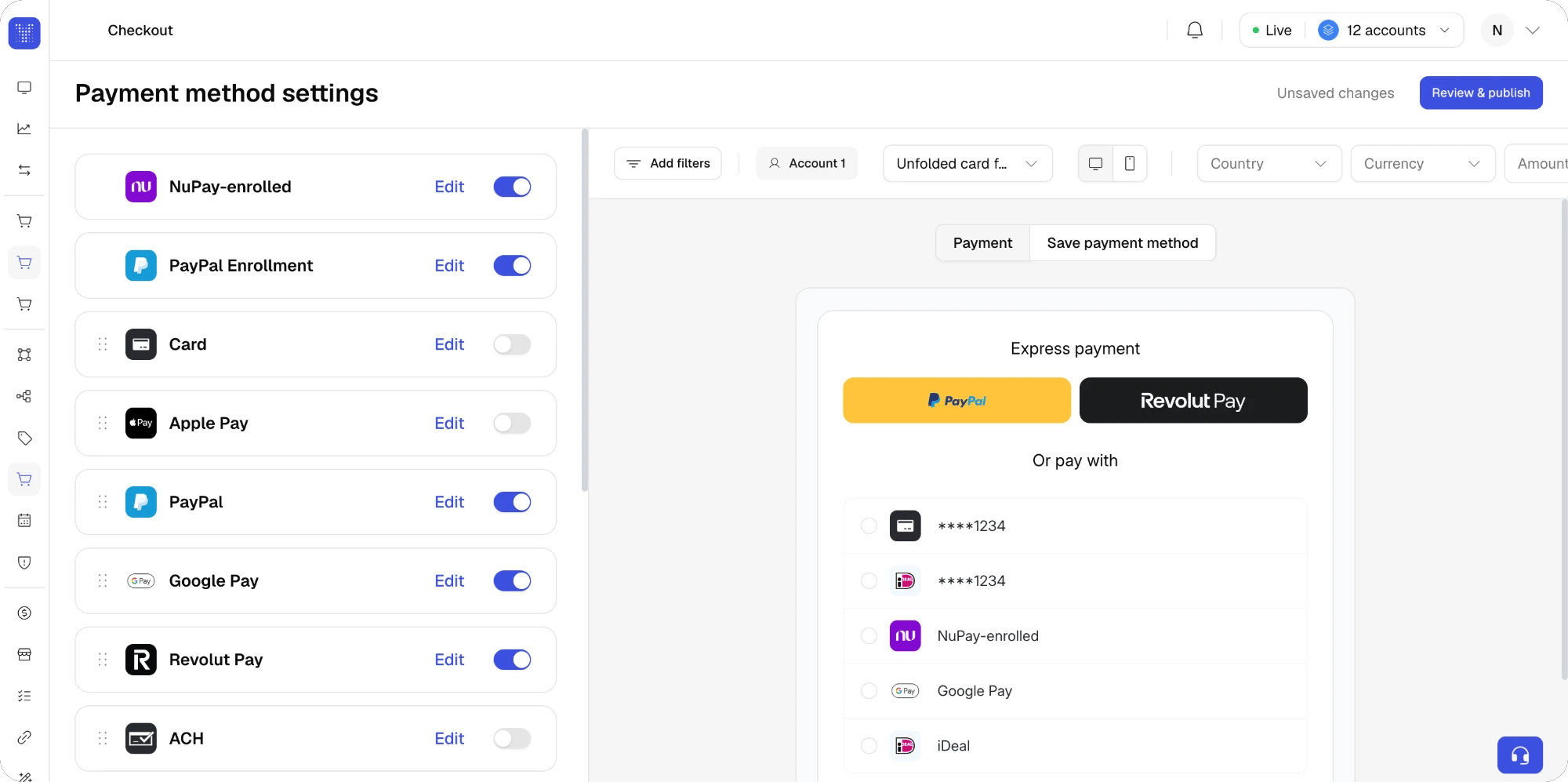
- Order. Drag rows to reorder. The order is what your shoppers see, and it also decides which wallets become express buttons when more than three are switched on.
- One item for new and saved. Card and the direct-debit methods (ACH, Bacs, PAD, SEPA) no longer have a separate enrolled row. Each is one item that covers both flows, and the saved flow is switched on or off from the method page, with Show shoppers their saved cards or Show shoppers their saved bank accounts on the General tab. Other methods that can be saved, such as wallets, keep their own saved item in the list, as before.
- Saved methods at checkout. The methods a returning shopper has saved still render above the rest of the list, whatever the order in the Builder. This is unchanged.
- Enable or disable. The switch on each row replaces the switches of the two previous lists. A method still needs a published route to appear here.
One page per method
Edit opens the method’s page. The General tab groups every setting that used to live in separate drawers: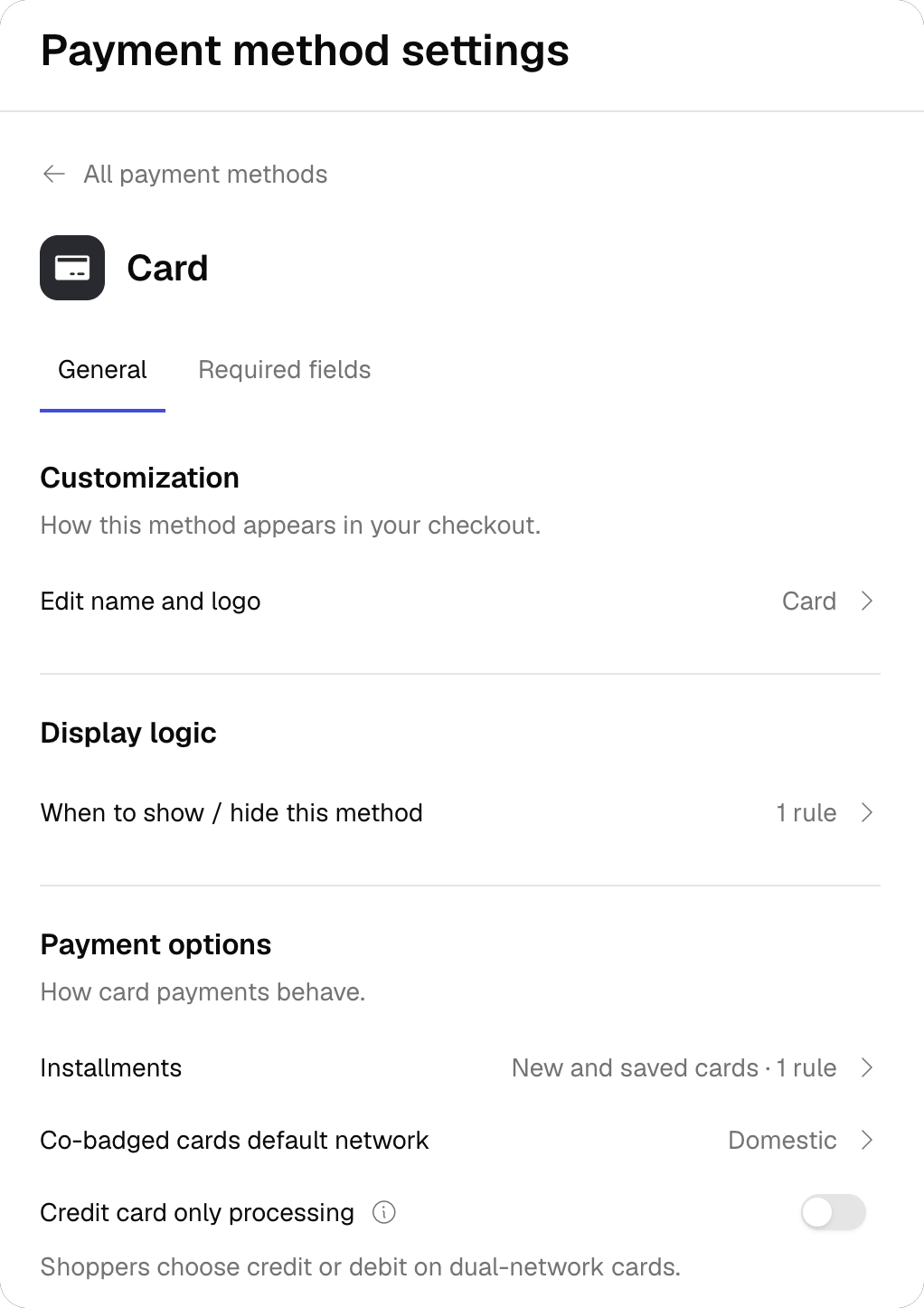
The Required fields tab keeps the same fields as before, with three changes:
- Fields a provider makes mandatory show the provider’s logo next to the switch, with a Required by … tooltip. They cannot be switched off from the Builder.
- Each field can carry its own display rule. Open the field and click Add condition to show or hide it by country, currency, amount or metadata.
- Document opens the global Document types modal. It applies to every payment method in the checkout, and it is the only global setting in this version.
Card and saved cards. The Card page has a second block, When this method is saved, for the fields shoppers fill in when paying with a saved card. Tick Apply these settings when shoppers save this method to reuse the main configuration, or untick it to configure the saved-card fields separately. Display rules on Card required fields apply to both flows.
Display logic
Conditions are now written as a sentence: If an attribute is or is not some values, Then Show or Hide this method. The Builder keeps the sentence updated as you edit, for example Card shows only when Country is Brazil, Mexico. Hidden in all other cases.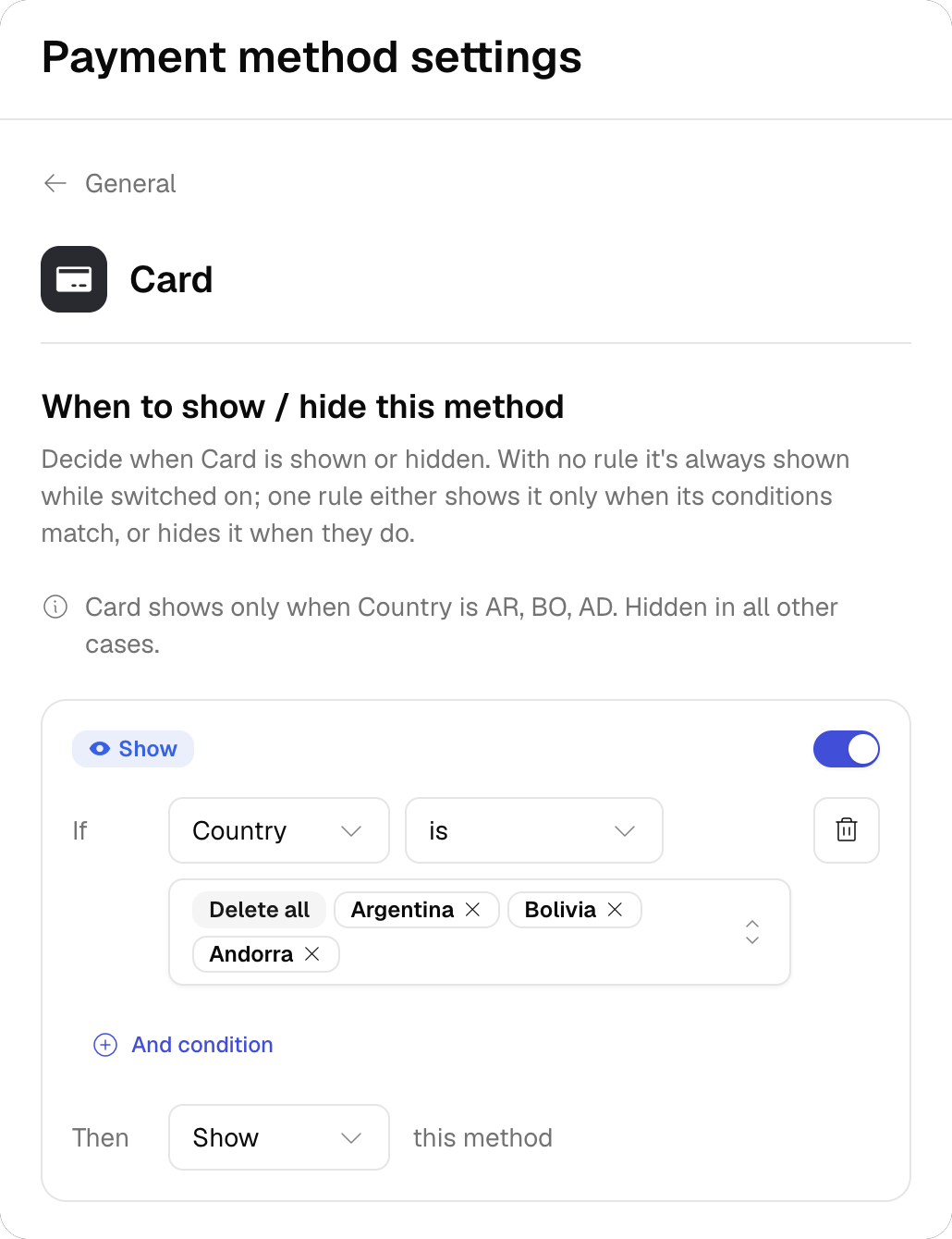
- Attributes: Country, Currency, Amount and Metadata. Country and Currency accept several values. Amount accepts greater than, less than, between and equal to. Metadata takes a key and a value, compared with is or is not only, and a rule can hold several metadata conditions.
- One rule per method, and one per required field. Attributes inside a rule are combined with AND.
- Amount needs one currency. The Amount attribute is not offered while two or more currencies are selected in the same rule.
- Outcome. Each rule is either Show or Hide. A method with no rule is always shown while it is switched on.
Accounts that have more than one active condition set on the same payment method stay on the current version for now, with their configurations untouched.The same applies to accounts whose conditions compare metadata with greater than or less than: the new version only offers is and is not for metadata, so those rules cannot be edited in it. They stay on the current version until the rules are rewritten.
Review & publish
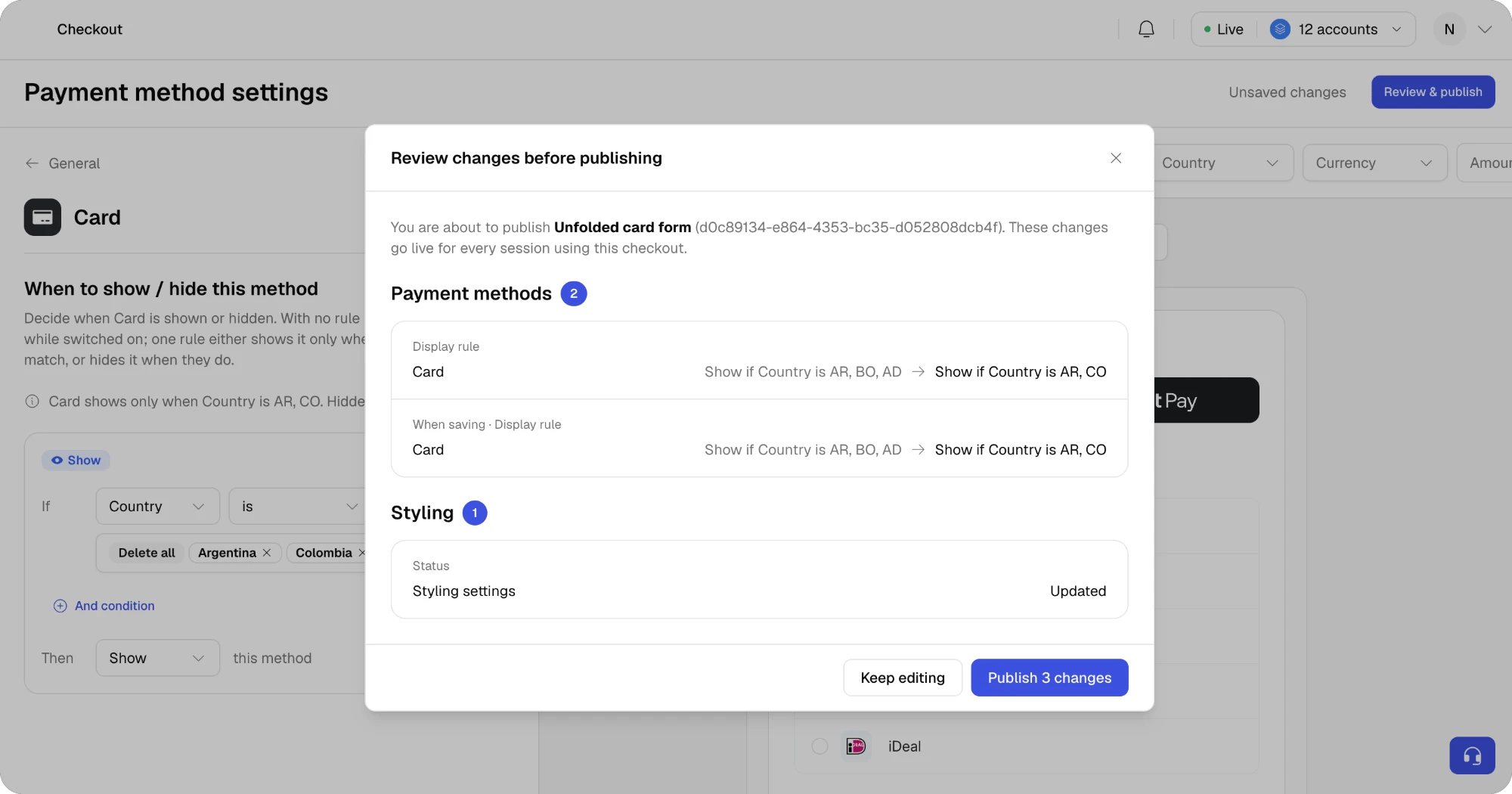
Publish settings is replaced by Review & publish. Nothing goes live until you confirm from the review.- While you edit, the header shows Unsaved changes. Changes are kept in the Builder, and the live checkout is untouched.
- Click Review & publish. The dialog lists every pending change grouped by Payment methods, Method settings, Required fields and Styling, with the value before and after. Changes that apply to the saved-card flow are marked When saving.
- Click Publish N changes. The header switches to Published with the publish date.
Preview: payment or save payment method
The live preview gains a switch at the top with two options:- Payment shows the checkout a shopper sees when paying: express buttons, saved methods such as a card ending in 1234, and the rest of the list, in the order you set.
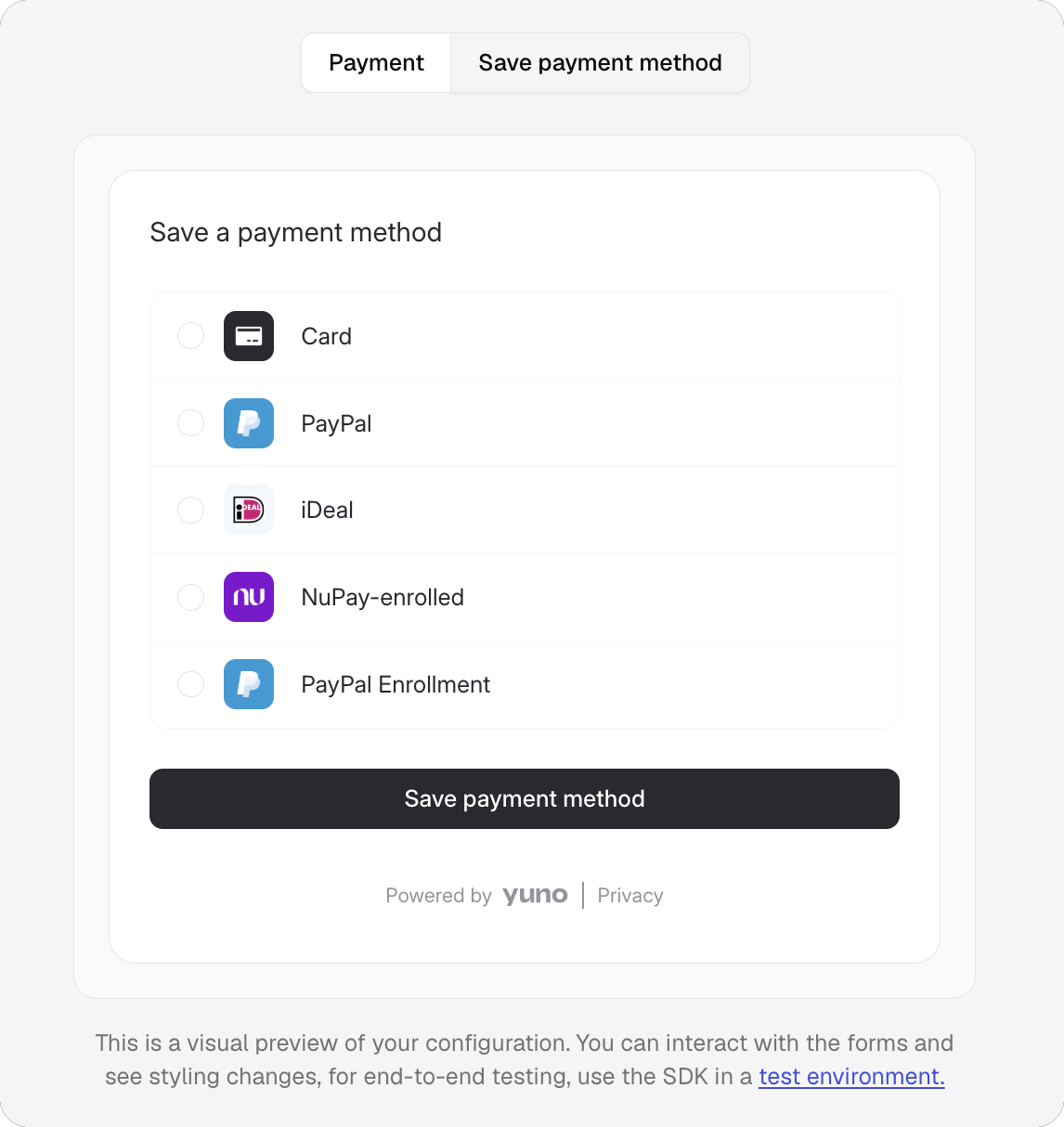
- Save payment method shows the enrollment checkout, titled Save a payment method: only the methods a shopper can save, with a Save payment method button instead of Pay.
Shipping address on its own
The Required fields tab lets you request Shipping address without Billing address. Previously, shipping could only be collected together with billing. The Web SDK renders the shipping form alone in that case.A short tour the first time you open it
The first time you open the new version, the Builder walks you through the list, a method page, required fields, the preview and Review & publish. The tour runs on demo data: nothing is published and your live checkout stays as it is. You can skip it from the first step.What did not change
- Styling settings, including payment method list style, dark mode and express button stacking.
- The live preview, its interactive form and the Country, Currency and Amount filters, apart from the new Payment / Save payment method switch. Express buttons now follow the switches you set per wallet.
- Custom checkouts and the checkout selector above the preview.
- Authorization text for direct-debit methods, now reached from the General tab.
- Your SDK integration. The new section writes the same configuration the SDK already reads. No code change is needed on your side.