
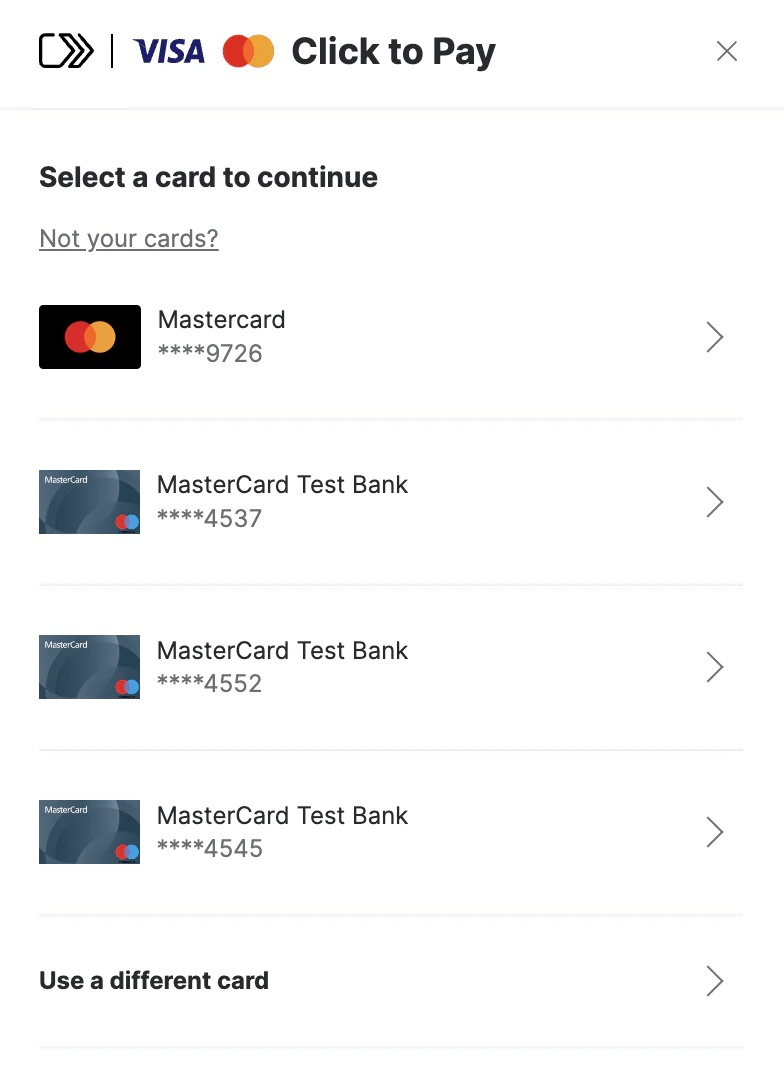
Passkey support is currently available for Mastercard only. Visa passkey support is in development.
Key features and benefits
- Ease of Use: It enables consumers to make online purchases with a single click, eliminating the need to enter credit card details for each purchase manually.
- Enhanced Security: Utilizes modern authentication standards to minimize fraud risk. This may include methods such as two-factor authentication or payment tokens.
- Consistent Across Various Sites: Offers a similar payment experience across all websites that support this technology, meaning consumers don’t have to learn different processes for each online store.
- Integration with Card Brands: Being backed by major card brands, Click to Pay is widely accepted and trusted.
- Mobile and Desktop Compatibility: Designed to work across various devices, it facilitates online shopping on both desktops and mobile devices.
Network Tokens RequirementNetwork tokens support is required for Click to Pay in all flows (Golden Flow and APM, both with and without passkeys). Merchants must configure network tokens in their Routing rules to ensure successful processing.
Integration
To integrate and start offering Click to Pay to your customers, follow these 4 simple steps:-
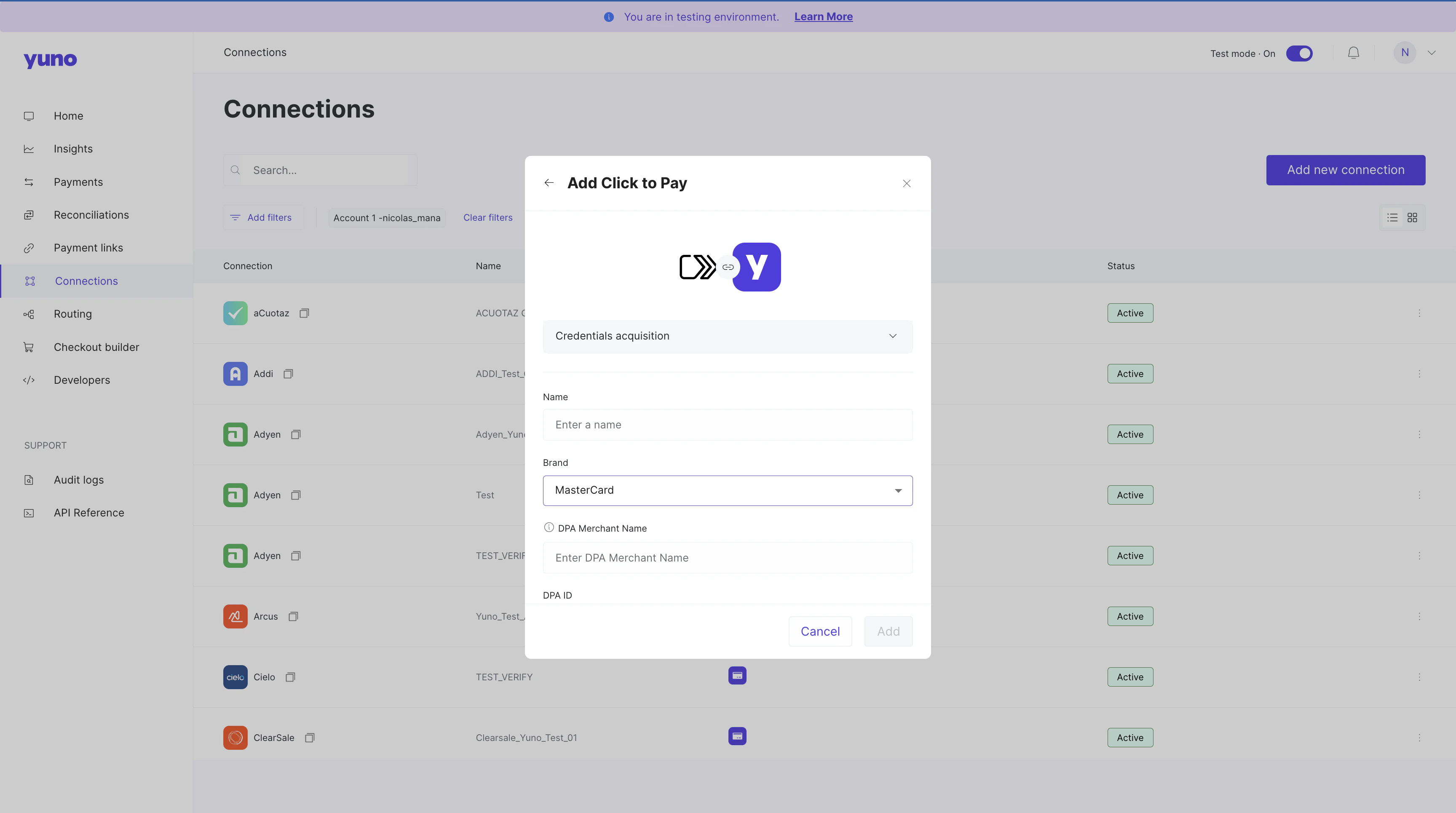
Create a connection in the Yuno dashboard using your Click to Pay credentials.
-
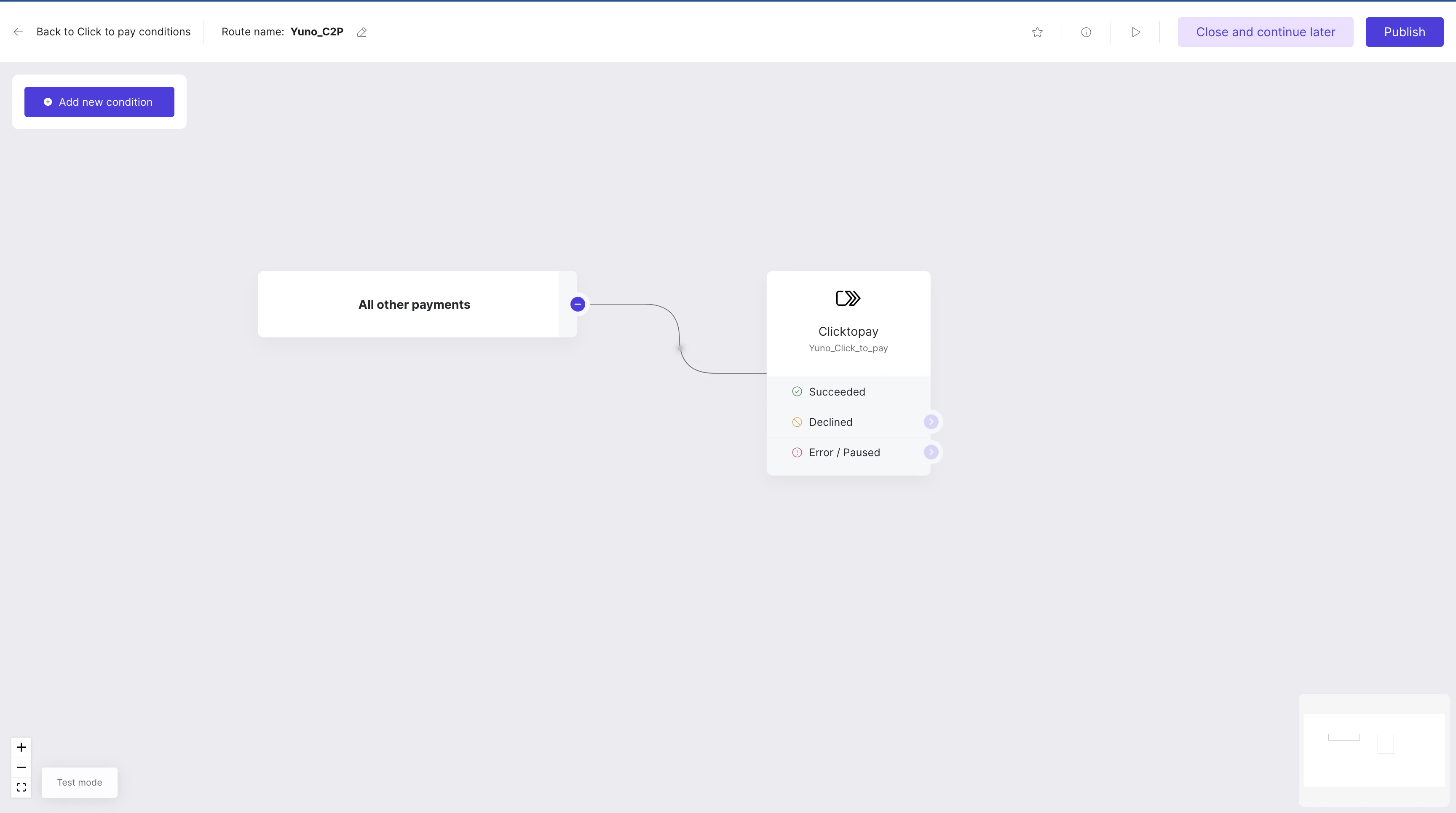
Define the payment method route in the Routing section to enable it in the Checkout Builder.
-
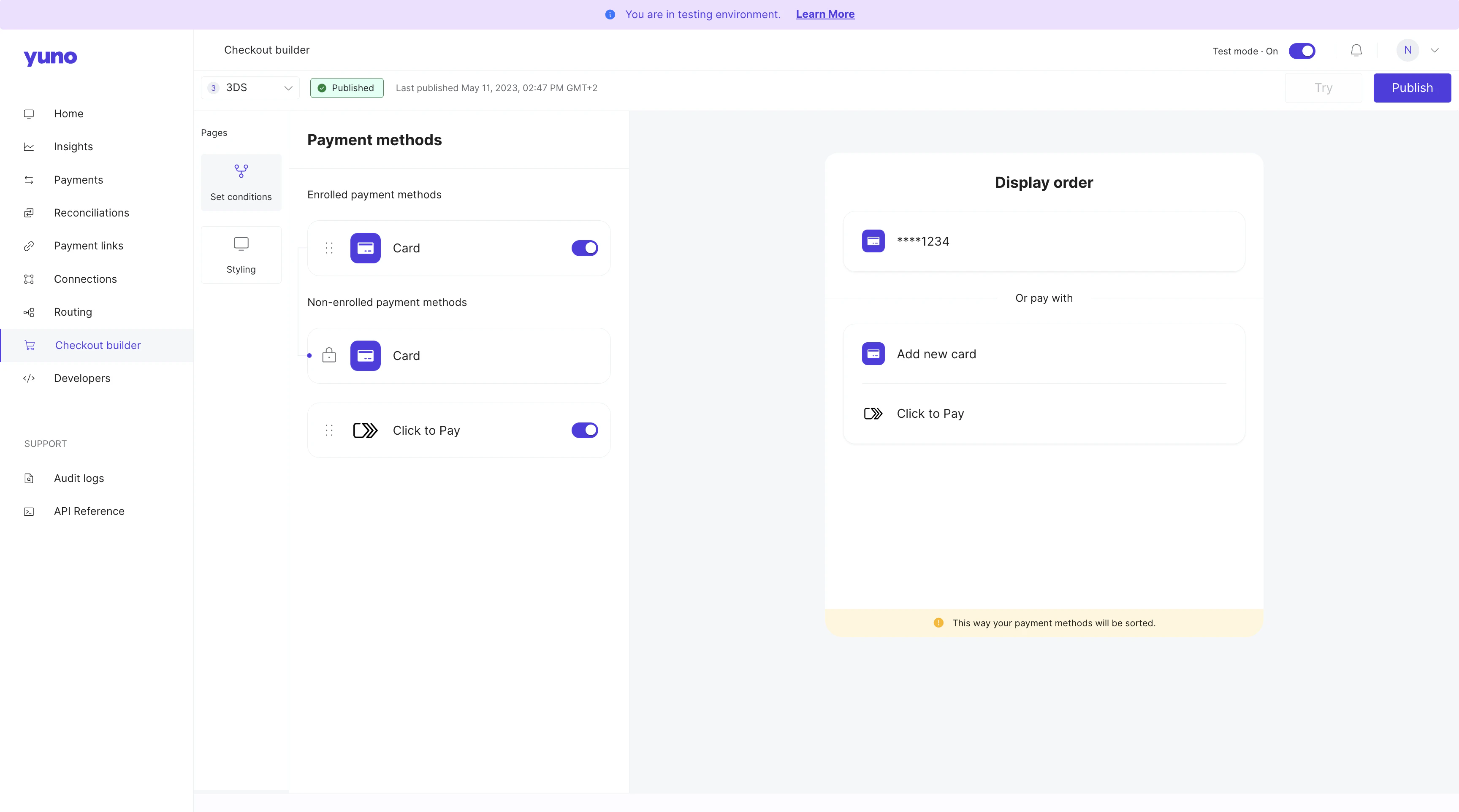
Enable Click to Pay in the Checkout builder.
- Define the Card route: Taking in consideration that Click to Pay is a wallet that stores credit card information, the route where you will need to define the providers for each scenario is the same as the Card payment method.
Checkout Flows
Merchants can choose how Click to Pay appears at checkout. Both experiences support passkeys across web and mobile platforms.Passkey behavior: a shopper’s first transaction always authenticates with 3DS, since they don’t have a passkey yet. Once that transaction completes, a passkey is created and subsequent transactions authenticate with it instead. A passkey is tied to the same device, browser, and card: if any of these changes, a new passkey must be created.
1. Standalone Payment Method (APM Flow)
Click to Pay appears as a separate payment button alongside cards and other methods.- Mandatory Enrollment: Account creation is mandatory for all users.
- Payload Requirement: Requires a C2P-specific payload.
- Visibility: Best for merchants who want Click to Pay prominently featured.
2. Embedded in Card (Golden Flow)
Click to Pay is embedded within the card payment method and is invisible until the user selects “Card.”- Optional Enrollment: Enrollment is via a checkbox. If declined, the user proceeds with manual card entry (the transaction still shows
CLICK_TO_PAYin the one-time token (OTT)). - Visibility: Best for low-friction UX where enrollment feels optional.
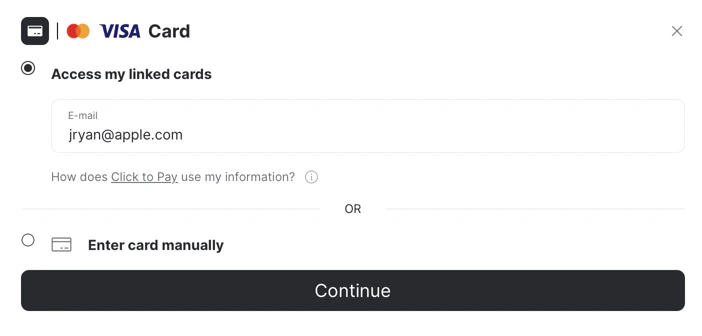
Card vaulting on successful payment
When a shopper enrolls during checkout — mandatorily in the APM flow, or by accepting the enrollment checkbox in the Golden Flow — their card is vaulted into their Click to Pay wallet once the payment is approved. Vaulting happens as part of the successful payment; no separate enrollment call is needed. On the shopper’s next visit, Click to Pay recognizes them (by device or by email lookup) and surfaces their vaulted cards directly in the checkout, so returning shoppers can pay without re-entering card details.Payment status lifecycle
For Click to Pay, passkey authentication happens before the payment exists: the shopper authenticates inside the Click to Pay experience, and only once authentication completes is the one-time token (OTT) generated — the OTT already carries the result of that authentication. You then create the payment using the OTT. If the passkey step does not complete, the flow aborts and no payment is created. After creating the payment, continue the flow in the SDK withcontinuePayment. The SDK evaluates the payment’s status at that point:
READY_TO_PAY— orPENDINGwith sub-statusWAITING_ADDITIONAL_STEPorDELAYED_PROVIDER_RESPONSE— means the provider requires an additional step (for example 3DS, a redirect, or a provider OTP), and the SDK executes it.- Any other status means the payment is already resolved, and the SDK reports the final status.
Activation Guide
Follow the steps below based on your desired configuration:Option 1: Click to Pay Only (APM)
- Request the DPA ID from the card network (for example, Mastercard).
- Add the Click to Pay connection in the Yuno dashboard using the DPA ID.
- Add the card connection that will process these cards.
- Define the payment method route in Routing and enable Click to Pay in the Checkout Builder.
Option 2: Click to Pay + Passkey
Supported on web and mobile platforms. Not supported in WebView.- Request the DPA ID from the card network (for example, Mastercard).
- Add the Click to Pay connection using the DPA ID.
- Add the card connection and configure the Acquirer BIN.
- Request the Yuno backend team to enable the Passkey and Dual Payload flags.
- Create checkout sessions with a
pricefor Passkey to work correctly.
Option 3: Click to Pay + Golden Flow
- Request the DPA ID from the card network (for example, Mastercard).
- Add the Click to Pay connection using the DPA ID.
- Add the card connection that will process these cards.
- Request the Yuno backend team to enable the Golden Flow flag.
Option 4: Click to Pay + Golden Flow + Passkey
Supported on web and mobile platforms. Not supported in WebView.- Request the DPA ID from the card network (for example, Mastercard).
- Add the Click to Pay connection.
- Add the card connection and configure the Acquirer BIN.
- Request the Yuno backend team to enable Passkey, Dual Payload, and Golden Flow flags.
- Create checkout sessions with a
pricefor Passkey to work correctly.
Click to Pay on VTEX
Click to Pay is also supported for VTEX stores through the Yuno VTEX plugin. The activation steps above (connection, routing, Checkout Builder) apply the same way.Click to Pay relies on a customer record existing in Yuno. When using the VTEX plugin, set the Create Customer field to Yes in your Yuno provider configuration so the plugin creates or updates the customer record on every payment. See the VTEX plugin FAQs for details.
SDK integration (Click to Pay Passkey)
ImportantStandard Click to Pay card flows use the existing SDK callbacks, but Passkey users must include a For Passkey transactions, the one-time token (OTT) never reaches the usual SDK callbacks (including
callback_url that matches the app’s deeplink scheme so the shopper returns to the app after authentication (on Android this must match the scheme configured in AndroidManifest.xml). For example:callbackOTT on Android). Always read it from the deeplink parameters before continuing the flow.Mobile: handling the response (OTT and deeplink)
The integration flow for Click to Pay Passkey has a specific response handling that differs from the standard payment flow. When a shopper completes a payment using CTP Passkey, the one-time token (OTT) is not delivered through the usual delegate/listener methods. Instead, the transaction result — both success and failure — is communicated to your app through the deeplink URL. This is the same on iOS, Android, and Flutter: the merchant reads the result from the deeplink URL and acts on it. Only where the deeplink arrives changes per platform. Read two parameters from the deeplink URLhas_error— an error occurred or the shopper canceled. Read themessageparameter and show the error.one_time_token— the transaction succeeded and the OTT is contained in the URL.
one_time_token
- Send it to your backend to create the payment via the Create payment endpoint.
- Continue the flow in the SDK with
continuePaymentto finalize the transaction.
- iOS — in
application(_:open:options:). CallYuno.receiveDeeplink(url)to close the Passkey browser, then read the parameters fromurl. - Flutter — in your deeplink handler.
await Yuno.receiveDeeplink(url: uri)to close the Passkey browser, then read the parameters fromuri. - Android — the deeplink relaunches your
Activity(there is no SDK close call). Read the parameters fromintent.datainonCreate/onNewIntent. The receiving activity must declare anintent-filterinAndroidManifest.xmlmatching the scheme/host/path of yourcallback_url.
Authentication method
Every Click to Pay transaction returns anauthentication_method field in the payment response, indicating exactly how the shopper was authenticated: for example, passkey (FIDO2), 3DS, OTP, SMS or email, federated login, and SPC, among others.
This is useful for fraud prevention, routing decisions, and tracking metrics such as approval rate by authentication method.
This field is backward compatible: transactions that don’t use Click to Pay simply return the field without a relevant value.
authentication_method in the transaction.
Card type filter and CVV behavior
Card type filter: you can block a debit or credit funding source in Click to Pay transactions. This is useful for combo cards, where the shopper would otherwise be able to choose either type: for example, showing only the credit option when a merchant wants to block debit.This isn’t self-service yet. Reach out to Yuno’s on-call team to configure it for your account. Self-service configuration for all payment methods is in development.