
Integrate Yuno SDK Web for VTEX Headless to handle online payments efficiently. This guide covers installation, configuration, and implementation steps.Documentation Index
Fetch the complete documentation index at: https://docs.y.uno/llms.txt
Use this file to discover all available pages before exploring further.
VTEXIO integration
To use Yuno in VTEXIO checkout, install the following applications:-
yunopartnerbr.yuno: A VTEXIO PPF connector that facilitates integration between VTEX and Yuno’s payment infrastructure. -
yunopartnerbr.yuno-app: A VTEXIO frontend payment application is required when using Card or Click to Pay as payment method. It is not required for Pix, Boleto, and other redirect-based payment methods.yunopartnerbr.yuno-apphas the following key features:- Runs the Yuno Web SDK to collect browser data.
- Executes third-party fraud detection SDKs.
- Processes payments directly within Yuno.
- Supports payments with two credit cards.
Installation
To integrate Yuno with VTEX, you need to install two applications:yunopartnerbr.yuno: VTEX PPF connector for backend communication.yunopartnerbr.yuno-app: Frontend payment application required for card-based payments.
Install yunopartnerbr.yuno
Follow these steps to install yunopartnerbr.yuno in VTEX Admin:
- Log into your VTEX store account.
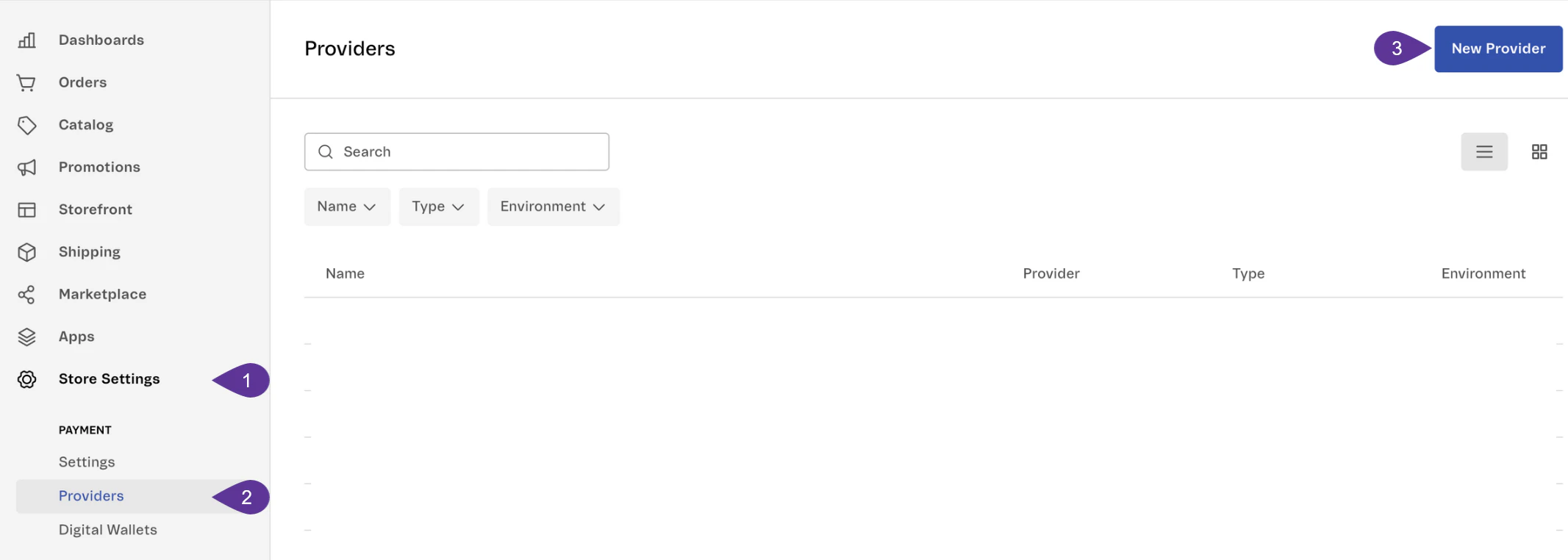
- In the VTEX Admin dashboard, navigate to Store Settings > Providers and click New Provider.
- Search for Yuno in the list of available providers.
- Click Install and follow the setup instructions.
Install yunopartnerbr.yuno-app
yunopartnerbr.yuno-app is required for payments using Card or Click to Pay. To install it, follow the steps:
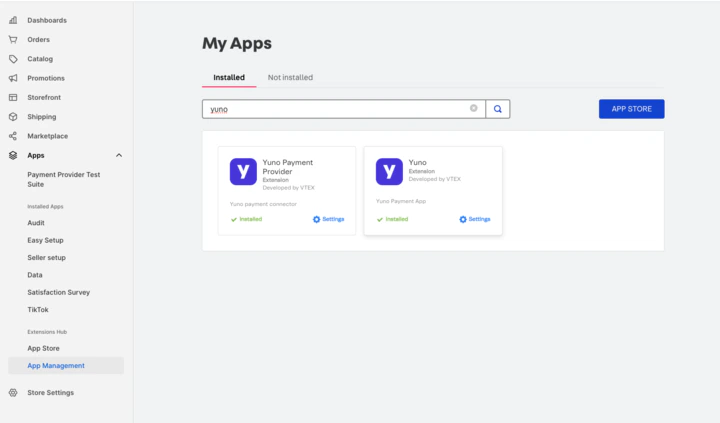
- In VTEX Admin, go to Apps > App Management.
- Search for Yuno.
- Locate and select Yuno Payment App (the second option in the list).
- Click Install to complete the setup.
Install Yuno SDK Web for VTEX (optional)
If your project requires Yuno SDK Web VTEX, install it usingnpm:
Payment flows
The following sections illustrate how payments are processed in VTEXIO and VTEX Headless using different payment methods:VTEXIO payment flows
VTEXIO enables seamless payment processing for various methods, including credit cards and alternative payment methods (APMs) like Pix. Below is a step-by-step breakdown of how these payment flows work.Credit card payment flow in VTEXIO
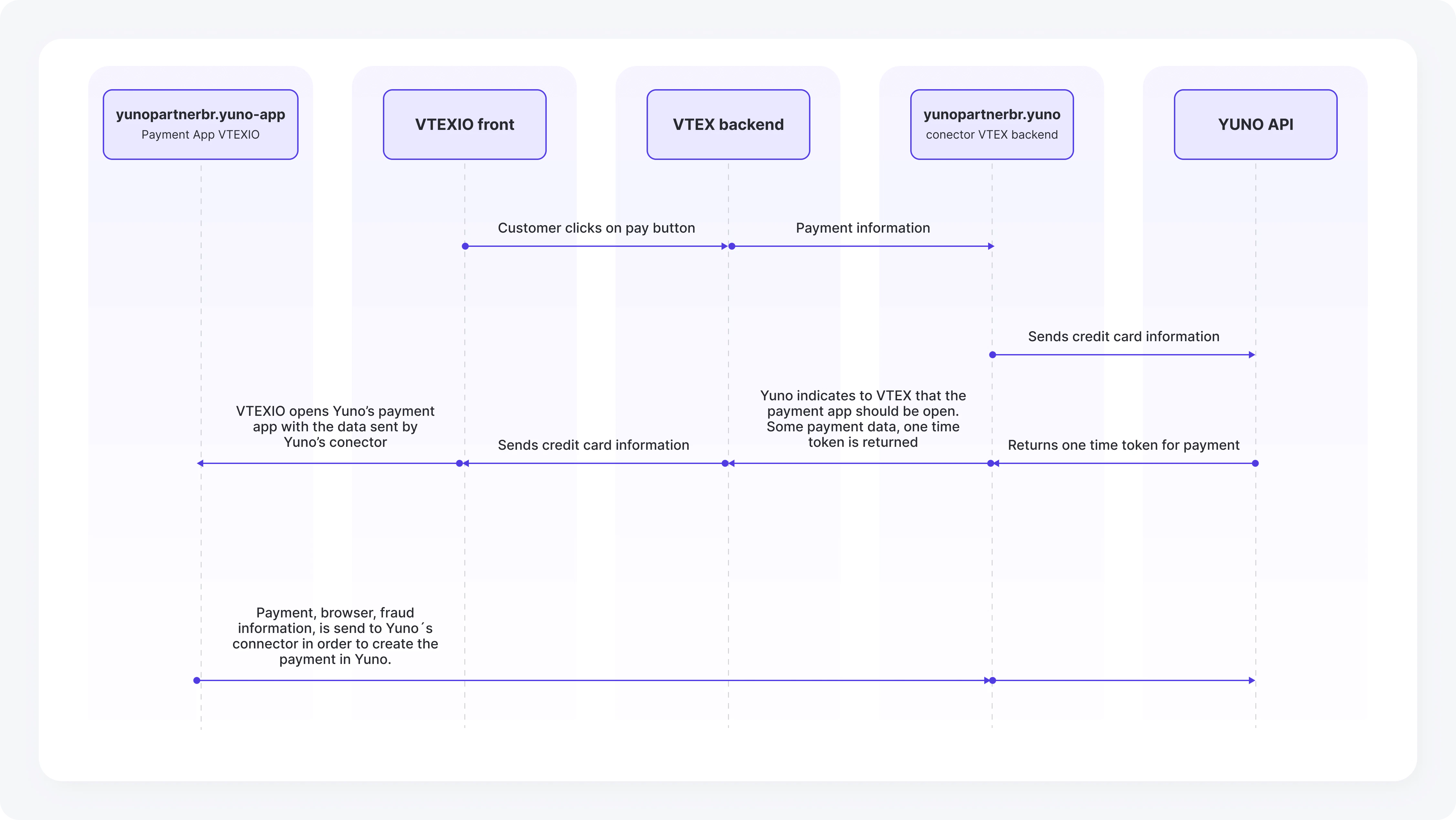
This flow details how credit card payments are processed in VTEXIO, from user interaction to transaction completion.- The user clicks on the pay button in the VTEXIO frontend.
- VTEX backend sends the payment information to the
yunopartnerbr.yunoconnector. - The Yuno connector sends the credit card information to the Yuno API.
- The Yuno API returns a one-time token for the payment.
- The Yuno connector informs VTEX that the payment app should be opened and provides the one-time token.
- VTEXIO opens the Yuno payment app with the data from the Yuno connector.
- The user enters credit card details in the Yuno payment app.
- Payment details, browser information, and fraud detection data are sent back to the Yuno connector.
- The payment is created in Yuno and processed.
- The user receives confirmation of the payment status from VTEX.
Pix (APMs) payment flow in VTEXIO
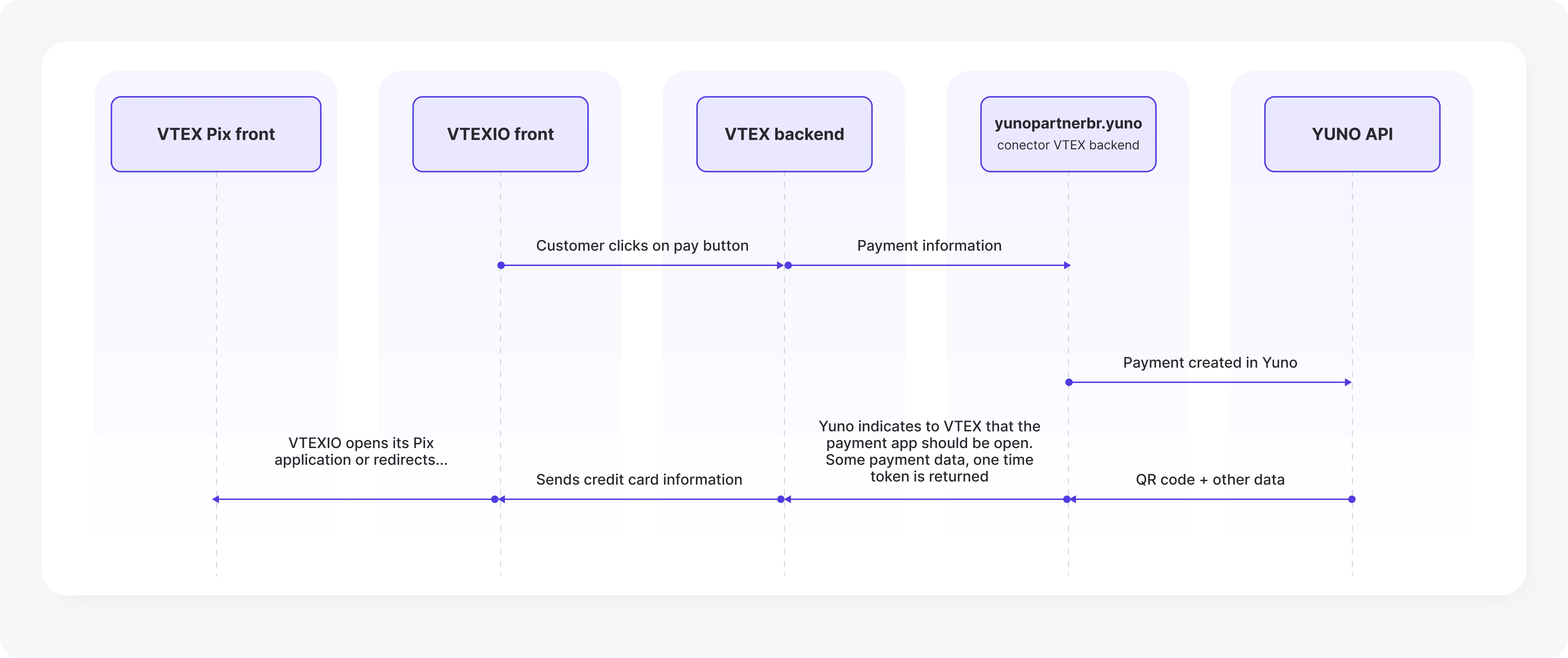
This flow explains how Pix and other APMs are handled in VTEXIO, including payment creation and redirection.- The user clicks on the pay button in the VTEXIO frontend.
- VTEX backend sends the payment information to the
yunopartnerbr.yunoconnector. - The Yuno connector creates the payment in Yuno’s system.
- Yuno generates a QR code and additional payment details and returns them to VTEX.
- VTEXIO opens the Pix application or redirects the user to complete the payment.
VTEX headless
To use Yuno in VTEX Headless checkout, install:yunopartnerbr.yuno: A VTEXIO PPF connector that runs on the VTEXIO server side.
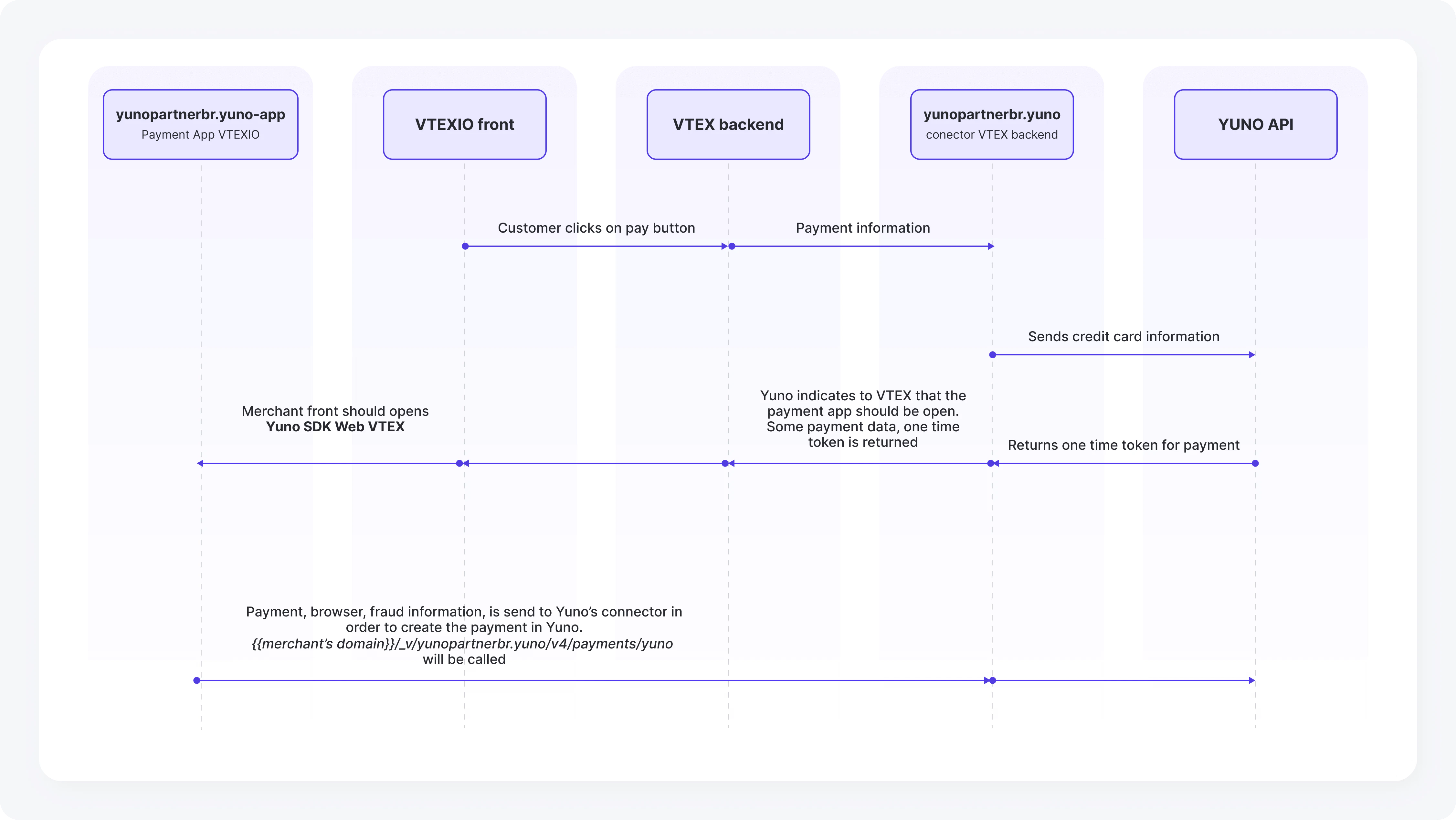
VTEX headless payment flow
VTEX Headless requires a different approach to payment processing. Below are the steps for handling credit card transactions within VTEX Headless.- The user clicks on the pay button in the merchant’s custom frontend.
- VTEX backend sends the payment information to the
yunopartnerbr.yunoconnector. - The Yuno connector sends the credit card information to the Yuno API.
- The Yuno API returns a one-time token for the payment.
- The Yuno connector informs VTEX that the payment app should be opened and provides the one-time token.
- The merchant frontend opens the Yuno SDK Web VTEX using the provided data.
- The payment details, browser information, and fraud detection data are sent to the Yuno connector.
- The Yuno connector processes the payment by calling the
{{merchant’s domain}}/_v/yunopartnerbr.yuno/v4/payments/yuno. - The user receives confirmation of the payment status from VTEX.
Installing and using the SDK Web VTEX
The Yuno SDK Web VTEX allows seamless integration with VTEX’s payment infrastructure, enabling merchants to handle payments directly within their frontend. To integrate Yuno SDK Web for VTEX, include the script in your HTML file and configure the necessary parameters:| Property | Type | Description | Required | Example |
|---|---|---|---|---|
elementRoot | String | HTML Element ID | True | "root-container" |
payload | String | Comes from our connector response | True | {"isVTEXCard":true, "checkoutSessions":["id"], "paymentIds":["id"], "orderId":"id"} |
language | String | ISO 639-1 language code | True | "pt" |
domainVTEX | String | Merchant’s VTEX domain (if different from VTEX) | False | "https://myvtex.yunopartnerbr.com" |
onLoading | Function | Called when SDK processes a payment | False | function(loading) { console.log(loading); } |
onPaymentDone | Function | Called when payment is complete | False | function(paymentResponse) { console.log(paymentResponse); } |
onError | Function | Called if an error occurs | False | function(message, error) { console.log(error); } |
npm package:
Payment response payloads
When processing payments through Yuno and VTEX, theyunopartnerbr.yuno connector generates a structured payload containing all the necessary transaction details. Below, we provide example payloads for credit card payments and Pix payments (APMs).
Payload Generation and Structure
- Automated Generation: Merchants do not need to modify or format the payload manually.
- Dynamic Structure: The payload format adapts based on the selected payment method (credit card, Pix, etc.).
- Seamless Integration: The data is retrieved automatically from Yuno’s connector when processing transactions in VTEX.
Credit card payment payload
The following JSON response represents a credit card payment authorization processed through Yuno.Pix payment payload
This example shows a Pix payment response, where Yuno generates a QR code in both text format and base64 image format.Payment metadata
When processing payments through the VTEX connector, Yuno includes metadata in both the checkout session and payment creation. This metadata provides additional context about the transaction.Seller ID (affiliate code)
The VTEX connector captures thesellerId (Affiliate Code) from VTEX orders and includes it in the checkout session and payment metadata. This enables marketplace tracking and affiliate mode functionality, allowing merchants to track attribution between their own stores and partner marketplaces.
The sellerId is automatically included in the metadata when processing payments: