
Mercado Pago Fast Payments is supported in Yuno SDK 2.0.0 (recommended) and Web SDK v1.11.21 or later (
https://sdk-web.y.uno/v1.11/main.js).Legacy SDKs remain supported side by side during the transition and are scheduled for deprecation in 2027. Yuno’s recommended path is to migrate to the new Yuno SDK rather than remain on a legacy SDK — see the migration guide. Contact your Account Manager for migration planning.Availability
Fast Payments is available on:- Yuno SDK 2.0 payment methods list (
getPaymentMethodsViews), with the checkout session created withworkflow: 'SDK_SEAMLESS' - Web SDK v1.11 Full checkout (
mountCheckout) - Web SDK v1.11 Lite checkout (
mountCheckoutLite) withpaymentMethodType: 'MERCADO_PAGO_SUPERTOKEN', supporting bothelementandmodalrender modes (Mercado Pago recommendselement).
Compatibility and platform support
Fast Payments operates inside web contexts and requires shopper authentication with Mercado Pago.Visibility on supported environments depends on shopper eligibility. If a shopper does not have a valid Mercado Pago account, or if Mercado Pago cannot authenticate the session, Fast Payments is not offered. What the shopper sees then depends on your integration, described in How it works for the shopper.
Functional limitations
Before planning your integration, review the functional boundaries where Fast Payments should not be used:- Recurrence and merchant-initiated transactions (MIT): Fast Payments requires interactive shopper authentication. It cannot be used for recurring subscription billing, tokenized card vaulting for future off-session charges, or MIT flows.
- Coupons and Mercado Pago promotions: In-app Mercado Pago discounts or merchant coupon codes managed inside Mercado Pago cannot be applied through Fast Payments.
- Partial capture or differing amounts: Authorizing an amount and capturing a different or partial amount later is not supported. The captured amount must equal the authorized checkout amount.
- Sub-acquirer fields: Custom sub-acquirer parameters or intermediary processing flags are not passed to Mercado Pago.
- Split payments: 1:1 split payments are not supported. 1:N split payment scenarios are currently under validation and not available for general release.
Onboarding and prerequisites
Activating Mercado Pago Fast Payments requires coordinated setup across the merchant, Yuno, and Mercado Pago:- Enable Fast Payments (Mercado Pago and merchant, in Mercado Pago Developers). Request Fast Payments activation on your Mercado Pago application through your Mercado Pago account manager.
- Authorize the connection (merchant, in the Yuno Dashboard). In Settings > Connections, run Connect with Mercado Pago to generate the seller access tokens.
- Configure public keys (merchant, in the Yuno Dashboard). Add the public key of each Mercado Pago site you sell in, tagged with its country. Add a key tagged
GLOBALas a fallback. - Configure the webhook (merchant, in Mercado Pago Developers). Set the Notification URL to
https://prod.y.uno/mercadopago-webhook/v1/orders/eventsand subscribe to the Order (Mercado Pago) event. - Enable routing rules (Yuno and merchant, in the Yuno Dashboard). Enable the
MERCADO_PAGO_SUPERTOKENpayment method in your checkout routing workflow.
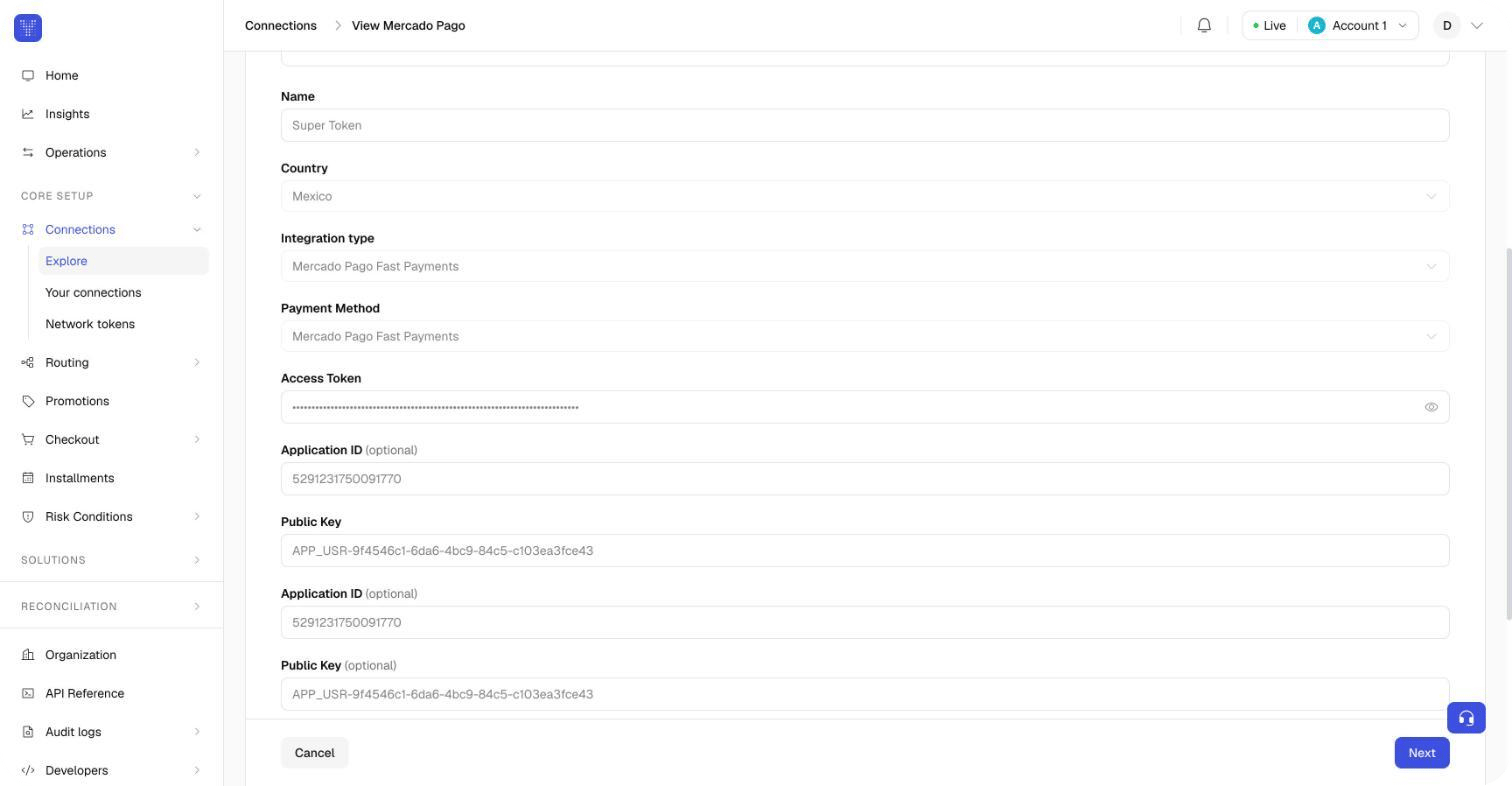
Configuring the Mercado Pago Fast Payments connection in the Yuno Dashboard
How it works for the shopper
Full checkout
In Full checkout, Mercado Pago always appears as one section at the top of the payment method list, headed by the Mercado Pago logo. It is never a selectable row on its own: the shopper selects one of the methods inside the section. The section adapts to what Yuno knows about the shopper: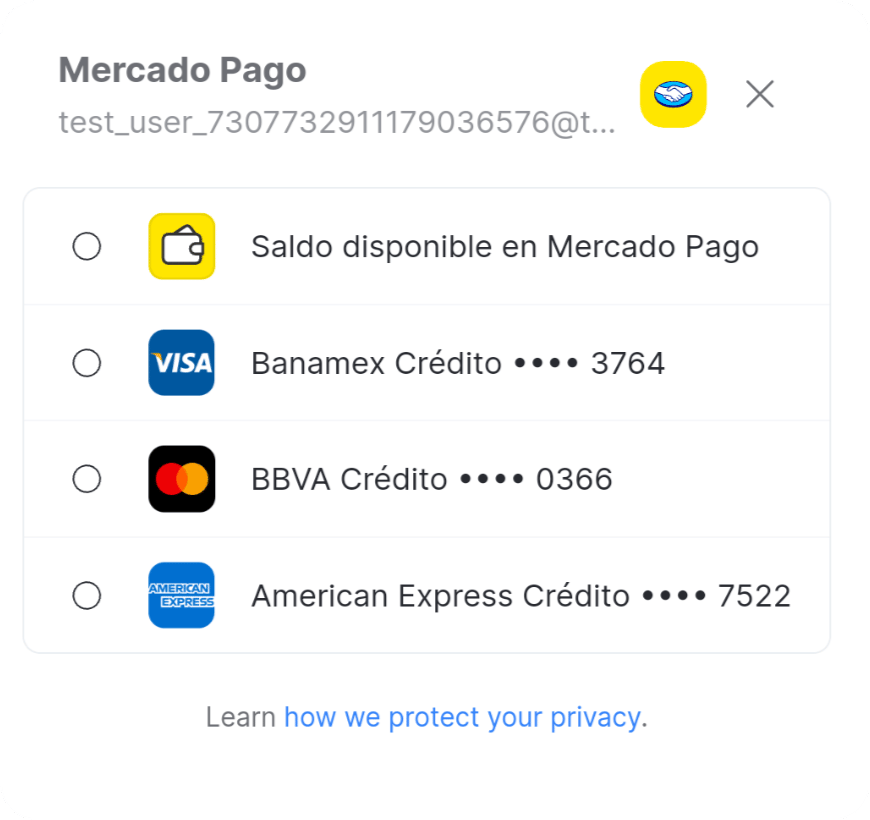
Mercado Pago Fast Payments displaying the shopper's saved payment methods
https://www.mercadopago.com.ar/privacidad for Argentina). Your other payment methods follow, under an Other payment methods heading.
Hiding the section is the behaviour from Web SDK 1.11.21. On 1.11.6 to 1.11.20 a single Mercado Pago row stays in the list instead, and a shopper who selects that row sees the message “Mercado Pago is not available right now. Please choose another payment method.” Update to 1.11.21 or later to keep that message out of the shopper’s path.
Lite checkout
In Lite checkout, the SDK renders the Mercado Pago component into the container configured forpaymentMethodType: 'MERCADO_PAGO_SUPERTOKEN'. Shoppers select and authenticate with their saved Mercado Pago methods directly inside that mounted component (or modal).
Just like in Full checkout, the component displays the privacy notice linking to Mercado Pago’s privacy policy for the shopper’s country.
Because your own page owns the payment method list in Lite checkout, Yuno cannot remove the Mercado Pago entry from it. When Mercado Pago cannot be used, or the shopper is not eligible, the mounted component shows the message “Mercado Pago is not available right now. Please choose another payment method.”
Integration
Workflow mapping
Setworkflow on the checkout session (POST /v1/checkout/sessions) to match the SDK you integrate:
Integration examples
- Yuno SDK 2.0 (Recommended)
- Web SDK v1.11 (Legacy)
Load the SDK from the CDN and initialize it once.The Mercado Pago section renders at the top of the SDK’s payment methods list:
Lite checkout with several payment methods
In Lite checkout your page owns the payment method list and the SDK renders one method at a time. To offer Fast Payments next to cards and other methods, mount the method the shopper selects and keep one Pay button on your page. Four rules decide the integration:- One mounted method at a time.
mountCheckoutLiterenders the chosen method’s form intorenderMode.elementSelector.apmForm(element mode) or into a modal. Calling it again with anotherpaymentMethodTypereplaces the previous form, so typed data and validation state never carry over from one method to the next. - Your Pay button. With
showPayButton: falsethe card and other-method forms render no button of their own.onChangetells you when the mounted form is complete, andyuno.submitOneTimeTokenForm()submits it. - Mercado Pago confirms inside its own component. The Fast Payments component keeps its Continue and Pay buttons, and
showPayButtonandsubmitOneTimeTokenForm()do not apply to it. In element mode, hide your Pay button while Mercado Pago is selected. - A method with nothing to ask pays on mount. When a method renders no form, the SDK creates the one-time token and calls
createPaymentas soon as the method mounts. Mount those methods when the shopper presses Pay, not when they select the method.
- Element render mode
- Modal render mode
#payment-form as soon as it mounts: the saved methods when the shopper is eligible, or the unavailable message described in Lite checkout when Mercado Pago cannot be used. In that case the shopper selects another method from your list and the next mount replaces the message.One-time token and payment creation
When the shopper confirms, the SDK’s one-time token carries the Mercado Pago details for you:third_party_tokenis the token Mercado Pago issues for the method the shopper chose. Yuno uses it to charge the payment; you never see card data.provider_method_idandprovider_method_typeidentify the method inside the shopper’s Mercado Pago account (a card brand such asmaster, oraccount_moneyfor the account balance).installmentis sent for cards, with the number of installments the shopper picked from Mercado Pago’s options. It is omitted foraccount_money.
Idempotency, retries, and diagnostics
- Idempotency and server timeouts: Always include an
X-Idempotency-Keyheader when creating payments viaPOST /v1/payments. If a network timeout occurs during this request, your server should first retry the request using the exact sameX-Idempotency-Keyor reconcile the payment status viaGET /v1/payments/{payment_id}. - Recovering checkout state (
continuePayment): Callyuno.continuePayment()on the client side only after the payment is created, when the payment response indicates an action is needed (such assdk_action_required) or when a card returnsDECLINEDorERRORand the shopper should select another method or retry. Do not usecontinuePayment()as a replacement for server-side timeout retries or status reconciliation. - Support diagnostics: When escalating payment or integration issues to Yuno or Mercado Pago support, always capture and provide these identifiers:
checkout_session: The unique session identifier created viaPOST /v1/checkout/sessions.payment_id: The transaction identifier returned by Yuno in the payment response.trace_id/request_id: The HTTP response tracking header (X-Trace-Id) from API requests.
Countries
Fast Payments is available in Argentina, Brazil, Mexico, and Chile. It follows your Mercado Pago connection: the SDK uses the public key tagged with the checkout’s country, falls back to a key taggedGLOBAL, and if neither is present uses the first public key on the connection.
Testing and production release
Testing checklist
Before going live, validate your integration against Mercado Pago sandbox environments:- Test user creation: Create test buyer and seller accounts in the Mercado Pago Developers portal for the target country site.
- Payment methods setup: Ensure the test buyer user has saved payment methods in their Mercado Pago account (credit card and account balance).
- Session e-mail: In
POST /v1/checkout/sessions, pass the test buyer’s registered email incustomer_payer.email. - Authentication flow: Verify that saved cards load in the checkout section. Test security code prompts and simulated challenge steps.
- Routing rules: Ensure routing rules direct
MERCADO_PAGO_SUPERTOKENtransactions to the Mercado Pago test connection.
Production release checklist
When promoting from sandbox to production:- Production OAuth authorization: In the Yuno Dashboard, click Connect with Mercado Pago under your production account to generate active seller tokens.
- Production public keys: Ensure production public keys are assigned for each active country site.
- Webhook verification: Verify that the production Notification URL is configured and receiving events in Mercado Pago Developers.
- Checkout validation: Verify the experience for non-eligible shoppers and shoppers without saved payment methods, as described in How it works for the shopper.