> ## Documentation Index
> Fetch the complete documentation index at: https://docs.y.uno/llms.txt
> Use this file to discover all available pages before exploring further.
# Mercado Pago Fast Payments
> Let shoppers pay with the cards and account balance saved in their Mercado Pago account, straight from the Yuno Web SDK checkout, without leaving your page.
Mercado Pago Fast Payments shows a shopper the payment methods they already saved in their Mercado Pago account — cards and account balance — inside your Yuno checkout. The shopper picks one, confirms with Mercado Pago, and pays without re-typing card details or leaving your page.
Yuno renders the experience inside the Web SDK **Full checkout** and **Lite checkout**. You create the checkout session and the payment as you do today; the SDK handles the Mercado Pago part.
Mercado Pago Fast Payments is available in **Yuno SDK 2.0.0** and the legacy **Web SDK v1.11** (`https://sdk-web.y.uno/v1.11/main.js`). It is not supported on Web SDK v1.10 or earlier.
v1 will be deprecated by the end of the year. Yuno's recommended path is that merchants migrate to the new Yuno SDK instead of keeping on legacy versions. Contact your account manager for more details and next steps to upgrade.
## Availability
Fast Payments is available on:
* **Full checkout** (`mountCheckout`)
* **Lite checkout** (`mountCheckoutLite`) with `paymentMethodType: 'MERCADO_PAGO_SUPERTOKEN'`, supporting both `element` and `modal` render modes (Mercado Pago recommends `element`).
It is not available on the Seamless checkout, on the condensed payment-method list, in Moon Active checkout, or on the mobile SDKs.
## Requirements
Before starting, ensure all prerequisites are met:
* A Yuno account with Dashboard access and a Web SDK integration on the new Yuno SDK using [Full checkout](/docs/sdks/full-checkout/web-payments) or [Lite checkout](/docs/sdks/lite-web/payment).
* **Fast Payments enabled on your Mercado Pago application:** Mercado Pago enables Fast Payments per application. If not enabled, the section displays *"Mercado Pago is not available right now"*.
* **Mercado Pago connection fully authorized:** In the Yuno Dashboard, complete **Connect with Mercado Pago** until you are redirected back to the Dashboard. Providing the public key alone is not sufficient; payments require the seller access token generated during authorization.
* **Public key configured per country:** Add the Mercado Pago **public key** of your Mercado Pago account to the connection. One public key belongs to one Mercado Pago site (for example Argentina, Brazil, or Mexico); if you sell across multiple countries, add the public key for each site tagged with its country (using `GLOBAL` as a fallback).
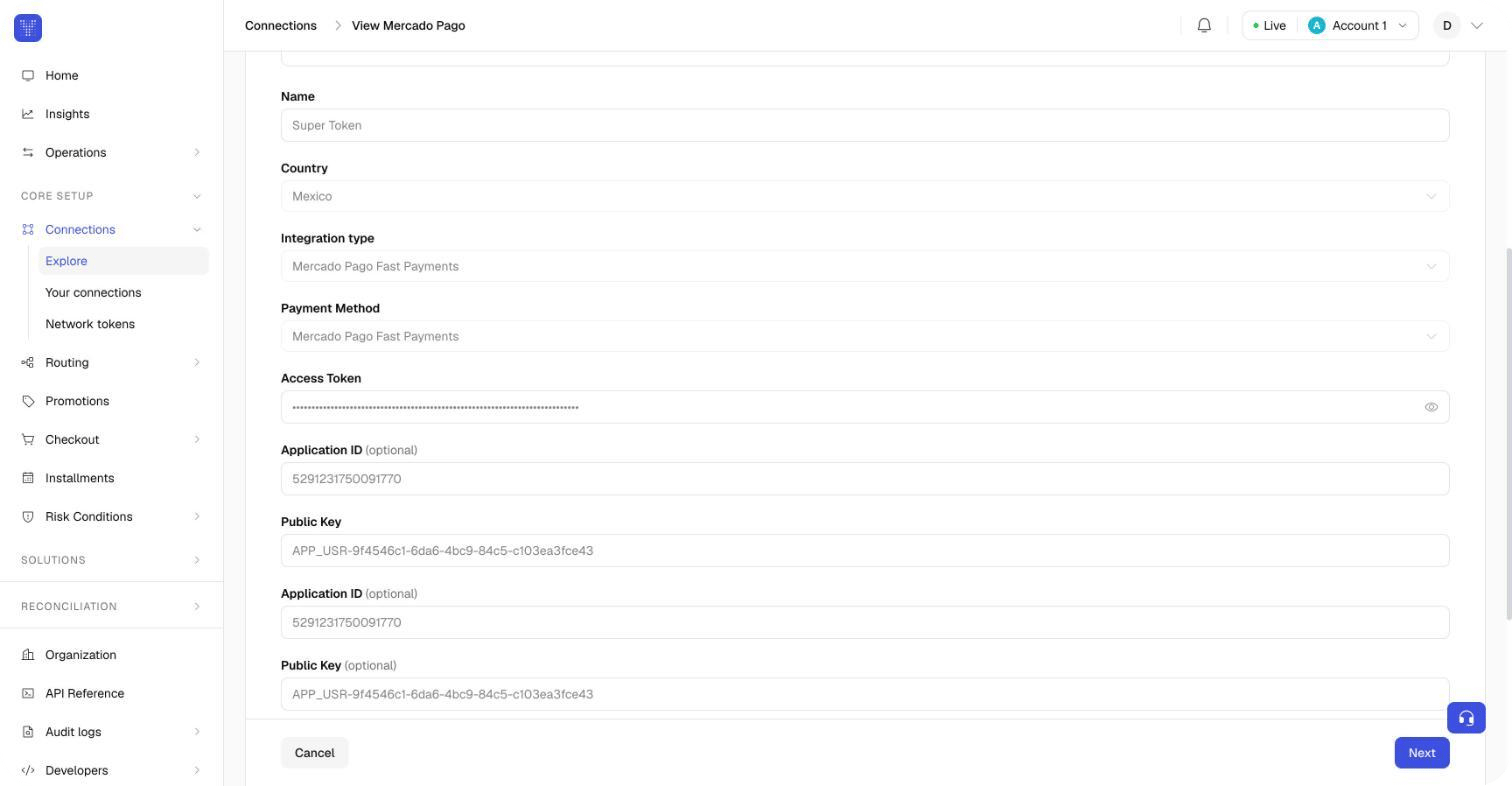 * **Notification webhook configured in Mercado Pago:** Set the Notification URL in your Mercado Pago application to `https://prod.y.uno/mercadopago-webhook/v1/orders/events` and subscribe to the **Order (Mercado Pago)** event.
* The `MERCADO_PAGO_SUPERTOKEN` payment method enabled for your checkout in your routing rules.
## How it works for the shopper
### Full checkout
In Full checkout, Mercado Pago always appears as **one section** at the top of the payment method list, headed by the Mercado Pago logo. It is never a selectable row on its own: the shopper selects one of the methods inside the section. The section adapts to what Yuno knows about the shopper:
| Situation | What the shopper sees |
| - | - |
| The checkout session has no shopper e-mail | A field asking for the e-mail of their Mercado Pago account: *"Enter the e-mail of your Mercado Pago account to see your saved payment methods."* |
| The e-mail is known and Mercado Pago is loading their methods | A placeholder while the list loads |
| Mercado Pago answered | Their saved cards and account balance as rows, each with its brand and last digits. Mercado Pago may ask for the card's security code before paying with a saved card, in a field Mercado Pago renders |
| Mercado Pago could not be reached or returned no methods | *"Mercado Pago is not available right now. Please choose another payment method."* |
* **Notification webhook configured in Mercado Pago:** Set the Notification URL in your Mercado Pago application to `https://prod.y.uno/mercadopago-webhook/v1/orders/events` and subscribe to the **Order (Mercado Pago)** event.
* The `MERCADO_PAGO_SUPERTOKEN` payment method enabled for your checkout in your routing rules.
## How it works for the shopper
### Full checkout
In Full checkout, Mercado Pago always appears as **one section** at the top of the payment method list, headed by the Mercado Pago logo. It is never a selectable row on its own: the shopper selects one of the methods inside the section. The section adapts to what Yuno knows about the shopper:
| Situation | What the shopper sees |
| - | - |
| The checkout session has no shopper e-mail | A field asking for the e-mail of their Mercado Pago account: *"Enter the e-mail of your Mercado Pago account to see your saved payment methods."* |
| The e-mail is known and Mercado Pago is loading their methods | A placeholder while the list loads |
| Mercado Pago answered | Their saved cards and account balance as rows, each with its brand and last digits. Mercado Pago may ask for the card's security code before paying with a saved card, in a field Mercado Pago renders |
| Mercado Pago could not be reached or returned no methods | *"Mercado Pago is not available right now. Please choose another payment method."* |
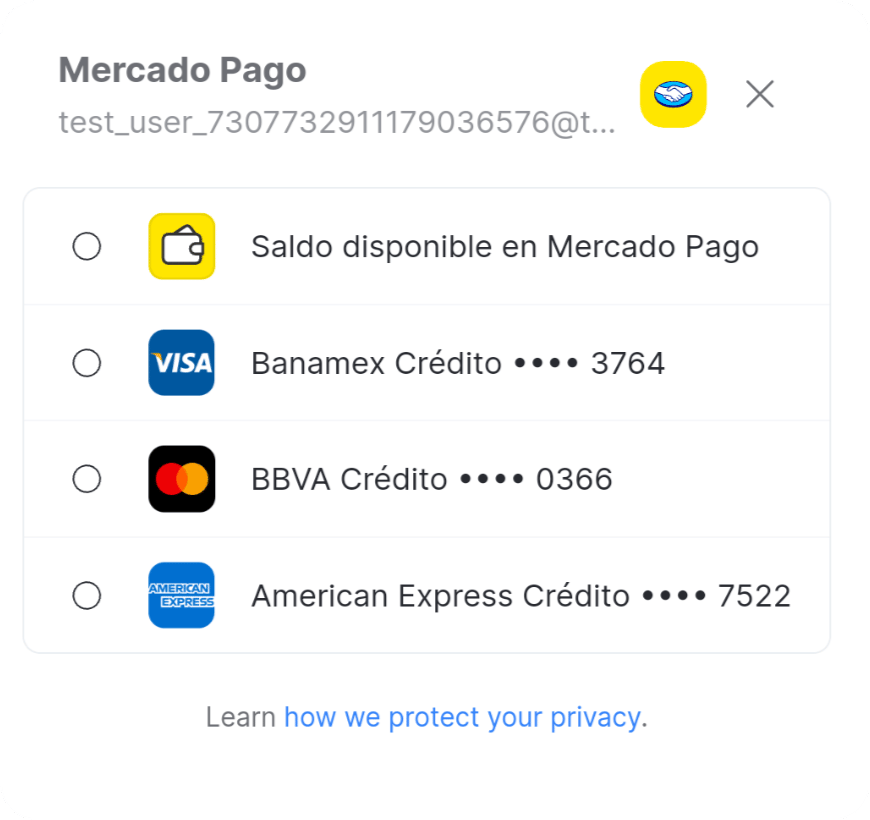 In every state the section keeps a privacy notice — *"Learn how we protect your privacy."* — that links to Mercado Pago's privacy page for the shopper's country (for example `https://www.mercadopago.com.ar/privacidad` for Argentina). Your other payment methods follow, under an **Other payment methods** heading.
Send the shopper's e-mail in `customer_payer.email` when you [create the checkout session](/reference/checkout-sessions/create-checkout-session). The section then loads the saved methods immediately instead of asking the shopper for the e-mail.
### Lite checkout
In Lite checkout, the SDK renders the Mercado Pago component into the container configured for `paymentMethodType: 'MERCADO_PAGO_SUPERTOKEN'`. Shoppers select and authenticate with their saved Mercado Pago methods directly inside that mounted component (or modal).
Just like in Full checkout, the component displays the privacy notice linking to Mercado Pago's privacy policy for the shopper's country.
## Integration
### Full checkout
Follow the [Web SDK Full checkout guide](/docs/sdks/full-checkout/web-payments); the section appears automatically as soon as the connection and payment method are configured.
### Lite checkout
Set the render mode in `startCheckout`, then mount the component with `paymentMethodType: 'MERCADO_PAGO_SUPERTOKEN'`:
```javascript theme={"theme":{"light":"github-dark","dark":"github-dark-dimmed"}}
await yuno.startCheckout({
checkoutSession,
elementSelector: '#root',
countryCode: 'AR',
// Mercado Pago recommends element render mode
renderMode: {
type: 'element', // or 'modal'
elementSelector: {
apmForm: '#apm-form',
actionForm: '#action-form',
},
},
// ...your callbacks
});
await yuno.mountCheckoutLite({
paymentMethodType: 'MERCADO_PAGO_SUPERTOKEN',
});
await yuno.startPayment();
```
### One-time token and payment creation
When the shopper confirms, the SDK's one-time token carries the Mercado Pago details for you:
```json theme={"theme":{"light":"github-dark","dark":"github-dark-dimmed"}}
{
"payment_method": {
"type": "MERCADO_PAGO_SUPERTOKEN",
"wallet": {
"third_party_token": "",
"provider_method_id": "master",
"provider_method_type": "credit_card"
},
"installment": { "value": 1, "id": null }
}
}
```
* `third_party_token` is the token Mercado Pago issues for the method the shopper chose. Yuno uses it to charge the payment; you never see card data.
* `provider_method_id` and `provider_method_type` identify the method inside the shopper's Mercado Pago account (a card brand such as `master`, or `account_money` for the account balance).
* `installment` is sent for cards, with the number of installments the shopper picked from Mercado Pago's options. It is omitted for `account_money`.
Create the payment with the one-time token exactly as you do for any other method ([Step 7 of the Full checkout guide](/docs/sdks/full-checkout/web-payments#step-7-create-the-payment)). The payment is processed through your Mercado Pago connection.
## Countries
Fast Payments follows your Mercado Pago connection: the SDK uses the public key tagged with the checkout's country and falls back to a key tagged `GLOBAL`. The privacy notice links to Mercado Pago's page for Argentina, Brazil, Mexico, Chile, Colombia, Peru and Uruguay.
## Testing
Use a Mercado Pago **test user** of the same site as your test public key, signed in to the Mercado Pago app, and pass its e-mail in `customer_payer.email`. Mercado Pago lists the test user's saved methods in the section; the payment is created in your Yuno sandbox as usual.
This documentation is built and hosted on [Mintlify](https://mintlify.com), a developer documentation platform.
In every state the section keeps a privacy notice — *"Learn how we protect your privacy."* — that links to Mercado Pago's privacy page for the shopper's country (for example `https://www.mercadopago.com.ar/privacidad` for Argentina). Your other payment methods follow, under an **Other payment methods** heading.
Send the shopper's e-mail in `customer_payer.email` when you [create the checkout session](/reference/checkout-sessions/create-checkout-session). The section then loads the saved methods immediately instead of asking the shopper for the e-mail.
### Lite checkout
In Lite checkout, the SDK renders the Mercado Pago component into the container configured for `paymentMethodType: 'MERCADO_PAGO_SUPERTOKEN'`. Shoppers select and authenticate with their saved Mercado Pago methods directly inside that mounted component (or modal).
Just like in Full checkout, the component displays the privacy notice linking to Mercado Pago's privacy policy for the shopper's country.
## Integration
### Full checkout
Follow the [Web SDK Full checkout guide](/docs/sdks/full-checkout/web-payments); the section appears automatically as soon as the connection and payment method are configured.
### Lite checkout
Set the render mode in `startCheckout`, then mount the component with `paymentMethodType: 'MERCADO_PAGO_SUPERTOKEN'`:
```javascript theme={"theme":{"light":"github-dark","dark":"github-dark-dimmed"}}
await yuno.startCheckout({
checkoutSession,
elementSelector: '#root',
countryCode: 'AR',
// Mercado Pago recommends element render mode
renderMode: {
type: 'element', // or 'modal'
elementSelector: {
apmForm: '#apm-form',
actionForm: '#action-form',
},
},
// ...your callbacks
});
await yuno.mountCheckoutLite({
paymentMethodType: 'MERCADO_PAGO_SUPERTOKEN',
});
await yuno.startPayment();
```
### One-time token and payment creation
When the shopper confirms, the SDK's one-time token carries the Mercado Pago details for you:
```json theme={"theme":{"light":"github-dark","dark":"github-dark-dimmed"}}
{
"payment_method": {
"type": "MERCADO_PAGO_SUPERTOKEN",
"wallet": {
"third_party_token": "",
"provider_method_id": "master",
"provider_method_type": "credit_card"
},
"installment": { "value": 1, "id": null }
}
}
```
* `third_party_token` is the token Mercado Pago issues for the method the shopper chose. Yuno uses it to charge the payment; you never see card data.
* `provider_method_id` and `provider_method_type` identify the method inside the shopper's Mercado Pago account (a card brand such as `master`, or `account_money` for the account balance).
* `installment` is sent for cards, with the number of installments the shopper picked from Mercado Pago's options. It is omitted for `account_money`.
Create the payment with the one-time token exactly as you do for any other method ([Step 7 of the Full checkout guide](/docs/sdks/full-checkout/web-payments#step-7-create-the-payment)). The payment is processed through your Mercado Pago connection.
## Countries
Fast Payments follows your Mercado Pago connection: the SDK uses the public key tagged with the checkout's country and falls back to a key tagged `GLOBAL`. The privacy notice links to Mercado Pago's page for Argentina, Brazil, Mexico, Chile, Colombia, Peru and Uruguay.
## Testing
Use a Mercado Pago **test user** of the same site as your test public key, signed in to the Mercado Pago app, and pass its e-mail in `customer_payer.email`. Mercado Pago lists the test user's saved methods in the section; the payment is created in your Yuno sandbox as usual.
This documentation is built and hosted on [Mintlify](https://mintlify.com), a developer documentation platform.