> ## Documentation Index
> Fetch the complete documentation index at: https://docs.y.uno/llms.txt
> Use this file to discover all available pages before exploring further.
# Teams and Roles
export const Video = ({src}) => {
return
;
};
The **Team and roles** section allows you to create teams, define roles, and assign permissions with precision. This setup supports structured collaboration and enforces access controls to maintain a secure and organized environment. To access this section within the Yuno dashboard, click your profile image and select **Team and roles**.
## Harnessing the power of teams
* **Building dynamic teams**: Yuno allows you to create flexible teams composed of users from different accounts. A single user can be part of multiple teams, each with unique roles tailored to their responsibilities.
* **Cross-account participation**: Yuno supports cross-account collaboration, enabling users to contribute to teams across different accounts. This promotes a unified, efficient workflow across your organization.
* **Customizable roles**: Roles define each member's level of access and responsibilities. Yuno offers a set of predefined roles with specific permissions, ensuring that every user has the appropriate tools and access to perform their tasks.
## Working with teams
The **Team members** tab allows you to invite new members and manage existing ones. The actions available to you will depend on your assigned permissions.
* **Invite members**: Send one or more invitations via email and assign roles to new members.
* **Member management**: Click the three-dot icon next to a member's name to edit their role or delete them from the team.
Use **Add filters** to sort between your [accounts](/docs/account-management).
**Team for each account**
Please, take into consideration that you will have to create a team for each account you have created.
## The dynamics of roles
Defining clear roles and permissions strengthens the security of your operations. Each team member works within a specific scope, reducing the risk of accidental errors or unauthorized access. Roles give individuals the access they need to do their jobs efficiently, while keeping workflows organized and secure.
There are two types of roles in Yuno:
* **Default roles**: Yuno offers a set of predefined roles, each encapsulating a distinct array of permissions. These default roles serve as a foundation for streamlined team functioning.
* **Custom role creation**: Yuno's flexibility extends to crafting custom roles. Tailor permissions to suit your precise requirements, allowing your teams to function optimally while adhering to the principle of least privilege.
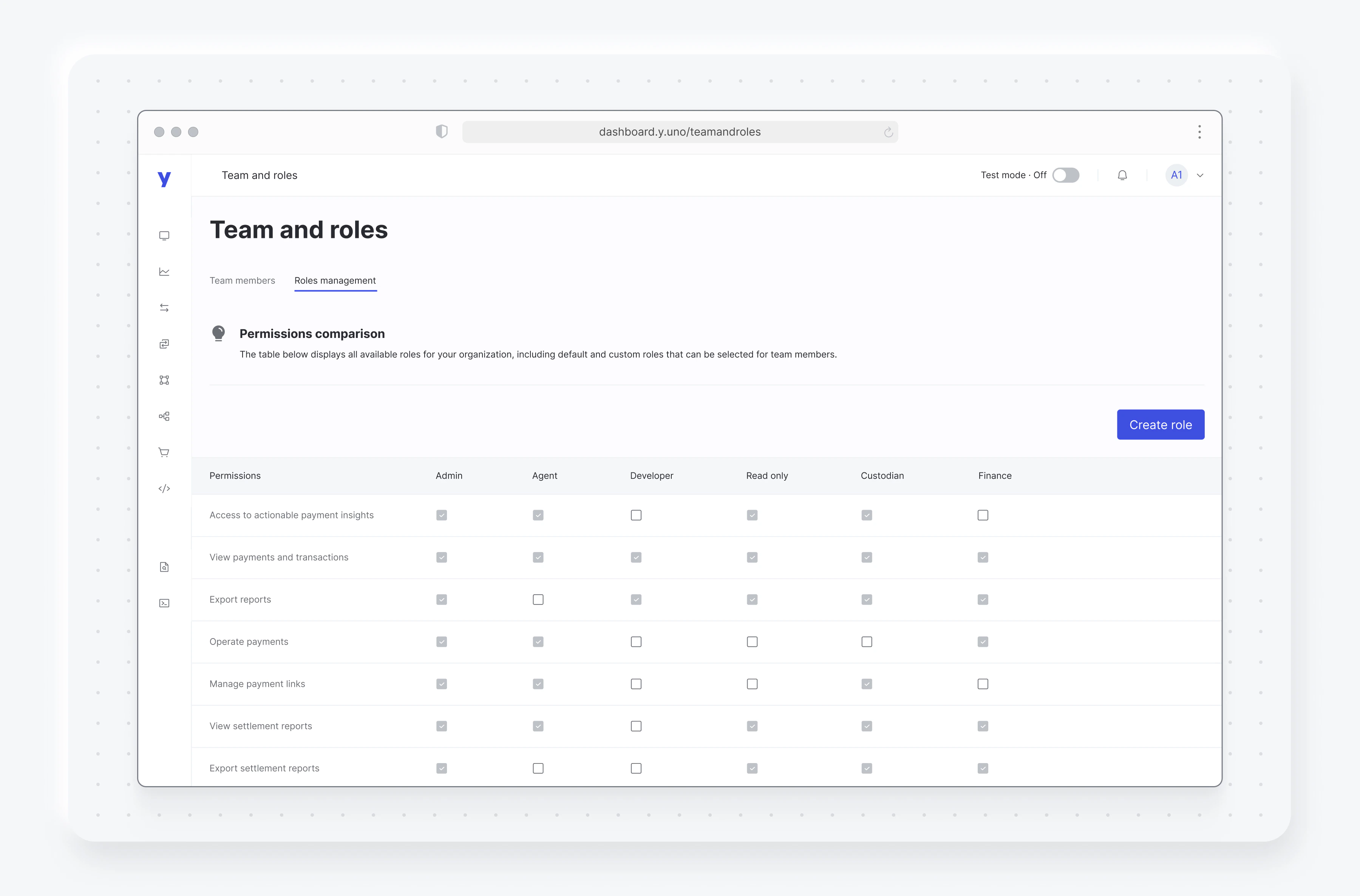
There are 6 types of default roles:
| Roles | Description |
| :-------- | :--------------------------------------------------------------------------------- |
| Admin | An Admin user has access to all features in the dashboard. |
| Agent | An Agent user can view and take actions on payments. |
| Developer | A Developer user can view and take actions on integrations and webhooks. |
| Read only | A Read-only user can view all features in the dashboard. |
| Custodian | Assign this role when you invite Yuno team experts to join your team. |
| IAM Admin | Users with this role manage access and security settings like SSO, MFA, and roles. |
The **Roles management** tab shows the permissions assigned to each role. Select **Create role** to define custom roles tailored to your team's specific needs.
 ## Creating custom roles
To create a custom role, navigate to the **Roles management** tab and select **Create role**. You can then define the role name, description, and assign specific permissions for each environment according to your team's needs.
Yuno's **Create role** feature provides enhanced flexibility for role management by allowing you to create custom roles with environment-specific permissions. This feature enables you to define precise access controls for different environments, promoting better security and operational control.
### Environment-specific configuration
For each permission, you can independently configure access for:
* **Sandbox environment**: Perfect for testing and development activities
* **Production environment**: For live operations and sensitive data
This granular control allows you to create roles where users might have full access in sandbox for testing purposes, but restricted access in production for security reasons.
### Available permissions
The custom role creation interface includes these permissions:
* **Insights** - Access to actionable payment insights
* **Payments** - View and operate payments, manage payment links
* **Payouts** - View payouts and transaction details
* **Reconciliation** - View settlement reports
* **Connections** - View and manage payment connections
* **Routing** - View and manage processing routes
* **Checkout builder** - View and build checkout configurations
* **Developers** - View and manage account keys
* **Webhooks** - View and manage webhooks
* **Accounts** - Manage account settings
* **Team and roles** - View and manage team members and roles
* **Risk conditions** - View and manage rules and lists
* **Audit logs** - View dashboard, API, and monitor logs
* **Security** - Manage 2FA and SSO configurations
## Creating custom roles
To create a custom role, navigate to the **Roles management** tab and select **Create role**. You can then define the role name, description, and assign specific permissions for each environment according to your team's needs.
Yuno's **Create role** feature provides enhanced flexibility for role management by allowing you to create custom roles with environment-specific permissions. This feature enables you to define precise access controls for different environments, promoting better security and operational control.
### Environment-specific configuration
For each permission, you can independently configure access for:
* **Sandbox environment**: Perfect for testing and development activities
* **Production environment**: For live operations and sensitive data
This granular control allows you to create roles where users might have full access in sandbox for testing purposes, but restricted access in production for security reasons.
### Available permissions
The custom role creation interface includes these permissions:
* **Insights** - Access to actionable payment insights
* **Payments** - View and operate payments, manage payment links
* **Payouts** - View payouts and transaction details
* **Reconciliation** - View settlement reports
* **Connections** - View and manage payment connections
* **Routing** - View and manage processing routes
* **Checkout builder** - View and build checkout configurations
* **Developers** - View and manage account keys
* **Webhooks** - View and manage webhooks
* **Accounts** - Manage account settings
* **Team and roles** - View and manage team members and roles
* **Risk conditions** - View and manage rules and lists
* **Audit logs** - View dashboard, API, and monitor logs
* **Security** - Manage 2FA and SSO configurations