> ## Documentation Index
> Fetch the complete documentation index at: https://docs.y.uno/llms.txt
> Use this file to discover all available pages before exploring further.
# Checkout Builder: the new Payment method settings
> What changes when your Checkout Builder switches to the redesigned Payment method settings: one page per payment method, display logic, Review & publish, and what stays the same.
The **Payment method settings** section of the Checkout Builder has been rebuilt. It is rolling out gradually, account by account, so for a while two versions coexist. This page describes what changes for you when your account is moved to the new version. **Styling settings** stays exactly as it is, and the live preview keeps working the same way, with one addition described below.
**How to tell which version you have.** The new version shows one row per payment method with an **Edit** button, and the header button reads **Review & publish**. The current version shows two lists (**Enrolled** and **Non-enrolled payment methods**), a **three dots (⋯)** menu on each row, and a **Publish settings** button. If you see the second one, nothing on this page applies to you yet: keep using the [Checkout Builder](/docs/using-yuno/dashboard-overview/checkout-builder) page.
## What changed at a glance
| Area | Before | Now |
| :- | :- | :- |
| Payment method list | Two lists, **Enrolled** and **Non-enrolled payment methods**. | One list for every payment method. Card and direct-debit methods (ACH, Bacs, PAD, SEPA) are one item that covers both the new and the saved flow; their saved flow is switched from the method page. |
| Editing a method | A **three dots (⋯)** menu per row opened a different drawer for each setting: **Edit name and logo**, **Set Conditions**, **Set Required fields**. | **Edit** opens one page per method with two tabs, **General** and **Required fields**. |
| Display conditions | Named condition sets created from a pop-up (**Add new condition**), several sets per method. | **Display logic** on the General tab: one rule per method, written as a plain-language sentence. |
| Installments | A toggle inside the **Required fields** drawer. | **Payment options** on the Card page, with its own display rule. |
| Express buttons | Decided by the SDK and the list style. | A **Render as express button** switch per wallet. Up to three, ordered by your list. |
| Address fields | Billing address only, or billing and shipping. | Shipping address can also be requested on its own. |
| Document types | A drawer reached from each method. | One global **Document types** modal reached from the Document field. |
| Copy to other accounts | In the **three dots (⋯)** menu. | **Manage \[method] on other accounts** on the General tab. |
| Publishing | **Publish settings** applied every pending change at once. | **Review & publish** lists every change, before and after, and you confirm from there. |
| Preview | Showed the payment flow only. | A **Payment** / **Save payment method** switch above the preview shows either flow. |
## One list for every payment method
Enrolled and non-enrolled methods now share a single list. Each row has an enable switch, a drag handle and an **Edit** button.
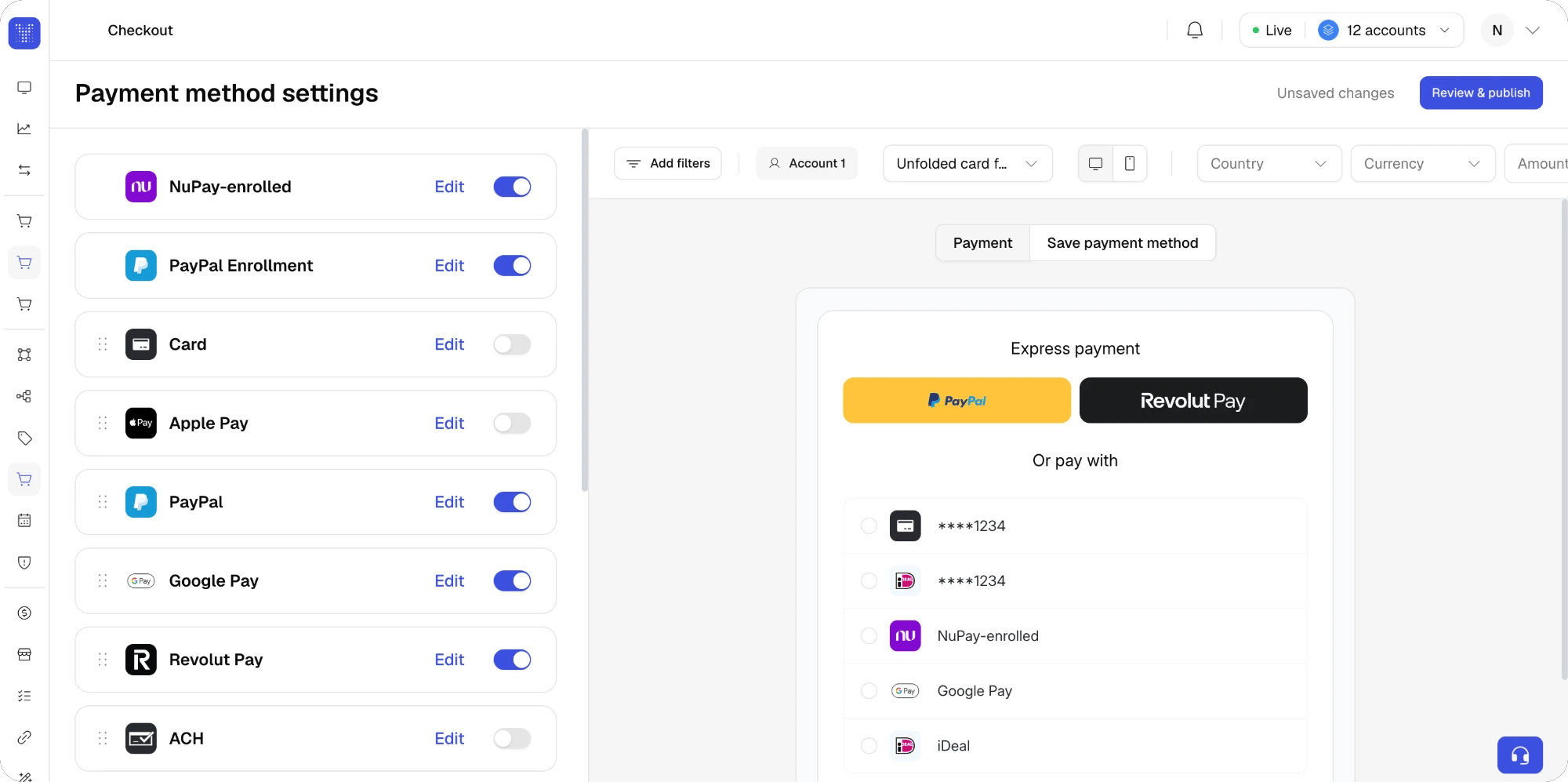 * **Order.** Drag rows to reorder. The order is what your shoppers see, and it also decides which wallets become express buttons when more than three are switched on.
* **One item for new and saved.** **Card** and the direct-debit methods (**ACH**, **Bacs**, **PAD**, **SEPA**) no longer have a separate enrolled row. Each is one item that covers both flows, and the saved flow is switched on or off from the method page, with **Show shoppers their saved cards** or **Show shoppers their saved bank accounts** on the General tab. Other methods that can be saved, such as wallets, keep their own saved item in the list, as before.
* **Saved methods at checkout.** The methods a returning shopper has saved still render above the rest of the list, whatever the order in the Builder. This is unchanged.
* **Enable or disable.** The switch on each row replaces the switches of the two previous lists. A method still needs a published route to appear here.
## One page per method
**Edit** opens the method's page. The **General** tab groups every setting that used to live in separate drawers:
* **Order.** Drag rows to reorder. The order is what your shoppers see, and it also decides which wallets become express buttons when more than three are switched on.
* **One item for new and saved.** **Card** and the direct-debit methods (**ACH**, **Bacs**, **PAD**, **SEPA**) no longer have a separate enrolled row. Each is one item that covers both flows, and the saved flow is switched on or off from the method page, with **Show shoppers their saved cards** or **Show shoppers their saved bank accounts** on the General tab. Other methods that can be saved, such as wallets, keep their own saved item in the list, as before.
* **Saved methods at checkout.** The methods a returning shopper has saved still render above the rest of the list, whatever the order in the Builder. This is unchanged.
* **Enable or disable.** The switch on each row replaces the switches of the two previous lists. A method still needs a published route to appear here.
## One page per method
**Edit** opens the method's page. The **General** tab groups every setting that used to live in separate drawers:
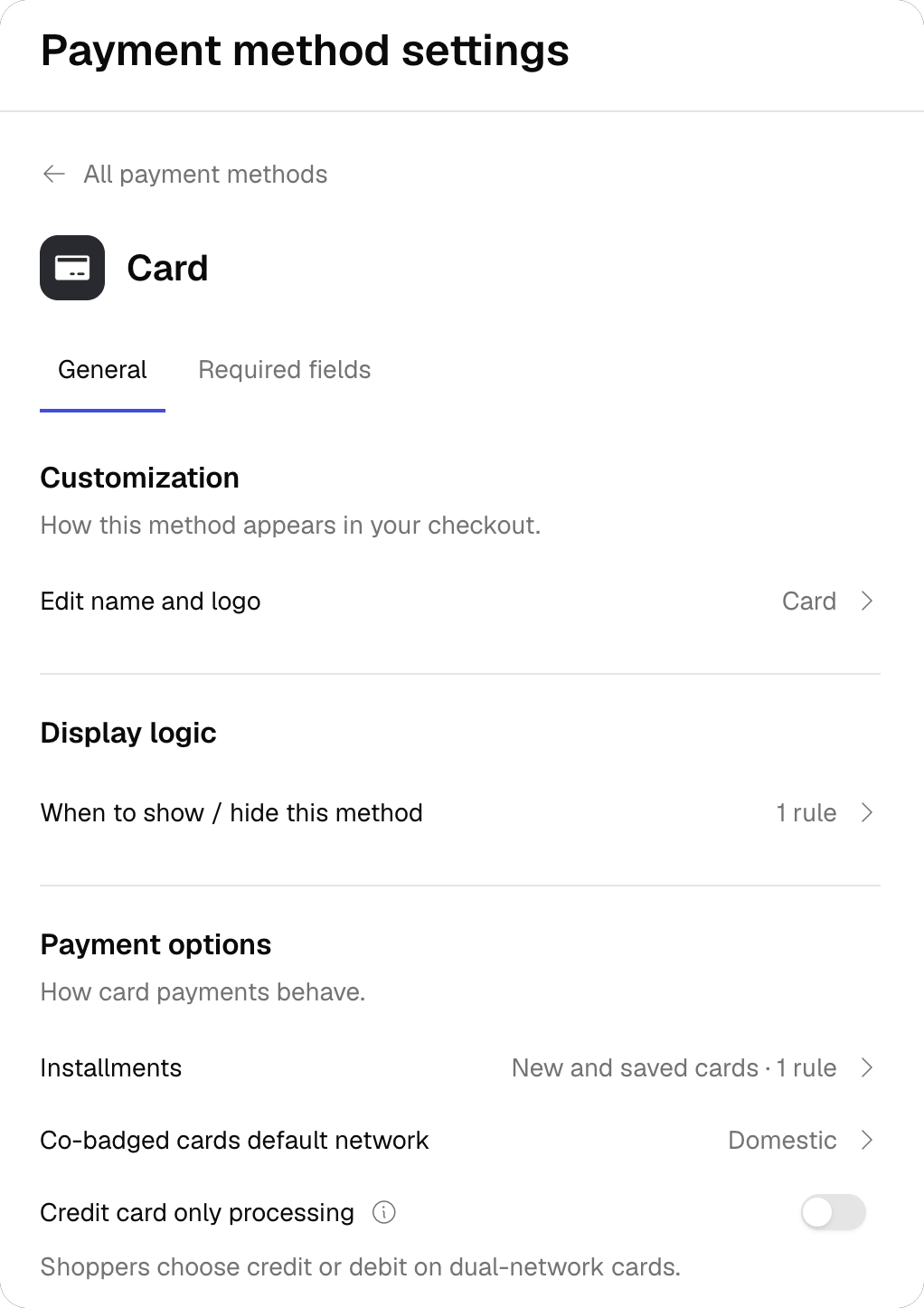 | Section | What it holds | Shown for |
| :- | :- | :- |
| **Customization** | **Edit name and logo**, as before. **Render as express button** for wallets that support it. | Every method; the express switch only for express-capable wallets. |
| **Display logic** | When to show or hide this method. See [Display logic](#display-logic). | Every method. |
| **Payment options** | **Installments** (moved here from Required fields), **Co-badged cards default network** (Domestic or International) and credit-only processing for dual-network cards. | Card. |
| **Consent management** | The **Debit authorization text** switch documented in [Authorization text](/docs/using-yuno/dashboard-overview/checkout-builder#authorization-text). | Direct-debit methods. |
| **Saved cards** / **Saved bank accounts** | **Show shoppers their saved cards** (or bank accounts). Returning shoppers can pay with what they saved before. Whether shoppers are offered to save during a payment is set in your SDK integration, not here. | Card and the direct-debit methods (ACH, Bacs, PAD, SEPA). |
| **Accounts** | **Manage \[method] on other accounts**, the former **Copy to other accounts**. | Organizations with more than one account. |
The **Required fields** tab keeps the same fields as before, with three changes:
* Fields a provider makes mandatory show the provider's logo next to the switch, with a **Required by …** tooltip. They cannot be switched off from the Builder.
* Each field can carry its own display rule. Open the field and click **Add condition** to show or hide it by country, currency, amount or metadata.
* **Document** opens the global **Document types** modal. It applies to every payment method in the checkout, and it is the only global setting in this version.
**Card and saved cards.** The Card page has a second block, **When this method is saved**, for the fields shoppers fill in when paying with a saved card. Tick **Apply these settings when shoppers save this method** to reuse the main configuration, or untick it to configure the saved-card fields separately. Display rules on Card required fields apply to both flows.
## Display logic
Conditions are now written as a sentence: **If** an attribute **is** or **is not** some values, **Then** **Show** or **Hide** this method. The Builder keeps the sentence updated as you edit, for example *Card shows only when Country is Brazil, Mexico. Hidden in all other cases.*
| Section | What it holds | Shown for |
| :- | :- | :- |
| **Customization** | **Edit name and logo**, as before. **Render as express button** for wallets that support it. | Every method; the express switch only for express-capable wallets. |
| **Display logic** | When to show or hide this method. See [Display logic](#display-logic). | Every method. |
| **Payment options** | **Installments** (moved here from Required fields), **Co-badged cards default network** (Domestic or International) and credit-only processing for dual-network cards. | Card. |
| **Consent management** | The **Debit authorization text** switch documented in [Authorization text](/docs/using-yuno/dashboard-overview/checkout-builder#authorization-text). | Direct-debit methods. |
| **Saved cards** / **Saved bank accounts** | **Show shoppers their saved cards** (or bank accounts). Returning shoppers can pay with what they saved before. Whether shoppers are offered to save during a payment is set in your SDK integration, not here. | Card and the direct-debit methods (ACH, Bacs, PAD, SEPA). |
| **Accounts** | **Manage \[method] on other accounts**, the former **Copy to other accounts**. | Organizations with more than one account. |
The **Required fields** tab keeps the same fields as before, with three changes:
* Fields a provider makes mandatory show the provider's logo next to the switch, with a **Required by …** tooltip. They cannot be switched off from the Builder.
* Each field can carry its own display rule. Open the field and click **Add condition** to show or hide it by country, currency, amount or metadata.
* **Document** opens the global **Document types** modal. It applies to every payment method in the checkout, and it is the only global setting in this version.
**Card and saved cards.** The Card page has a second block, **When this method is saved**, for the fields shoppers fill in when paying with a saved card. Tick **Apply these settings when shoppers save this method** to reuse the main configuration, or untick it to configure the saved-card fields separately. Display rules on Card required fields apply to both flows.
## Display logic
Conditions are now written as a sentence: **If** an attribute **is** or **is not** some values, **Then** **Show** or **Hide** this method. The Builder keeps the sentence updated as you edit, for example *Card shows only when Country is Brazil, Mexico. Hidden in all other cases.*
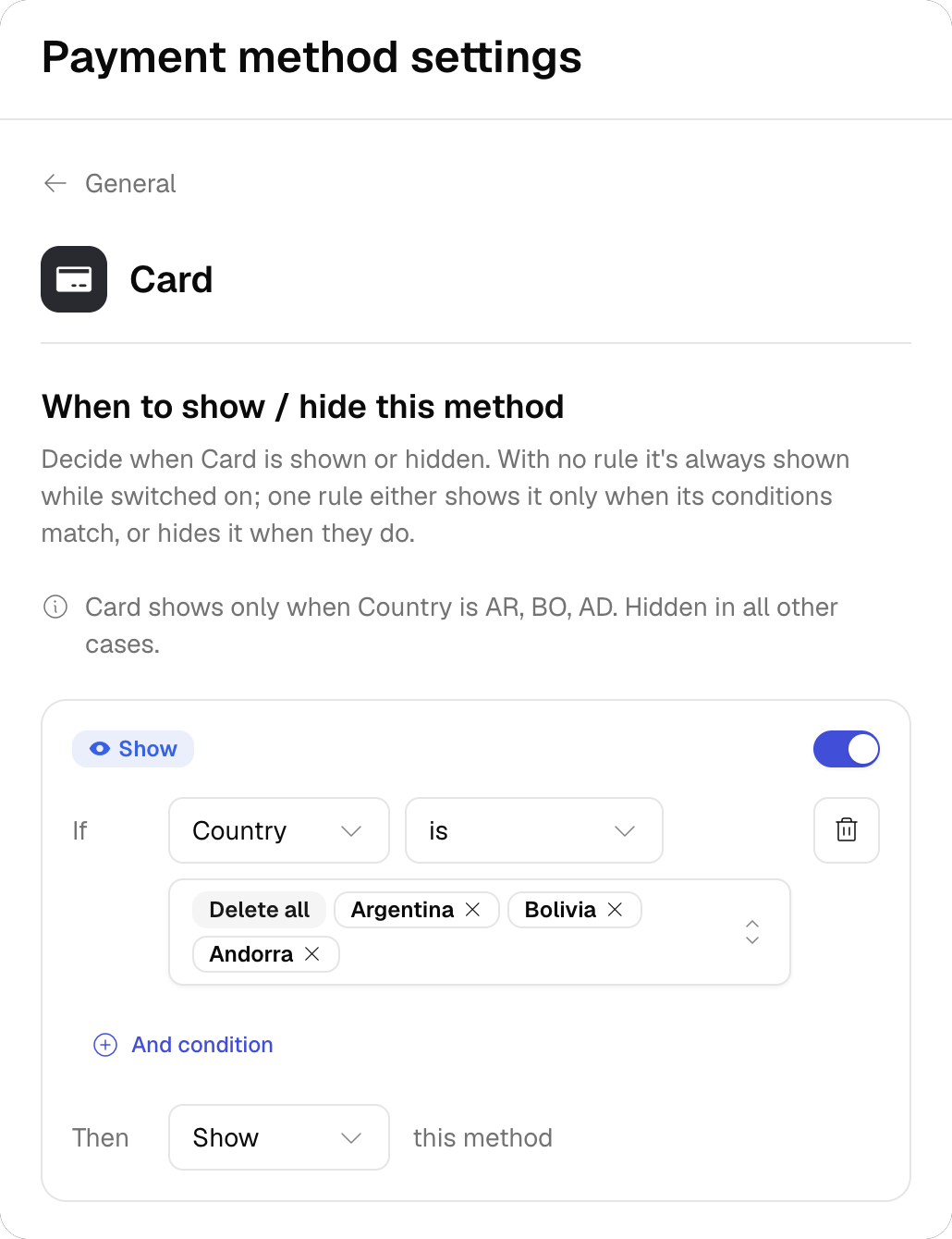 * **Attributes:** Country, Currency, Amount and Metadata. Country and Currency accept several values. Amount accepts greater than, less than, between and equal to. Metadata takes a key and a value, compared with **is** or **is not** only, and a rule can hold several metadata conditions.
* **One rule per method, and one per required field.** Attributes inside a rule are combined with AND.
* **Amount needs one currency.** The Amount attribute is not offered while two or more currencies are selected in the same rule.
* **Outcome.** Each rule is either **Show** or **Hide**. A method with no rule is always shown while it is switched on.
Your existing conditions are carried over. Values stored as *equal* or *not equal* read as **is** and **is not**.
Accounts that have **more than one active condition set on the same payment method** stay on the current version for now, with their configurations untouched.
The same applies to accounts whose conditions compare **metadata with greater than or less than**: the new version only offers **is** and **is not** for metadata, so those rules cannot be edited in it. They stay on the current version until the rules are rewritten.
## Review & publish
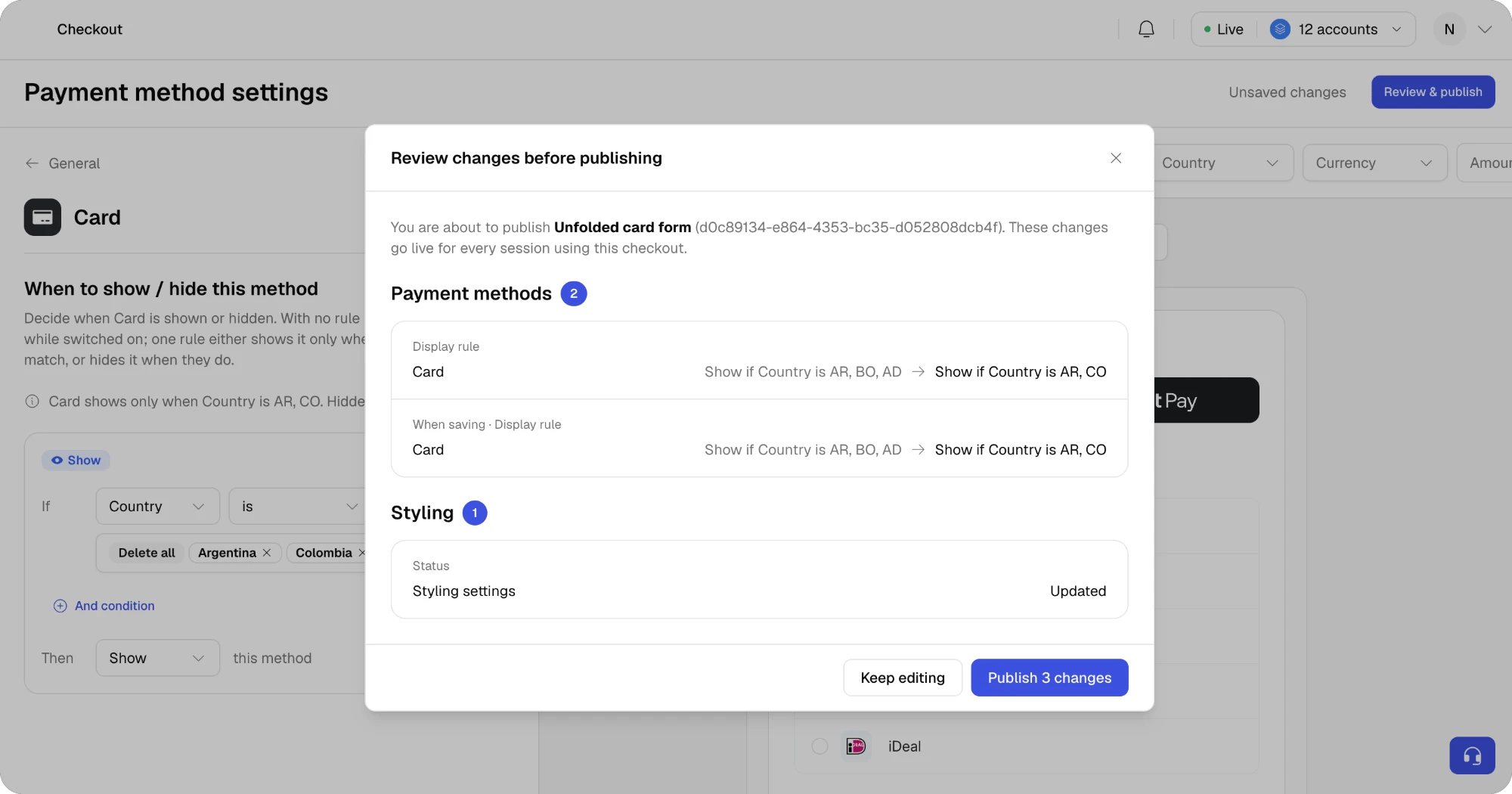
**Publish settings** is replaced by **Review & publish**. Nothing goes live until you confirm from the review.
1. While you edit, the header shows **Unsaved changes**. Changes are kept in the Builder, and the live checkout is untouched.
2. Click **Review & publish**. The dialog lists every pending change grouped by **Payment methods**, **Method settings**, **Required fields** and **Styling**, with the value before and after. Changes that apply to the saved-card flow are marked **When saving**.
3. Click **Publish N changes**. The header switches to **Published** with the publish date.
* **Attributes:** Country, Currency, Amount and Metadata. Country and Currency accept several values. Amount accepts greater than, less than, between and equal to. Metadata takes a key and a value, compared with **is** or **is not** only, and a rule can hold several metadata conditions.
* **One rule per method, and one per required field.** Attributes inside a rule are combined with AND.
* **Amount needs one currency.** The Amount attribute is not offered while two or more currencies are selected in the same rule.
* **Outcome.** Each rule is either **Show** or **Hide**. A method with no rule is always shown while it is switched on.
Your existing conditions are carried over. Values stored as *equal* or *not equal* read as **is** and **is not**.
Accounts that have **more than one active condition set on the same payment method** stay on the current version for now, with their configurations untouched.
The same applies to accounts whose conditions compare **metadata with greater than or less than**: the new version only offers **is** and **is not** for metadata, so those rules cannot be edited in it. They stay on the current version until the rules are rewritten.
## Review & publish
**Publish settings** is replaced by **Review & publish**. Nothing goes live until you confirm from the review.
1. While you edit, the header shows **Unsaved changes**. Changes are kept in the Builder, and the live checkout is untouched.
2. Click **Review & publish**. The dialog lists every pending change grouped by **Payment methods**, **Method settings**, **Required fields** and **Styling**, with the value before and after. Changes that apply to the saved-card flow are marked **When saving**.
3. Click **Publish N changes**. The header switches to **Published** with the publish date.
 Leaving the Builder with unsaved changes asks you to confirm, because unpublished changes are discarded.
## Preview: payment or save payment method
The live preview gains a switch at the top with two options:
* **Payment** shows the checkout a shopper sees when paying: express buttons, saved methods such as a card ending in 1234, and the rest of the list, in the order you set.
* **Save payment method** shows the enrollment checkout, titled **Save a payment method**: only the methods a shopper can save, with a **Save payment method** button instead of **Pay**.
Leaving the Builder with unsaved changes asks you to confirm, because unpublished changes are discarded.
## Preview: payment or save payment method
The live preview gains a switch at the top with two options:
* **Payment** shows the checkout a shopper sees when paying: express buttons, saved methods such as a card ending in 1234, and the rest of the list, in the order you set.
* **Save payment method** shows the enrollment checkout, titled **Save a payment method**: only the methods a shopper can save, with a **Save payment method** button instead of **Pay**.
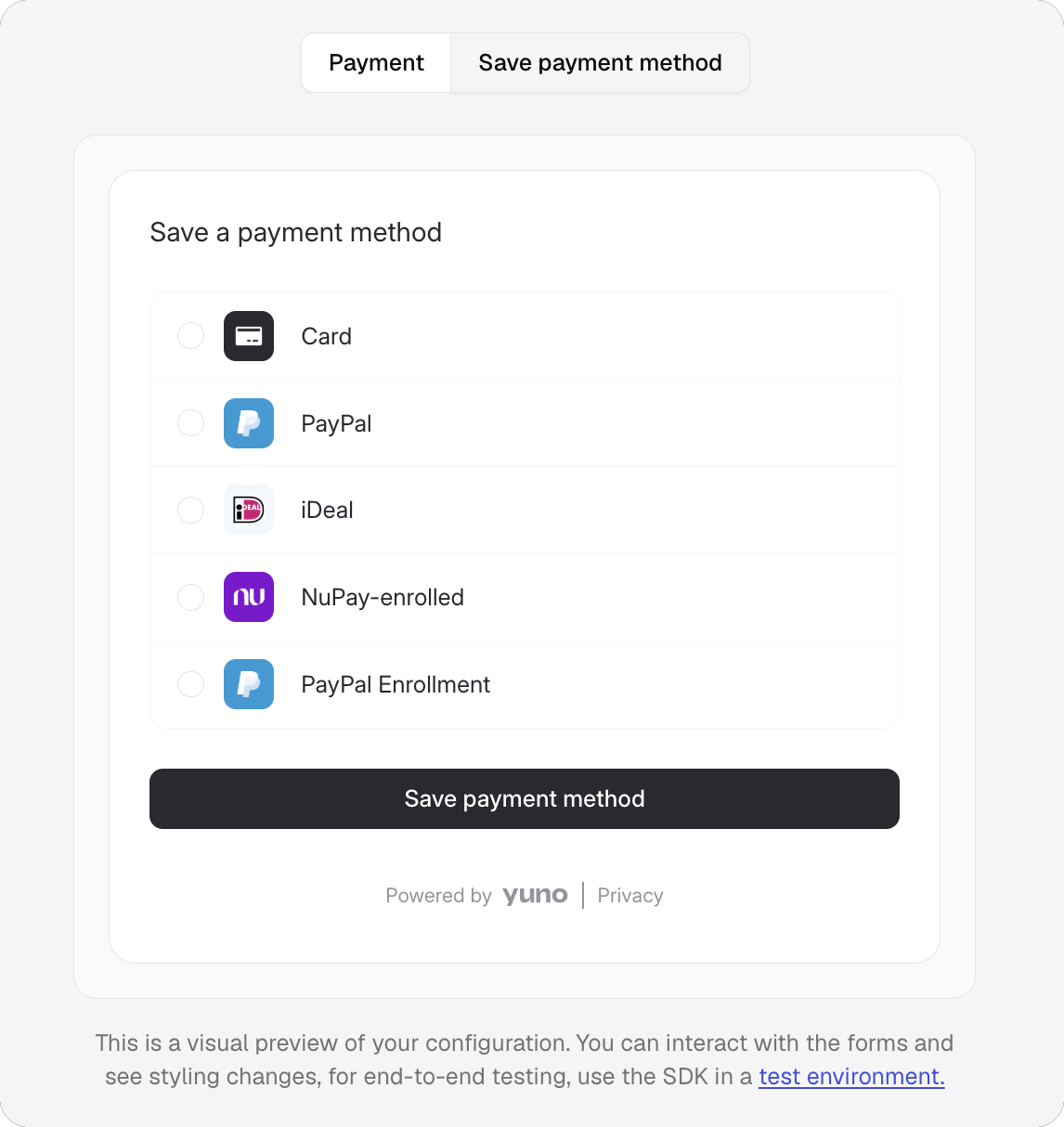 Use it to check both flows while you edit a method, in particular the **When this method is saved** fields on Card and the **Show shoppers their saved cards** and **Show shoppers their saved bank accounts** switches. The Country, Currency and Amount filters, and the interactive form, work in both.
## Shipping address on its own
The **Required fields** tab lets you request **Shipping address** without **Billing address**. Previously, shipping could only be collected together with billing. The Web SDK renders the shipping form alone in that case.
## A short tour the first time you open it
The first time you open the new version, the Builder walks you through the list, a method page, required fields, the preview and **Review & publish**. The tour runs on demo data: nothing is published and your live checkout stays as it is. You can skip it from the first step.
## What did not change
* **Styling settings**, including payment method list style, dark mode and express button stacking.
* **The live preview**, its interactive form and the Country, Currency and Amount filters, apart from the new **Payment** / **Save payment method** switch. Express buttons now follow the switches you set per wallet.
* **Custom checkouts** and the checkout selector above the preview.
* **Authorization text** for direct-debit methods, now reached from the General tab.
* **Your SDK integration.** The new section writes the same configuration the SDK already reads. No code change is needed on your side.
This documentation is built and hosted on [Mintlify](https://mintlify.com), a developer documentation platform.
Use it to check both flows while you edit a method, in particular the **When this method is saved** fields on Card and the **Show shoppers their saved cards** and **Show shoppers their saved bank accounts** switches. The Country, Currency and Amount filters, and the interactive form, work in both.
## Shipping address on its own
The **Required fields** tab lets you request **Shipping address** without **Billing address**. Previously, shipping could only be collected together with billing. The Web SDK renders the shipping form alone in that case.
## A short tour the first time you open it
The first time you open the new version, the Builder walks you through the list, a method page, required fields, the preview and **Review & publish**. The tour runs on demo data: nothing is published and your live checkout stays as it is. You can skip it from the first step.
## What did not change
* **Styling settings**, including payment method list style, dark mode and express button stacking.
* **The live preview**, its interactive form and the Country, Currency and Amount filters, apart from the new **Payment** / **Save payment method** switch. Express buttons now follow the switches you set per wallet.
* **Custom checkouts** and the checkout selector above the preview.
* **Authorization text** for direct-debit methods, now reached from the General tab.
* **Your SDK integration.** The new section writes the same configuration the SDK already reads. No code change is needed on your side.
This documentation is built and hosted on [Mintlify](https://mintlify.com), a developer documentation platform.