> ## Documentation Index
> Fetch the complete documentation index at: https://docs.y.uno/llms.txt
> Use this file to discover all available pages before exploring further.
# Visa Tap to Add (Android)
> Enroll contactless Visa cards using NFC on Android with the Yuno Tap SDK or full checkout enrollment
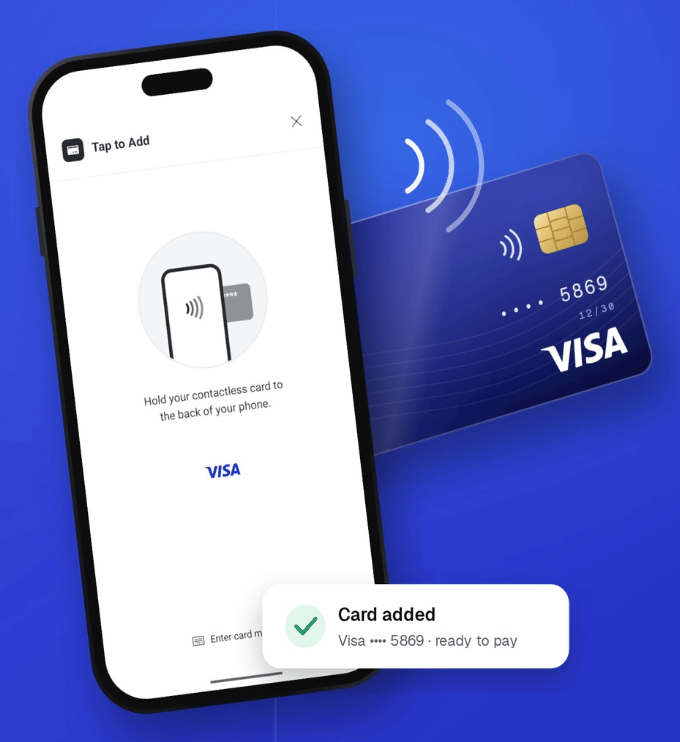
*Visa Tap to Add* enables customers to enroll their contactless cards by tapping them against the NFC antenna on their Android device.
The tap interaction uses Visa's Thin Client Tap SDK under the hood: card details are read directly over NFC, encrypted on device, and submitted securely to Yuno. The merchant application never accesses or handles clear Primary Account Numbers (PANs).
```mermaid theme={"theme":{"light":"github-dark","dark":"github-dark-dimmed"}}
sequenceDiagram
autonumber
actor Customer
participant MerchantApp as Merchant App / Yuno SDK
participant TapSDK as Yuno Tap SDK (Visa Thin Client)
participant Yuno as Yuno Backend
participant MerchantServer as Merchant Backend
Customer->>MerchantApp: Selects "Tap to Add"
MerchantApp->>MerchantServer: Request customer session
MerchantServer->>Yuno: Create Customer Session (POST /v1/customers/sessions)
Yuno-->>MerchantServer: customer_session + session_token
MerchantServer-->>MerchantApp: customer_session + session_token
MerchantApp->>TapSDK: Start Tap Session (YunoTapTransaction.start)
TapSDK->>Customer: Display animated tap UI & prompt NFC tap
Customer->>TapSDK: Taps contactless card on NFC antenna
TapSDK->>TapSDK: Encrypt card payload on device
TapSDK->>Yuno: Submit encrypted card payload
Yuno-->>TapSDK: Enrollment response
TapSDK-->>MerchantApp: TapOutcome.Added(paymentMethodCode, paymentAccountReference)
MerchantApp->>Customer: Display enrollment success
```
***
## Prerequisites & Requirements
Your Android project must meet the following hardware, system, and toolchain requirements:
* **Hardware & OS**: Android 11.0 (API level 30) or higher with an active NFC antenna and Host Card Emulation (HCE) support.
* **Services**: Google Play Services must be available on the device.
* **Architecture**: 64-bit (`arm64-v8a`) or 32-bit (`armeabi-v7a`) ARM architecture. (x86 / x86\_64 emulators are not supported for contactless NFC operations).
* **Toolchain Requirements**:
* **Compile SDK**: `compileSdk 35`
* **Java**: Java 17
* **Kotlin**: 2.1.0 or higher
* **Android Gradle Plugin (AGP)**: 8.6.0 or higher
* **Gradle**: 8.7 or higher
* **Hilt**: 2.56 or higher (if using dependency injection)
* **Room**: 2.7.0-alpha13 or higher (if using Room in your project)
**Supported Brands**: Currently, *Tap to Add* is powered by Visa's Tap SDK. Support for Mastercard and other card schemes will be introduced in subsequent releases.
***
## Integration Paths
You can integrate Tap to Add in one of two ways:
1. **Path A: Automatic Enrollment via Yuno Android SDK 3.x (Recommended)**: If you already use Yuno's Full Checkout SDK for Android, adding the `yuno-tap` dependency automatically enables the Tap to Add entrypoint on the enrollment form with zero UI code.
2. **Path B: Standalone Yuno Tap SDK**: If you build custom enrollment screens or headless UI, integrate `com.yuno.payments:yuno-tap` directly with either the pre-built `YunoTapToAddButton` or the headless `YunoTapController`.
***
## Path A: Automatic Full Checkout Enrollment
When integrating with the Yuno Android Universal SDK (`3.0.0-alpha` or later), the SDK automatically inspects whether `yuno-tap` is present on the runtime classpath. If found and the device supports NFC, the SDK displays the **Tap to Add** option directly within the card enrollment form.
**Enrollment Only**: Tap to Add is exclusively supported for card enrollment and saving payment methods to a customer account. It is **never** presented during checkout, one-off payment flows, or direct purchase screens.
### 1. Add Dependencies
Add the Yuno Android SDK and Yuno Tap artifact to your module's `build.gradle.kts`:
```kotlin theme={"theme":{"light":"github-dark","dark":"github-dark-dimmed"}}
dependencies {
// Yuno Android SDK
implementation("com.yuno.payments:android-sdk:3.0.0-alpha.1")
// Yuno Tap SDK for Tap to Add
implementation("com.yuno.payments:yuno-tap:0.3.0")
}
```
### 2. Configure Manifest for Devices below API 30
The Yuno Tap SDK enforces `minSdk = 30`. If your main application targets a lower `minSdkVersion` (for example, `minSdk = 24`), allow the manifest merger to proceed by adding a `tools:overrideLibrary` declaration in your `AndroidManifest.xml`:
```xml theme={"theme":{"light":"github-dark","dark":"github-dark-dimmed"}}
```
On devices running Android 10 (API 29) or lower, the Yuno SDK gracefully detects the platform version and hides the Tap to Add option, falling back to manual card entry.
### Visual Flow
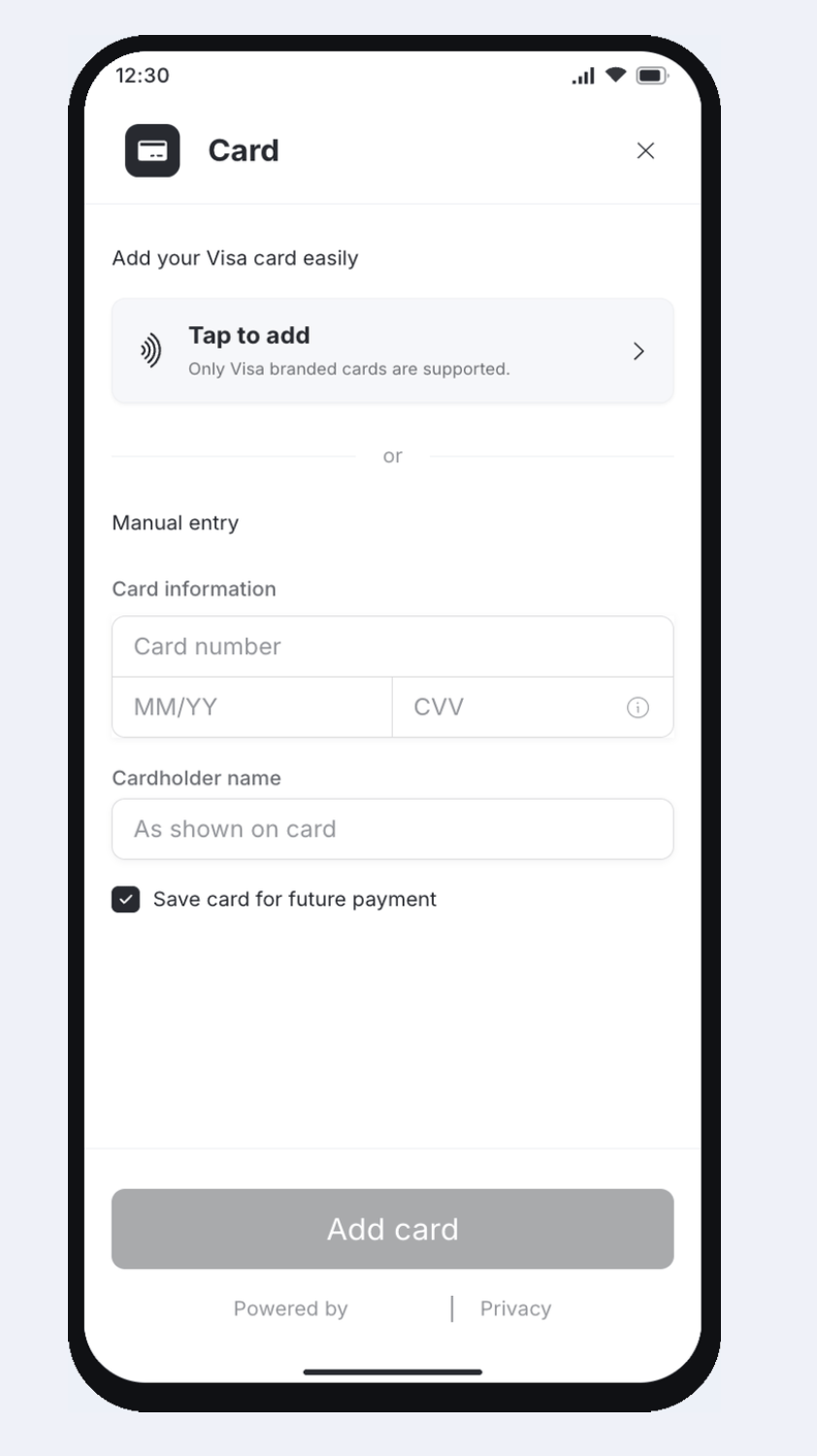
When `yuno-tap` is included in the project, the card enrollment form displays the **Tap to add** entrypoint above manual card entry.
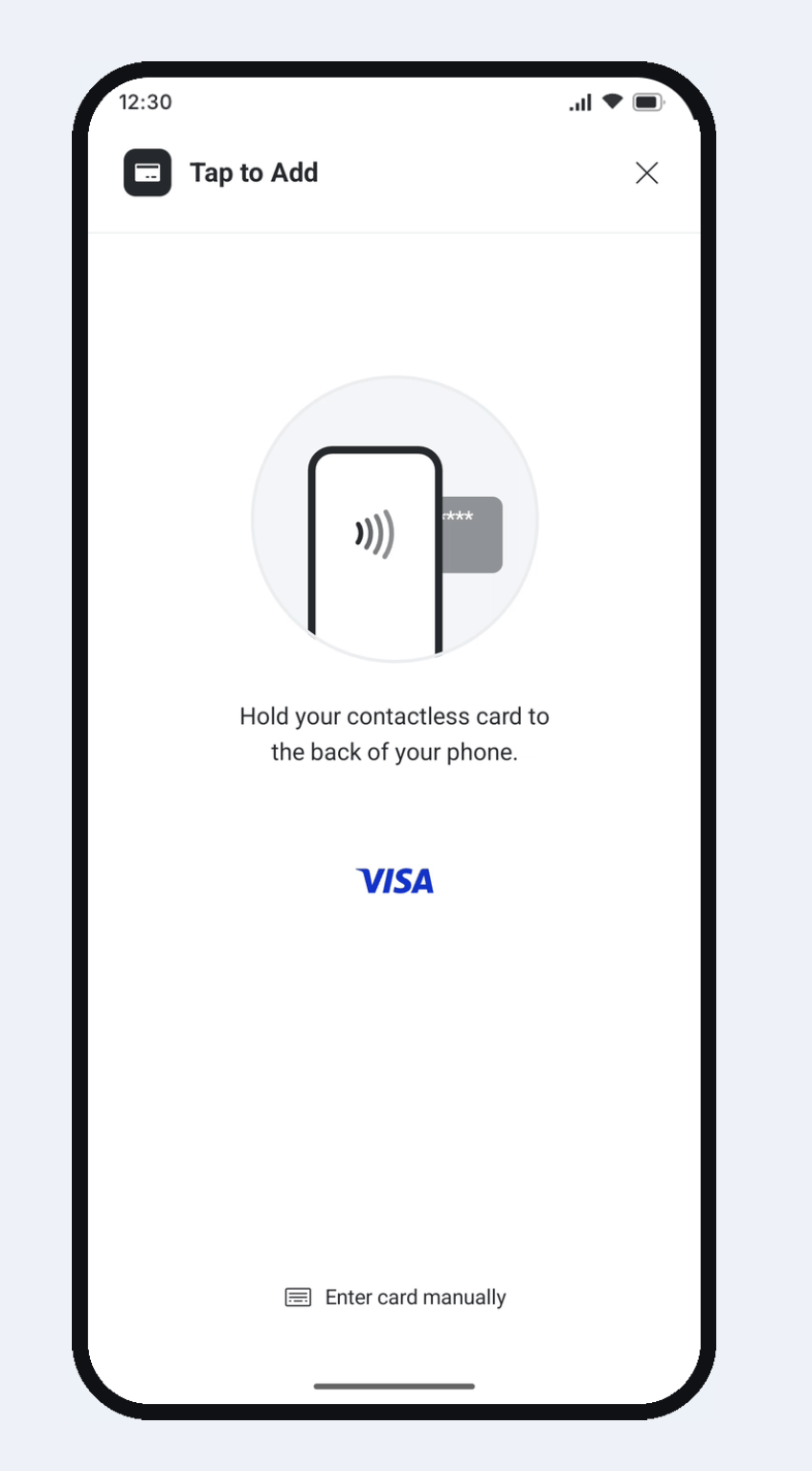
Selecting **Tap to add** launches the animated NFC tap interface prompting the customer to hold their contactless card to the back of the device.
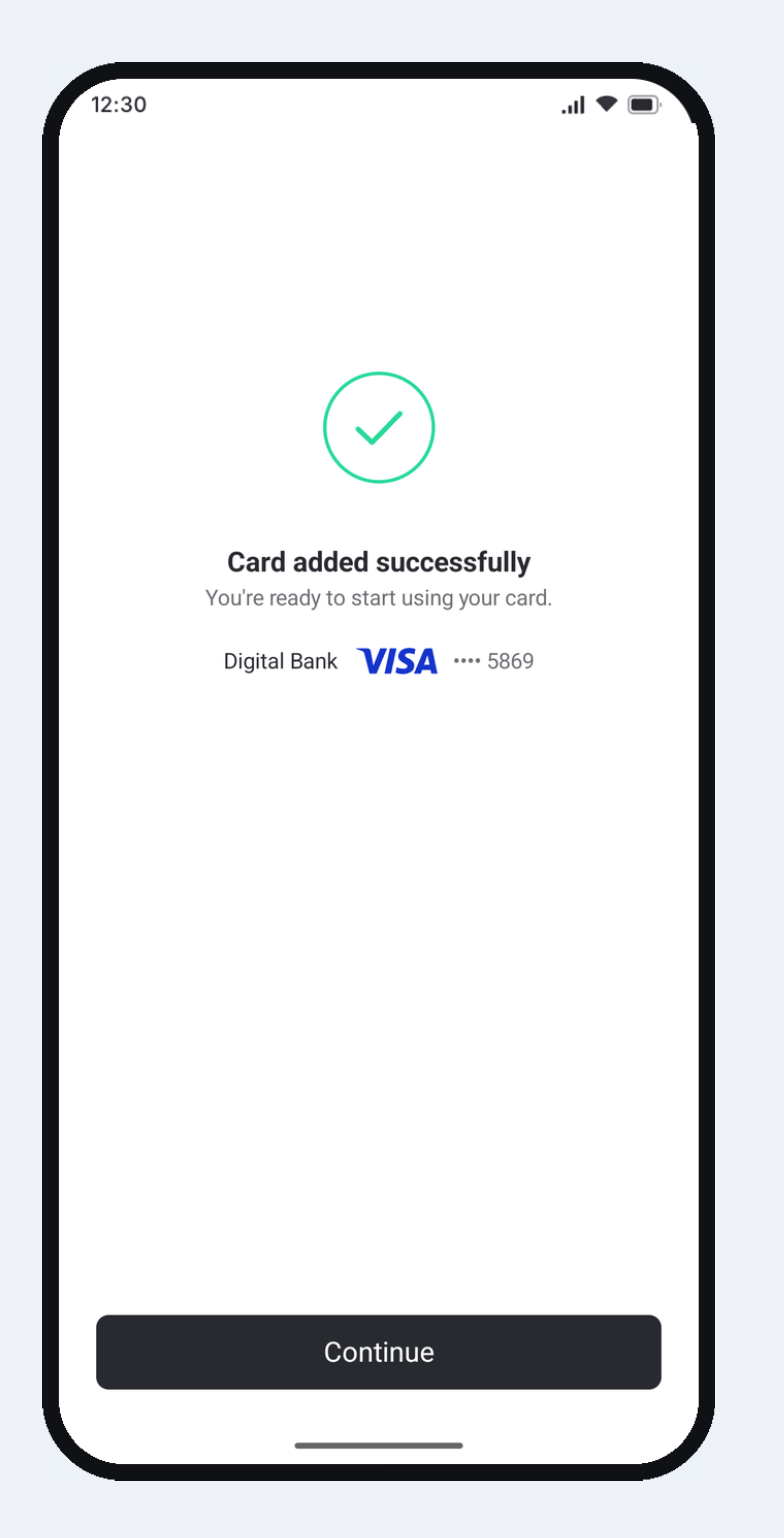
Once the card data is read and encrypted on device, Yuno securely completes the enrollment and returns a success confirmation.
***
## Path B: Standalone Yuno Tap SDK
If you manage your own card capture UI or want custom placement of the Tap to Add action, use the standalone `yuno-tap` library.
### 1. Add Dependency
Add `yuno-tap` to your `build.gradle.kts`:
```kotlin theme={"theme":{"light":"github-dark","dark":"github-dark-dimmed"}}
dependencies {
implementation("com.yuno.payments:yuno-tap:0.3.0")
}
```
### 2. Obtain Customer Session
Before starting the tap flow, your backend must create a customer session using Yuno's server-to-server API:
```bash theme={"theme":{"light":"github-dark","dark":"github-dark-dimmed"}}
curl -X POST https://api-sandbox.y.uno/v1/customers/sessions \
-H "public-api-key: YOUR_PUBLIC_API_KEY" \
-H "private-secret-key: YOUR_PRIVATE_SECRET_KEY" \
-H "Content-Type: application/json" \
-d '{
"country": "US",
"customer_id": "cust_12345"
}'
```
The response returns a `customer_session` ID and a `session_token`. Pass both values to your Android application.
### 3. Initialize YunoTapConfig
Initialize the SDK in your `Application` class or main activity:
```kotlin theme={"theme":{"light":"github-dark","dark":"github-dark-dimmed"}}
import android.app.Application
import com.yuno.payments.tap.YunoTapConfig
import com.yuno.payments.tap.model.YunoEnvironment
class MainApplication : Application() {
override fun onCreate() {
super.onCreate()
YunoTapConfig.init(
context = this,
apiKey = "YOUR_PUBLIC_API_KEY",
environment = YunoEnvironment.SANDBOX // Use YunoEnvironment.PRODUCTION in release builds
)
}
}
```
### 4. Option 1: Drop-in YunoTapToAddButton
The simplest standalone UI integration uses `YunoTapToAddButton`. Place it directly in your layout or Composable tree:
```xml theme={"theme":{"light":"github-dark","dark":"github-dark-dimmed"}}
```
Attach your transaction parameters and completion callback in your Activity or Fragment:
```kotlin theme={"theme":{"light":"github-dark","dark":"github-dark-dimmed"}}
import androidx.appcompat.app.AppCompatActivity
import android.os.Bundle
import android.widget.Toast
import com.yuno.payments.tap.ui.YunoTapToAddButton
import com.yuno.payments.tap.model.TapTransactionData
import com.yuno.payments.tap.model.TapFlow
import com.yuno.payments.tap.model.TapOutcome
class EnrollmentActivity : AppCompatActivity() {
override fun onCreate(savedInstanceState: Bundle?) {
super.onCreate(savedInstanceState)
setContentView(R.layout.activity_enrollment)
val btnTapToAdd = findViewById(R.id.btnTapToAdd)
btnTapToAdd.setup(
activity = this,
data = TapTransactionData(
customerSession = "YOUR_CUSTOMER_SESSION",
sessionToken = "YOUR_SESSION_TOKEN",
flow = TapFlow.Add
)
) { outcome ->
handleTapOutcome(outcome)
}
}
private fun handleTapOutcome(outcome: TapOutcome) {
when (outcome) {
is TapOutcome.Added -> {
// Card successfully enrolled
val paymentMethodCode = outcome.paymentMethodCode
val par = outcome.paymentAccountReference // Note: PAR may be null depending on issuer support
Toast.makeText(this, "Card enrolled: $paymentMethodCode", Toast.LENGTH_SHORT).show()
}
is TapOutcome.Canceled -> {
// User dismissed or canceled the tap sheet
}
is TapOutcome.Error -> {
// Tap error occurred
val errorCode = outcome.code
val message = outcome.message
Toast.makeText(this, "Error: $message ($errorCode)", Toast.LENGTH_LONG).show()
}
}
}
}
```
### 4. Option 2: Programmatic YunoTapController
For custom UI or button designs, trigger the tap flow programmatically using `YunoTapController`:
```kotlin theme={"theme":{"light":"github-dark","dark":"github-dark-dimmed"}}
import com.yuno.payments.tap.YunoTapController
import com.yuno.payments.tap.model.TapTransactionData
import com.yuno.payments.tap.model.TapFlow
import com.yuno.payments.tap.model.TapOutcome
class CustomEnrollmentActivity : AppCompatActivity() {
private lateinit var tapController: YunoTapController
override fun onCreate(savedInstanceState: Bundle?) {
super.onCreate(savedInstanceState)
setContentView(R.layout.activity_custom_enrollment)
tapController = YunoTapController(this)
findViewById