> ## Documentation Index
> Fetch the complete documentation index at: https://docs.y.uno/llms.txt
> Use this file to discover all available pages before exploring further.

# Split Payments Marketplace

This feature allows **merchants to split payments among multiple recipients**, which is particularly useful for marketplace models where transactions need to be divided among different sellers or stakeholders. Merchants can specify how the payment is split, including the amounts, recipients, and any applicable fees.

The split payment functionality depends on the support of the selected payment provider. Yuno acts solely as the orchestrator of the payment, not the processor. Ensure your provider supports split payments before using this functionality.

## Key features

The key features of the split payments marketplace include:

* **Split payments**: Define how the total payment amount is distributed among different recipients.
* **Flexible configuration**: Supports both absolute-based and auto-calculation splits.
* **Auto Split Configuration**: Define rules at the recipient level (percentage, fixed, or mixed) to automate split calculations without specifying amounts in each payment request.
* **Integration with providers**: Splits can be executed by payment providers that support this functionality.
* **Detailed handling of fees**: The system allows for fine-tuning of how transaction fees and chargebacks are managed.
* **Onboarding transfer**: Allows the transfer of onboardings between different recipients.

To use this feature, you must **first onboard your recipients** for the payment split, and **then create the payment** specifying the necessary information.

## 1. Onboarding

Yuno's onboarding model is crafted to assist marketplaces in seamlessly connecting and managing their **submerchants** across **multiple payment providers**. Central to this system is the **recipient object**, which represents each individual submerchant within the marketplace ecosystem.

* Each **marketplace owner** is represented in **Yuno as an organization**.
* Within an organization, one or more accounts can be created, each configured with its own set of **connections** to payment providers (e.g., Stripe, Adyen, dLocal).
* For every account, the marketplace can register one or more **recipients** — these are the submerchants to be onboarded.
* Each **recipient** is then linked individually to one or more **connections**, depending on which payment processors they will use.

This **architecture** enables:

* A single, unified onboarding process.
* Independent status tracking per provider.
* Easy scaling of submerchant operations across providers.

This design ensures flexibility, transparency, and full traceability throughout the onboarding lifecycle. The [recipients endpoint](/reference/create-recipient-1) is used to create and manage each submerchant profile and to trigger the corresponding provider-specific onboarding workflows.

### Onboarding flows

Yuno offers two onboarding flows for submerchants, providing flexibility based on the submerchant's current status with payment providers.

1. **Pre-onboarded accounts**: If a submerchant has already completed the onboarding process with a specific provider (e.g., through an external dashboard or platform), the marketplace can supply the corresponding `recipient_id` during creation. In this scenario, no further onboarding is required, and the status will be immediately set to `SUCCEEDED` (`onboardings.type`=`PREVIOUSLY_ONBOARDED`).

2. **Dynamic onboarding**: If no credentials are provided, Yuno will initiate the onboarding process for the chosen provider (`onboardings.type`=`ONE_STEP_ONBOARDING` or `TWO_STEP_ONBOARDING`). This process may include:
   1. Form submission or redirection to a hosted onboarding page.
   2. Uploading legal or financial documentation.
   3. Completing KYC/KYB validation steps.

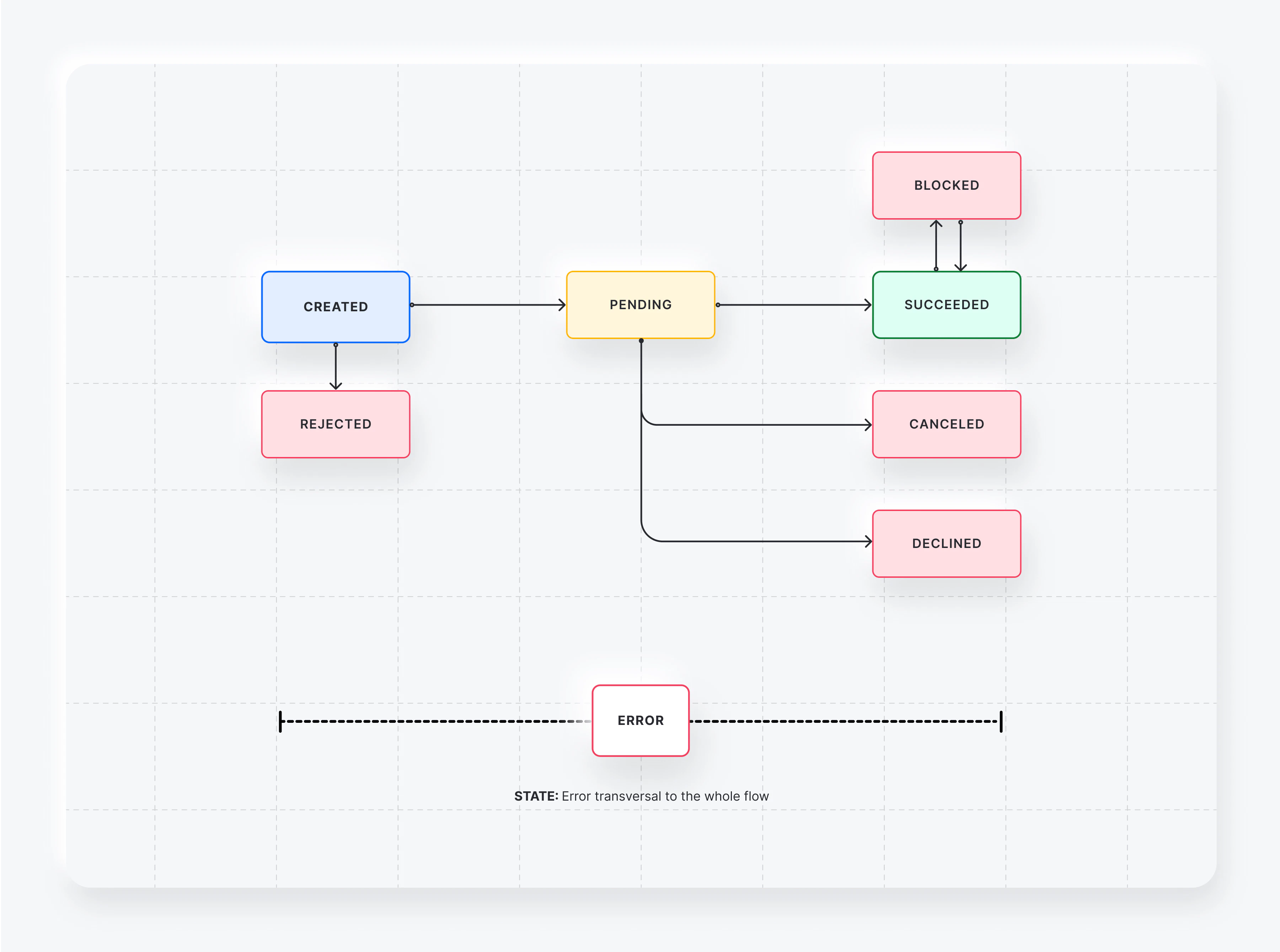
Throughout the onboarding lifecycle, a recipient may experience various statuses that reflect the current state of the process:

| Status      | Description                                                                  |
| ----------- | ---------------------------------------------------------------------------- |
| `CREATED`   | Initial state after creation; onboarding process not yet started.            |
| `PENDING`   | Awaiting provider review after data submission.                              |
| `SUCCEEDED` | The recipient is fully onboarded and active.                                 |
| `DECLINED`  | The onboarding was rejected by the provider and cannot be retried.           |
| `BLOCKED`   | The provider has explicitly blocked the onboarding due to compliance issues. |
| `CANCELED`  | The onboarding process was voluntarily canceled before completion.           |
| `REJECTED`  | The onboarding failed due to incorrect data or failed validations.           |
| `ERROR`     | A technical error occurred during the onboarding flow.                       |

These statuses assist the marketplace in understanding the onboarding lifecycle and implementing appropriate retry, alert, or fallback mechanisms when necessary.

This flexible approach allows marketplaces to tailor the onboarding process to their operational needs, maintaining control and visibility.

### Workflow

The onboarding workflow follows a structured process that ensures submerchants are properly integrated into the marketplace ecosystem. The diagram below illustrates the complete flow from initial setup to payment processing.

<Frame>
  <img src="https://mintcdn.com/yuno-3979e326/m5ay49t24ir2tLEj/images/reference/split-payments-marketplace/image1.png?fit=max&auto=format&n=m5ay49t24ir2tLEj&q=85&s=75bb788474ca615357709b6a76ac9fc9" width="3601" height="2679" data-path="images/reference/split-payments-marketplace/image1.png" />
</Frame>

**Workflow Steps:**

1. **Organization & Account Setup**: The marketplace owner creates an organization in Yuno and configures accounts with payment provider connections.

2. **Recipient Creation**: For each submerchant, the marketplace creates a recipient using the [Create Recipients API](/reference/create-recipient-1) endpoint, specifying either:

   * `provider_recipient_id` for pre-onboarded submerchants
   * Provider connection details for new onboarding

3. **Onboarding Execution**:

   * **Pre-onboarded**: Status immediately becomes `SUCCEEDED`
   * **New onboarding**: Yuno initiates provider-specific flow with status progression from `CREATED` → `PENDING` → `SUCCEEDED`

4. **Payment Creation**: Once recipients are successfully onboarded (`SUCCEEDED` status), the marketplace can create payments with the `split_marketplace` object.

5. **Split Processing**: The payment provider executes the split according to the defined distribution, transferring funds to each recipient's designated share.

## 2. Auto Split Configuration

Yuno allows you to define **automatic split rules** at the recipient level. When a payment is created without an explicit `amount` for a recipient in the `split_marketplace` array, Yuno uses these rules to calculate the split automatically.

### Calculation types

The `split_configuration` object supports three calculation methods:

| Type         | Description                                     | Formula                                               |
| :----------- | :---------------------------------------------- | :---------------------------------------------------- |
| `PERCENTAGE` | A percentage of the total payment amount.       | `Split = Total * (Percentage / 100)`                  |
| `FIXED`      | A constant fixed amount in a specific currency. | `Split = fixed_amount`                                |
| `MIXED`      | Combines a percentage and a fixed amount.       | `Split = (Total * (Percentage / 100)) + fixed_amount` |

### Rounding mode

To ensure precision across different currencies, Yuno supports three rounding strategies for automatic calculations:

| Mode         | Description                                            | Strategy    |
| :----------- | :----------------------------------------------------- | :---------- |
| `STANDARD`   | Rounds to the nearest even number (Bankers' Rounding). | `HALF_EVEN` |
| `ROUND_UP`   | Always rounds away from zero.                          | `CEILING`   |
| `ROUND_DOWN` | Always rounds towards zero.                            | `FLOOR`     |

### Implementation

You can define the `split_configuration` when [creating](/reference/create-recipient-1) or [updating](/reference/update-recipient-1) a recipient.

| Field              | Type            | Description                                                             | Required   |
| :----------------- | :-------------- | :---------------------------------------------------------------------- | :--------- |
| `calculation_type` | `string` (enum) | The method used to calculate the split: `PERCENTAGE`, `FIXED`, `MIXED`. | **Yes**    |
| `currency`         | `string`        | ISO 4217 currency code. Must match the payment currency.                | **Yes**    |
| `percentage`       | `number`        | Percentage of the total payment.                                        | Optional\* |
| `fixed_amount`     | `number`        | Flat amount to be split.                                                | Optional\* |
| `rounding_mode`    | `string` (enum) | Rounding strategy: `STANDARD`, `ROUND_UP`, `ROUND_DOWN`.                | Optional\* |

<Note>
  \*Requirement depends on `calculation_type`:

  * **PERCENTAGE**: `percentage` and `rounding_mode` are required.
  * **FIXED**: `fixed_amount` is required.
  * **MIXED**: `percentage`, `fixed_amount`, and `rounding_mode` are required.
</Note>

```json Example Recipient with Auto Split theme={"theme":{"light":"github-dark","dark":"github-dark"}}
{
  "merchant_recipient_id": "seller-123",
  "split_configuration": {
    "calculation_type": "PERCENTAGE",
    "percentage": 10.5,
    "rounding_mode": "STANDARD",
    "currency": "USD"
  }
}
```

## 3. Payment split integration

In this section, we explore how the `split_marketplace` object is used to divide a [payment](/reference/payments/create-payment) among multiple recipients. This object is an array where each entry specifies a recipient and their corresponding share of the payment.

<Note>
  In this step, reference recipients created in Step 1 (Onboarding).

  For `type` = `PURCHASE` or `MARKETPLACE`, include the `recipient_id` of that recipient.

  For `PAYMENTFEE`, `VAT` and `COMMISSION`, `recipient_id` is optional.
</Note>

<table>
  <thead>
    <tr>
      <th>
        Field
      </th>

      <th>
        Type
      </th>

      <th>
        Description
      </th>

      <th>
        Mandatory
      </th>

      <th>
        Example Value
      </th>
    </tr>
  </thead>

  <tbody>
    <tr>
      <td>
        `recipient_id`
      </td>

      <td>
        `string`
      </td>

      <td>
        The unique identifier for the recipient within the

        Use the ID of a recipient created in Step 1 (Onboarding) when `type` is `PURCHASE` or `MARKETPLACE`.
      </td>

      <td>
        Conditional
      </td>

      <td>
        `rec_test123`
      </td>
    </tr>

    <tr>
      <td>
        `provider_recipient_id`
      </td>

      <td>
        `string`
      </td>

      <td>
        The recipient's ID as provided by the payment provider, if applicable.
      </td>

      <td>
        Conditional
      </td>

      <td>
        `prov_rec_abc`
      </td>
    </tr>

    <tr>
      <td>
        **Note:**
      </td>

      <td />

      <td>
        You must provide either `recipient_id` or `provider_recipient_id`.

        For marketplace owners (`type`=`COMMISSION`), `provider_recipient_id` is optional if not required by the provider.
      </td>

      <td />

      <td />
    </tr>

    <tr>
      <td>
        `type`\*
      </td>

      <td>
        `enum`
      </td>

      <td>
        The transaction detail item type. Options include `PURCHASE`, `PAYMENTFEE`, `VAT`, `COMMISSION`, `MARKETPLACE`.

        `recipient_id` is mandatory for `PURCHASE` and `MARKETPLACE`.
      </td>

      <td>
        Conditional
      </td>

      <td>
        `PURCHASE`
      </td>
    </tr>

    <tr>
      <td>
        **Note:**
      </td>

      <td />

      <td>
        **Propagation considerations**

        * Items are sent to the provider only if it supports transmitting details

        * These types do not affect fund disbursement, they are merely informational when the provider allows it

        <br />
      </td>

      <td />

      <td />
    </tr>

    <tr>
      <td>
        `merchant_reference`
      </td>

      <td>
        `string`
      </td>

      <td>
        An identifier for the payment transaction. This is optional. If not specified, the main payment's merchant reference will be used for all split transactions. (MAX 255; MIN 3 characters).
      </td>

      <td>
        No
      </td>

      <td>
        `AAB01-432245`
      </td>
    </tr>

    <tr>
      <td>
        `amount`
      </td>

      <td>
        `struct`
      </td>

      <td>
        Specifies the amount for the split. **Optional** if the recipient has a `split_configuration` defined.
      </td>

      <td>
        Conditional
      </td>

      <td />
    </tr>

    <tr>
      <td>
            `value`
      </td>

      <td>
        `number`
      </td>

      <td>
        The monetary value of the split (e.g., 7500 for 75.00). Required if `amount` is provided.
      </td>

      <td>
        Conditional
      </td>

      <td>
        `7500`
      </td>
    </tr>

    <tr>
      <td>
            `currency`
      </td>

      <td>
        `enum`
      </td>

      <td>
        The currency in which the payment is made (ISO 4217, 3 characters). Required if `amount` is provided.
      </td>

      <td>
        Conditional
      </td>

      <td>
        `COP`
      </td>
    </tr>

    <tr>
      <td>
        `liability`
      </td>

      <td>
        `struct`
      </td>

      <td>
        Information about the recipient's liability for fees and chargebacks, if applicable.
      </td>

      <td>
        No
      </td>

      <td />
    </tr>

    <tr>
      <td>
            `processing_fee`
      </td>

      <td>
        `enum`
      </td>

      <td>
        Specifies who is responsible for the transaction fee: `MERCHANT`, `RECIPIENT`, `SHARED`.
      </td>

      <td>
        No
      </td>

      <td>
        `MERCHANT`
      </td>
    </tr>

    <tr>
      <td>
            `chargebacks`
      </td>

      <td>
        `boolean`
      </td>

      <td>
        Indicates if the recipient is liable for chargebacks (`true` if they are responsible).
      </td>

      <td>
        No
      </td>

      <td>
        `false`
      </td>
    </tr>

    <tr>
      <td>
        **Note:**
      </td>

      <td />

      <td>
        **Auto Split Calculation**

        If `amount` is omitted, Yuno will use the recipient's `split_configuration` to calculate the share. If both are present, the `amount` in the request takes precedence.
      </td>

      <td />

      <td />
    </tr>
  </tbody>
</table>

<br />

```json Example using provider recipients directly theme={"theme":{"light":"github-dark","dark":"github-dark"}}
{
  "split_marketplace": [
    {
      "provider_recipient_id": "recipient_123",
      "type": "PURCHASE",
      "amount": {
        "value": 750,
        "currency": "EUR"
      }
    },
    {
      "type": "COMMISSION",
      "amount": {
        "value": 30,
        "currency": "EUR"
      }
    }
  ]
}
```

```json Example using Yuno recipients theme={"theme":{"light":"github-dark","dark":"github-dark"}}
{
  "split_marketplace": [
    {
      "recipient_id": "4b31a9b8-4cd2-4e47-93cf-03729241bd68",
      "type": "PURCHASE",
      "amount": {
        "value": 750,
        "currency": "EUR"
      }
    },
    {
      "recipient_id": "9104911d-5df9-429e-8488-ad41abea1a4b",
      "type": "COMMISSION",
      "amount": {
        "value": 30,
        "currency": "EUR"
      }
    }
  ]
}
```

```json Example with Implicit Auto-calculation theme={"theme":{"light":"github-dark","dark":"github-dark"}}
{
  "split_marketplace": [
    {
      "recipient_id": "4b31a9b8-4cd2-4e47-93cf-03729241bd68",
      "type": "PURCHASE"
      // The amount is omitted, Yuno uses the recipient's split_configuration
    },
    {
      "recipient_id": "9104911d-5df9-429e-8488-ad41abea1a4b",
      "type": "COMMISSION",
      "amount": {
        "value": 50,
        "currency": "USD"
      }
    }
  ]
}
```

## 3. Onboarding transfer

The goal of this flow is to allow the transfer of onboardings between recipients in a controlled and reversible way.

The process has several stages. First, the initial recipient is created with its onboarding (a prior step). Later, when a transfer is required, follow the steps to create the new recipient, use the transfer service, and, if needed, reverse the operation.

1. **Recipient and onboarding (before any transfer)**: [Create recipient](/reference/create-recipient-1), then [create onboarding](/reference/create-onboarding).

<Note>
  This step happens in advance when a new recipient is created and its onboarding is assigned. It is not part of the transfer itself.
</Note>

If you decide to transfer the onboarding to another recipient, continue the flow:

2. **Create the new recipient and onboarding**: Use the [create recipient](/reference/create-recipient-1) and [create onboarding](/reference/create-onboarding) endpoints to set up the recipient and onboarding that will receive the transfer.

3. **Transfer the onboarding**: Use [transfer onboarding](/reference/transfer-onboarding) and include:

   * `recipient_id`: the target recipient ID
   * `onboarding_id`: the onboarding to transfer

   The onboarding will be transferred to the new recipient.

4. **Reverse the transfer (optional)**: Use [reverse onboarding](/reference/reverse-onboarding) to revert the previous transfer, providing the same `recipient_id` and `onboarding_id`.

The `onboarding` object includes a `history` element that stores the complete traceability of the onboarding. This history includes not only updates to the object but also events related to transfers between recipients, ensuring full lifecycle visibility.

## 4. Standalone Transfers

Merchants often need to send funds to recipients (sellers, vendors, contractors) independently of a payment lifecycle, directly from their organization balance. This is known as a **Standalone Transfer** or **Forward Transfer**.

This feature allows you to:

* Distribute sales proceeds to sellers in a Marketplace.
* Pay contractors after completed jobs (Gig Economy).
* Manage revenue sharing for subscriptions or commission payments for affiliates.
* Execute bulk payouts to multiple recipients.

### Transfer Statuses

A standalone transfer flow goes through multiple states depending on the provider's response and any subsequent reversals:

| Status      | Description                                      | Terminal? |
| ----------- | ------------------------------------------------ | --------- |
| `CREATED`   | Transfer flow created, not yet sent to provider. | No        |
| `PENDING`   | Sent to provider, awaiting confirmation.         | No        |
| `SUCCEEDED` | Forward transfer completed successfully.         | No        |
| `DECLINED`  | Provider declined the transfer.                  | Yes       |
| `ERROR`     | Provider error during processing.                | Yes       |
| `REVERSED`  | Reverse transaction completed successfully.      | Yes       |

### Transactions and Reversals

In the Standalone Transfer Flow, forward and reverse operations are treated as identical independent transactions to maintain an explicit audit trail. This means:

1. **Forward Transfer (`SPLIT_TRANSFER`):** You create a transfer moving funds from your balance to the recipient's connection.
2. **Reverse Transfer (`SPLIT_TRANSFER_REVERSE`):** You can fully or partially reverse the `SPLIT_TRANSFER` to return the funds to your balance. The original forward transfer *must be* in `SUCCEEDED` status for a reverse to take place.

### Idempotency

Both the creation and reversal of standalone transfers require an **Idempotency Key** via the `X-Idempotency-Key` header. This allows you to safely retry requests without accidentally duplicating fund distribution. These keys are retained for 24 hours. Duplicate requests using the same combination of `account_id` and idempotency key will return the original transfer object.

## Validations

To ensure successful split payments, the following validations are enforced:

* **Total Split Matching**: The sum of all splits must match the overall payment amount.
* **Recipient Existence**: Every `recipient_id` included in the split must correspond to a successfully onboarded recipient.
* **Auto Split Currency**: If a recipient has a `split_configuration`, its `currency` must exactly match the payment's `amount.currency`.
* **Amount Consistency**: If you provide an `amount.value` for a recipient with `split_configuration`, it must match the result of the automatic calculation.
* **Individual Split Limits**: Each individual split's resolved value must be greater than zero and less than or equal to the total payment amount.
* **Minimum Precision**: For `PERCENTAGE` splits, the calculated value must be at least `0.0001` (platform minimum).
* **Required Fields**:
  * For manual splits (no `split_configuration`): `amount.value` and `amount.currency` are mandatory.
  * If `split_configuration` is provided during recipient creation: `calculation_type` and `currency` are always mandatory.
* **Exclusion Rule**: You must include either `recipient_id` or `provider_recipient_id` for each split item, but never both.
* **Multiple Providers**: For recipients linked to multiple payment providers, use the [recipients object](/reference/recipients-for-marketplace/create-recipient-1) to manage the split logic across connections.

## API endpoints involved

This section lists the API endpoints involved in managing split payments.

* **[Create recipients](/reference/create-recipient-1)**: **POST**: `https://api-sandbox.y.uno/v1/recipients`
* **[Create onboarding](/reference/create-onboarding)**: **POST**: `https://api-sandbox.y.uno/v1/recipients/{recipient_id}/onboardings`
* **[Continue onboarding](/reference/continue-onboarding)**: **POST**: `https://api-sandbox.y.uno/v1/recipients/{recipient_id}/onboardings/{onboarding_id}/continue`
* **[Create payment](/reference/create-payment)**: **POST**: `https://api-sandbox.y.uno/v1/payments`
* **[Capture authorization](/reference/capture-authorization)**: **POST**: `https://api-sandbox.y.uno/v1/payments/{id}/transactions/{transaction_id}/capture`
* **[Refund payment](/reference/refund-payment)**: **POST**: `https://api-sandbox.y.uno/v1/payments/{id}/transactions/{transaction_id}/refund`
* **[Cancel or refund a payment](/reference/cancel-or-refund-a-payment)**: **POST**: `https://api-sandbox.y.uno/v1/payments/{id}/cancel-or-refund`
* **[Cancel or refund a payment with transaction](/reference/cancel-or-refund-payment-with-transaction)**: **POST**: `https://api-sandbox.y.uno/v1/payments/{id}/transactions/{transaction_id}/cancel-or-refund`
* **[Transfer onboarding](/reference/transfer-onboarding)**: **POST**: `https://api-sandbox.y.uno/v1/recipients/{recipient_id}/onboardings/{onboarding_id}/transfer`
* **[Reverse onboarding transfer](/reference/reverse-onboarding)**: **POST**: `https://api-sandbox.y.uno/v1/recipients/{recipient_id}/onboardings/{onboarding_id}/reverse-transfer`
* **[Create standalone transfer](/reference/create-standalone-transfer)**: **POST**: `https://api-sandbox.y.uno/v1/split-marketplace/transfers`
* **[Get standalone transfer](/reference/get-standalone-transfer)**: **GET**: `https://api-sandbox.y.uno/v1/split-marketplace/transfers/{transfer_id}`
* **[Reverse standalone transfer](/reference/reverse-standalone-transfer)**: **POST**: `https://api-sandbox.y.uno/v1/split-marketplace/transfers/{transfer_id}/reverse`
