> ## Documentation Index
> Fetch the complete documentation index at: https://docs.y.uno/llms.txt
> Use this file to discover all available pages before exploring further.
# Merchant Installments
export const Video = ({src}) => {
return
;
};
You can use the Merchant Installments options when you, the merchant, have your own commercial agreements and installment capabilities defined within your payment processors. In this case, you are responsible for handling the logic behind the installment options available for each transaction. When creating the payment, you will inform Yuno of the available number of installments that customers can choose from.
## How to use merchant installments?
Depending on the way you are connected to Yuno, the process of configuring the installments may vary. Next, we present how you can inform Yuno of the installment option for the Direct workflow and the SDK integration.
### Direct workflow
When using a [Direct integration](/docs/direct-flow), you manage the front-end checkout experience. In this case, you will inform Yuno about the number of installments when creating the payment using the [Create Payment](/reference/create-payment) endpoint. The number of installments will be defined through the `payment_method.detail.card.installments` parameter.
### SDK Integration
When you use Yuno's SDK, Yuno is responsible for presenting to the customer the installment options available for each payment. As a result, you need to inform Yuno which installments will be available for your account. In this case, the installment configurations are performed through [Yuno's Dashboard](https://auth.y.uno/u/login?). To perform this configuration, execute the two steps described below.
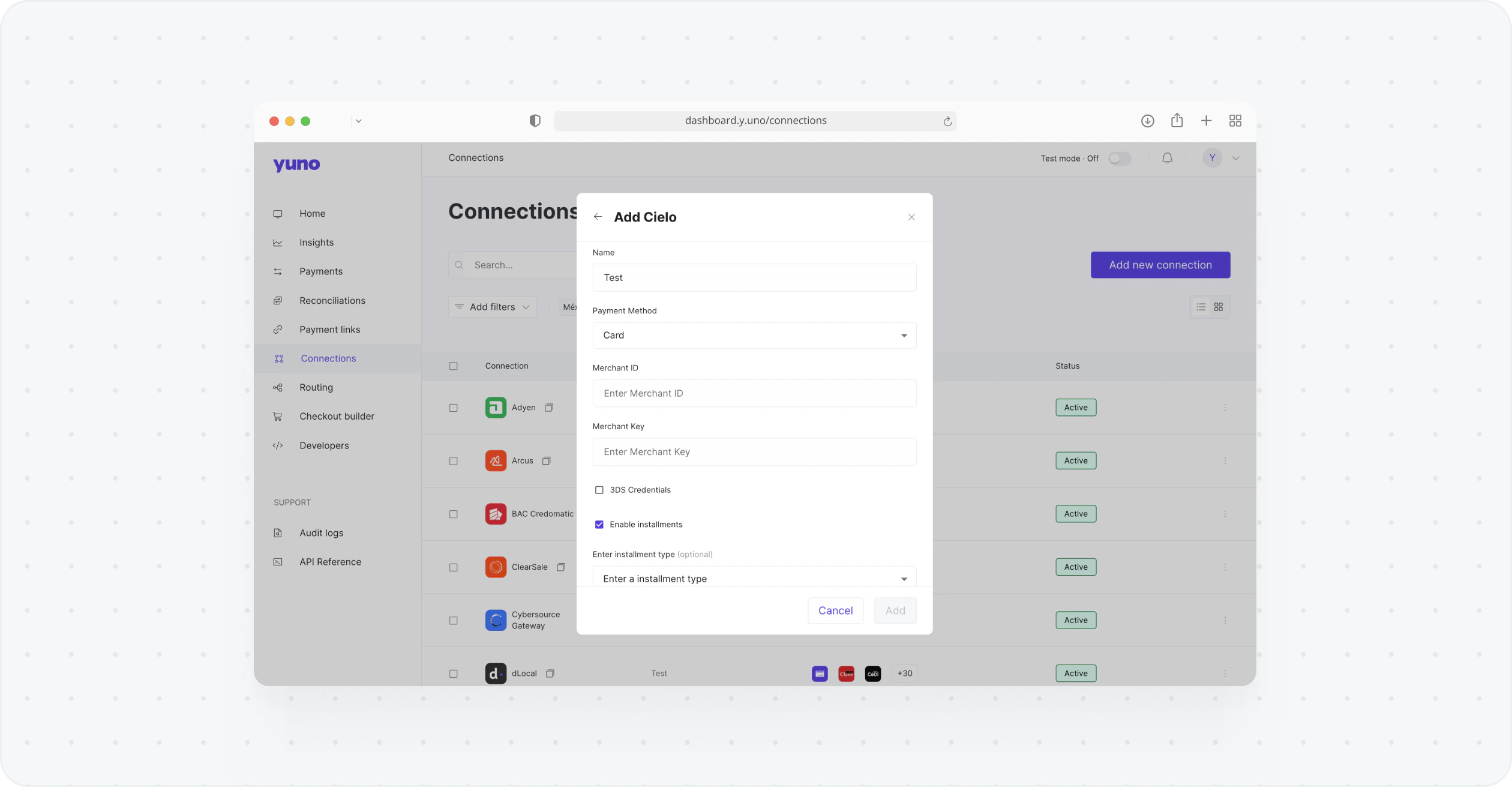
1. First, when configuring your provider [Connection](/docs/connections) in Yuno Dashboard, you need to enable the installments option. Thus, Yuno will show the installment option when the customer chooses the Credit card option form of the SDK checkout.
 2. After enabling the installments, you need to create an installment plan using the [Create Installments Plan](/reference/create-installments-plan) endpoint. When creating a plan, you will specify the accepted currency, amounts, card brands, dates, etc. After that, we will take care of the rest.
**Secure Fields SDK Integration**
When using Secure Fields SDK integration, you will need to [enable the installments option](/docs/sdks/customization/secure-fields/payment-secure-fields) while starting the checkout process.
For merchant-created installments, you also have the possibility of specifying the plan for every session by either using:
* the `plan_id` while [creating the session](/reference/create-checkout-session).
* a `plan structure` while [creating the checkout session](/reference/create-checkout-session).
**Routing with Fallback Providers**
When setting up your [route](/docs/using-yuno/dashboard-overview/routing) for the Card payment method, it's important to remember that if you have a fallback provider while using installments, we will try to make a fallback payment if the first transaction is rejected. Therefore, it's crucial to ensure that both providers support the amount of installments set for your account. If they do not, you can set up different routes for each scenario to avoid issues.
2. After enabling the installments, you need to create an installment plan using the [Create Installments Plan](/reference/create-installments-plan) endpoint. When creating a plan, you will specify the accepted currency, amounts, card brands, dates, etc. After that, we will take care of the rest.
**Secure Fields SDK Integration**
When using Secure Fields SDK integration, you will need to [enable the installments option](/docs/sdks/customization/secure-fields/payment-secure-fields) while starting the checkout process.
For merchant-created installments, you also have the possibility of specifying the plan for every session by either using:
* the `plan_id` while [creating the session](/reference/create-checkout-session).
* a `plan structure` while [creating the checkout session](/reference/create-checkout-session).
**Routing with Fallback Providers**
When setting up your [route](/docs/using-yuno/dashboard-overview/routing) for the Card payment method, it's important to remember that if you have a fallback provider while using installments, we will try to make a fallback payment if the first transaction is rejected. Therefore, it's crucial to ensure that both providers support the amount of installments set for your account. If they do not, you can set up different routes for each scenario to avoid issues.