> ## Documentation Index
> Fetch the complete documentation index at: https://docs.y.uno/llms.txt
> Use this file to discover all available pages before exploring further.
# 3DS Standalone
3DS Standalone runs only the 3D Secure authentication step — no payment provider is involved and no authorization happens. The response returns the authentication result (ECI + CAVV cryptogram and related data), which the merchant uses to decide what to do next (for example, forward it to their acquirer).
The flow uses the standard `/payments` endpoint. What runs depends on how the route is configured: for standalone, the route must resolve **only** to the Yuno 3DS connection with no payment provider attached, so only the authentication runs.
## Dashboard configuration
### Step 1 — Create the Yuno 3DS connection
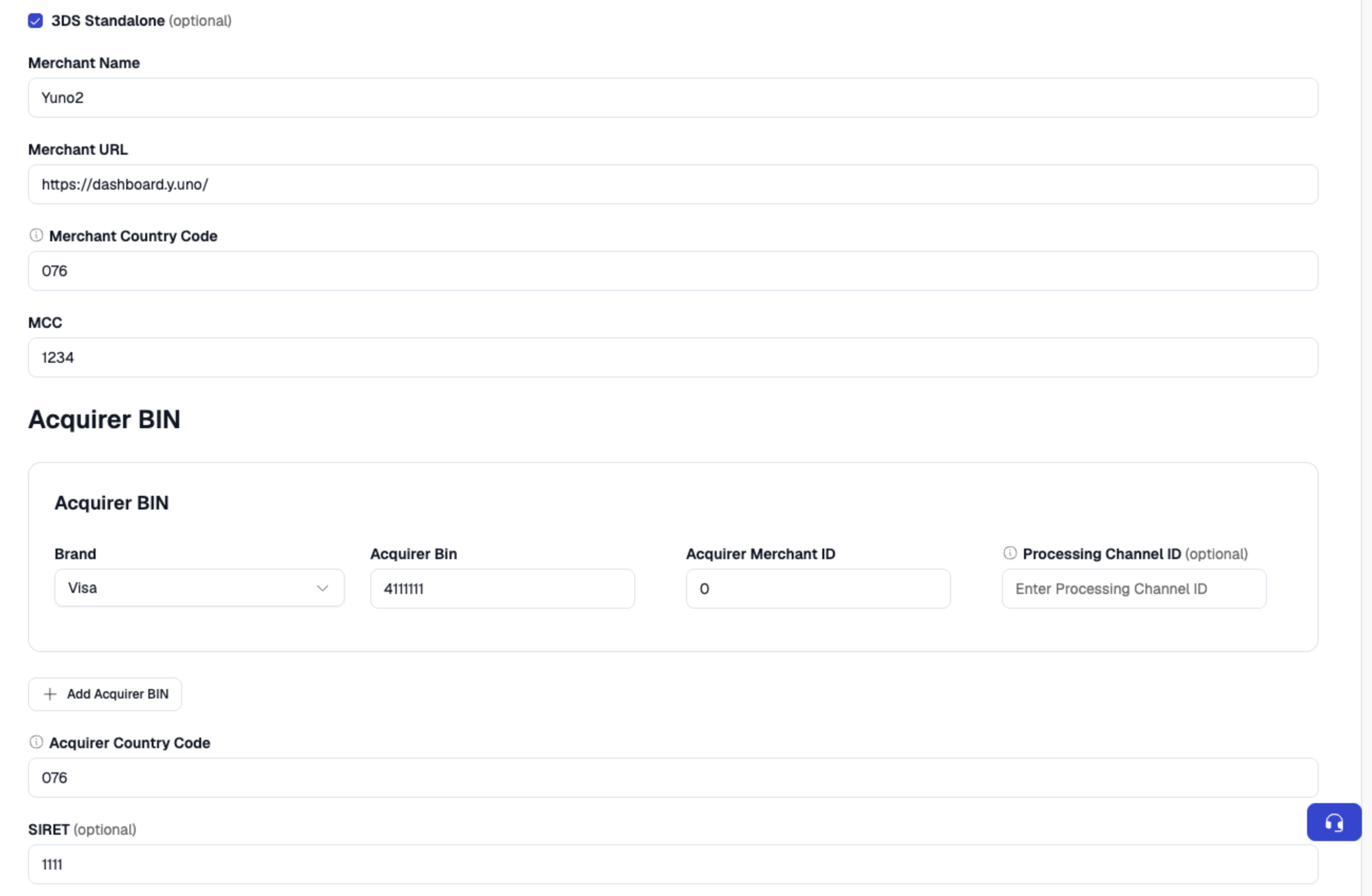
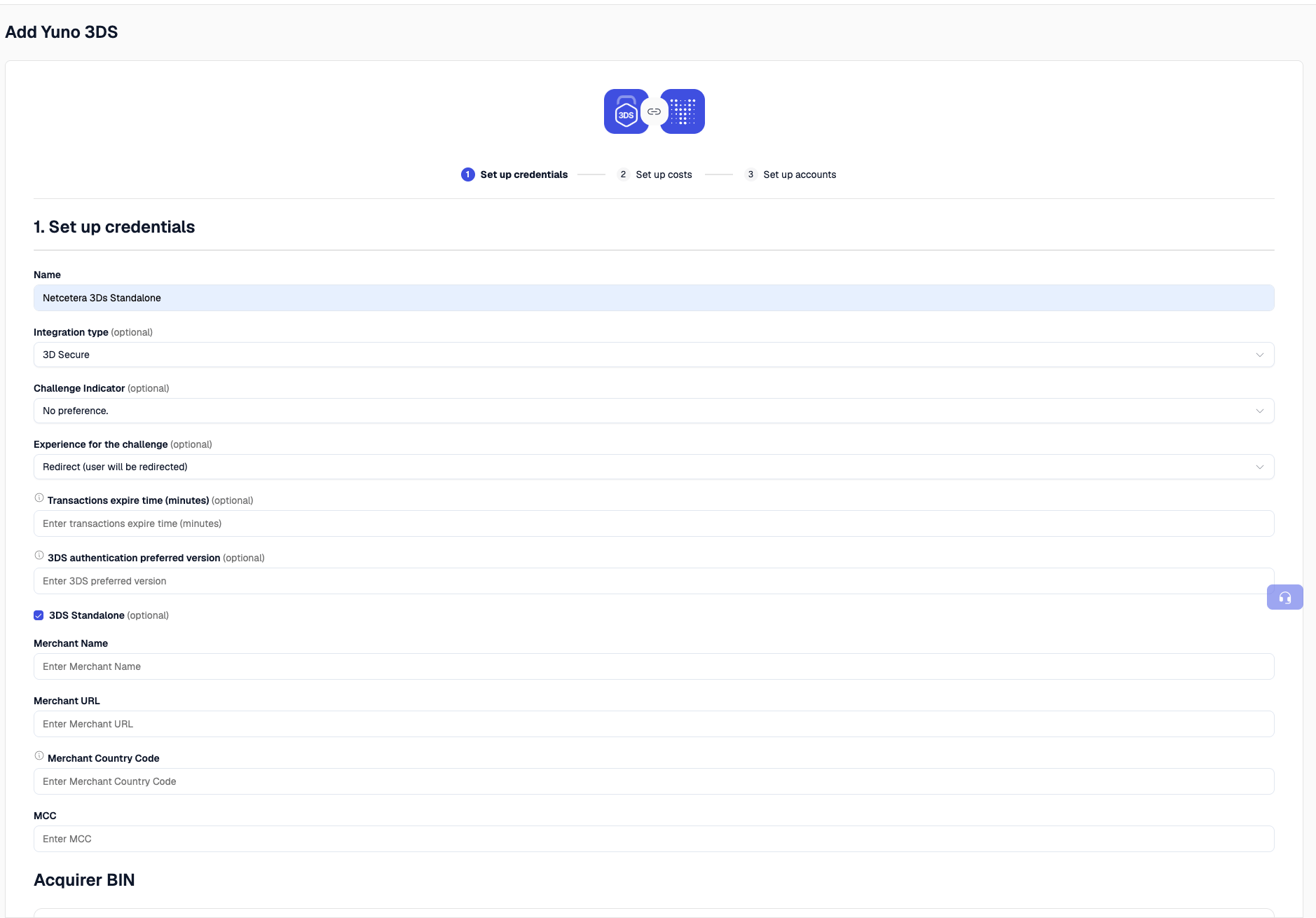
Go to **Dashboard → Connections → Add Connection** and select **Yuno 3DS**. Check the **"Yuno 3DS Standalone"** checkbox, fill in the acquirer data, and click **Next**.
The **acquirer data** is the 3DS registration data your acquirer provides. For the default provider (Netcetera) the fields are:
* **Acquirer BIN** — the Bank Identification Number used to clear and settle the transaction, together with the country where it is licensed.
* **Merchant ID** — the affiliation number provided by the acquirer.
* **Merchant Category Code (MCC)** — the code representing your merchant category, provided by the acquirer.
* **Merchant Name** — the official business name conducting the transaction.
* **Merchant URL** — the merchant's website / online platform.
* **Country Code** — the country where the payment is processed ([ISO 3166-1](https://en.wikipedia.org/wiki/ISO_3166-1)).
 ### Step 2 — Configure the route
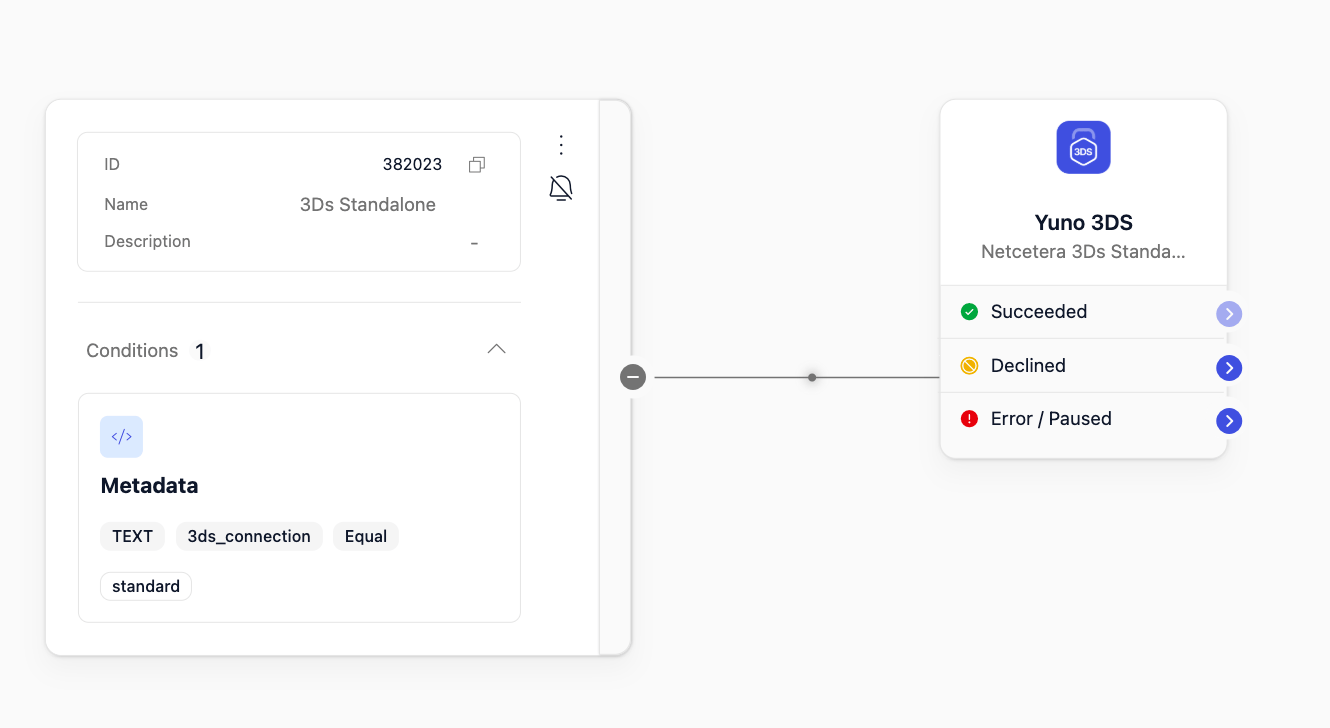
Go to **Dashboard → Routing** and create a **CARD** route that points all transactions to the Yuno 3DS connection. The branch that handles standalone traffic must resolve **only** to the Yuno 3DS connection — no payment provider.
If you already have a CARD route that points to a payment provider and want standalone authentication to coexist with it, you can isolate the standalone traffic with a condition group on metadata (for example `3ds_connection = standard`) that points only to the Yuno 3DS connection.
### Step 2 — Configure the route
Go to **Dashboard → Routing** and create a **CARD** route that points all transactions to the Yuno 3DS connection. The branch that handles standalone traffic must resolve **only** to the Yuno 3DS connection — no payment provider.
If you already have a CARD route that points to a payment provider and want standalone authentication to coexist with it, you can isolate the standalone traffic with a condition group on metadata (for example `3ds_connection = standard`) that points only to the Yuno 3DS connection.
 #### Selecting a specific connection (more than one 3DS Standalone connection)
If you have **more than one 3DS Standalone connection** configured — for example one set to **Data Only** and another with **no preference** (standard) — the router cannot decide on its own which one to use. In that case you must drive the selection explicitly with **metadata**.
The mechanism has two parts that must always work together:
1. **In the route:** add a condition group per connection that matches on a metadata key (for example `3ds_connection = standard` for one connection and a different value for the other). Each value points the traffic to the connection you want.
2. **In the requests:** add a `metadata` entry carrying that same key/value. It must be sent in **both** the 3DS Setup request and the `/payments` request — and it must be **identical in both**.
The 3DS Setup and the payment are routed independently. If the `metadata` sent in the 3DS Setup does not match the `metadata` sent in `/payments`, each call can resolve to a different connection — the Setup and the payment would then run against different connections and the authentication would not complete. Always send the **same** `metadata` in both calls so they select the **same** connection from the route.
`metadata` is a JSON array of `{ "key", "value" }` entries. Send the same entry in both the Setup and the payment:
```json theme={"theme":{"light":"github-dark","dark":"github-dark"}}
"metadata": [
{
"key": "3ds_connection",
"value": "standard"
}
]
```
If you have a single 3DS Standalone connection **and the route has no other condition groups beyond it** (no other connections or conditionals), this metadata selection is not required — the route resolves to that connection automatically. If the route combines the 3DS Standalone connection with other conditionals (for example a second standalone connection), use the metadata mechanism above to isolate and select it.
## Standalone flow (using 3DS Setup)
The standalone flow runs through a **3DS Setup** that produces a `three_d_secure_setup_id`, which is then referenced in the payment.
### 1. Generate a 3DS Setup
The 3DS Setup has two possible values in the `type` field. The difference is **who collects the browser/device data** used for authentication:
| `type` | What it does | When to use |
| :------------------- | :---------------------------------------------------------------------------------------------------------------------------------------------------------------------------------------------------------------- | :-------------------------------------------------------------------------------- |
| `STANDARD` (default) | Yuno (through the 3DS provider) handles the device-data collection. The response returns a `collect_url` and a `token`; the merchant must complete the collection by loading that `collect_url` with the `token`. | The standard flow — let Yuno / the 3DS provider drive the device-data collection. |
| `MERCHANT_PROVIDED` | The merchant sends all the required data themselves (`browser_info` and `device_fingerprints`), so no device-data collection step is performed. | When a 3DS provider already collects this data on its own and hands it to you. |
If you have more than one 3DS Standalone connection, include the `metadata` in this request (as shown below) so the Setup is routed to the intended connection. Remember to send the **same** `metadata` later in the `/payments` request.
#### Type STANDARD
Yuno performs the device-data collection. The merchant must complete it by going to the `collect_url` returned in the response and using the `token` also provided there.
`STANDARD` is the default, so the `type` field can be omitted.
**Request**
```bash theme={"theme":{"light":"github-dark","dark":"github-dark"}}
curl --location 'https://api-staging.y.uno/v1/three-d-secure/setups' \
--header 'X-idempotency-key: idempotency-key' \
--header 'public-api-key: api-key' \
--header 'private-secret-key: secret-key' \
--header 'Content-Type: application/json' \
--data '{
"account_id": "account_id",
"type": "STANDARD",
"card": {
"holder_name": "TEST CUSTOMER",
"number": "4916994064252017",
"expiration_month": 12,
"expiration_year": 26,
"security_code": "123"
},
"metadata": [
{
"key": "3ds_connection",
"value": "standard"
}
]
}'
```
```json Netcetera 3DS theme={"theme":{"light":"github-dark","dark":"github-dark"}}
{
"three_d_secure_setup_id": "59192489-3713-4d1b-894b-ac15ac5b6f6f",
"collect_url": "https://ndm-prev.3dss-non-prod.cloud.netcetera.com/acs/3ds-method",
"token": "eyJ0aHJlZURTTWV0aG9kTm90aWZpY2F0aW9uVVJMIjoiaHR0cHM6Ly9zYW5kYm94LnkudW5vL25ldGNldGVyYS0zZHMtd2ViaG9vay92MS9zdGFydCIsInRocmVlRFNTZXJ2ZXJUcmFuc0lEIjoiNTkxOTI0ODktMzcxMy00ZDFiLTg5NGItYWMxNWFjNWI2ZjZmIn0",
"provider_id": "NETCETERA_3DS",
"timeout_value": 3000,
"account_id": "account_id"
}
```
```json Cybersource 3DS theme={"theme":{"light":"github-dark","dark":"github-dark"}}
{
"three_d_secure_setup_id": "06bc1782-b00d-4ef7-9b56-78f066821d2e",
"collect_url": "https://cas.client.cardinaltrusted.com/centinelapi/V1/Cruise/Collect",
"token": "eyJhbGciOiJIUzI1NiIsInR5cCI6IkpXVCJ9...",
"provider_id": "CYBERSOURCE_3DS",
"timeout_value": 3000,
"account_id": "05327270-54f8-4189-b2fc-492864ecfc47"
}
```
```json Checkout.com 3DS theme={"theme":{"light":"github-dark","dark":"github-dark"}}
{
"three_d_secure_setup_id": "eae7eca3-902b-475d-a2ea-a434aa57391b",
"collect_url": "",
"token": "",
"provider_id": "CHECKOUT_COM_3DS",
"timeout_value": 3000,
"account_id": "05327270-54f8-4189-b2fc-492864ecfc47"
}
```
**Completing the device-data collection**
After you receive the `collect_url` and `token`, complete the device-data collection (the 3DS Method) **before** creating the payment.
**Suggested implementation (reference only — not a fixed contract).** The exact field name and mechanics can vary by 3DS provider, so validate against the provider you use. The general idea: render a hidden iframe and auto-submit a form that POSTs the token to the `collect_url`, wait for the period indicated by `timeout_value`, then continue to create the payment.
```html theme={"theme":{"light":"github-dark","dark":"github-dark"}}
```
If the provider returns an **empty** `collect_url` and `token` (for example `CHECKOUT_COM_3DS` above), there is no collection step — skip it and go straight to creating the payment.
#### Type MERCHANT\_PROVIDED
The merchant sends all the required data themselves (`browser_info` and `device_fingerprints`), so no device-data collection step is performed.
Use `device_fingerprints` only when a 3DS provider that collects this data on its own (i.e. does not use the `collect_url`) hands you the fingerprint `id` — forward that `id` here. The `provider_id` must match the 3DS provider configured on the connection.
**Request**
```bash theme={"theme":{"light":"github-dark","dark":"github-dark"}}
curl --location 'https://api-staging.y.uno/v1/three-d-secure/setups' \
--header 'X-idempotency-key: idempotency-key' \
--header 'public-api-key: api-key' \
--header 'private-secret-key: secret-key' \
--header 'Content-Type: application/json' \
--data '{
"account_id": "account_id",
"type": "MERCHANT_PROVIDED",
"card": {
"holder_name": "TEST CUSTOMER",
"number": "4556557955726624",
"expiration_month": 12,
"expiration_year": 26,
"security_code": "123"
},
"browser_info": {
"user_agent": "Mozilla/5.0 (Windows NT 10.0; Win64; x64) AppleWebKit/537.36",
"accept_header": "text/html,application/xhtml+xml,application/xml;q=0.9,*/*;q=0.8",
"color_depth": "24",
"screen_height": "1080",
"screen_width": "1920",
"language": "es-CO",
"java_enabled": false,
"javascript_enabled": true,
"browser_time_difference": "300",
"platform": "WEB"
},
"device_fingerprints": [
{
"id": "3dae048e-b95e-47c6-8064-ea7f1aa16e90",
"provider_id": "NETCETERA_3DS"
}
],
"metadata": [
{
"key": "3ds_connection",
"value": "standard"
}
]
}'
```
**Response**
```json theme={"theme":{"light":"github-dark","dark":"github-dark"}}
{
"three_d_secure_setup_id": "59192489-3713-4d1b-894b-ac15ac5b6f6f",
"account_id": "account_id",
"type": "MERCHANT_PROVIDED",
"browser_info": {
"user_agent": "Mozilla/5.0 (Windows NT 10.0; Win64; x64) AppleWebKit/537.36",
"accept_header": "text/html,application/xhtml+xml,application/xml;q=0.9,*/*;q=0.8",
"color_depth": "24",
"screen_height": "1080",
"screen_width": "1920",
"language": "es-CO",
"javascript_enabled": true,
"java_enabled": false,
"browser_time_difference": "300",
"platform": "WEB"
},
"device_fingerprints": [
{
"provider_id": "NETCETERA_3DS",
"id": "3dae048e-b95e-47c6-8064-ea7f1aa16e90"
}
]
}
```
### 2. Create the payment
Create the payment using the `three_d_secure_setup_id` generated in the previous step. Since the route resolves only to the Yuno 3DS connection (no payment provider), only the authentication runs and the 3DS result is returned — no authorization takes place.
**Payment method:** because this is a standalone 3DS authentication flow, the card must already be available to it — either send the `card_data` in the request, or reference a payment method that was **enrolled (vaulted) beforehand**. Do **not** send `vault_on_success: true` — this flow does not support it.
If you used `metadata` in the 3DS Setup to select a specific connection, you **must** send the **same** `metadata` here. Otherwise the payment may be routed to a different 3DS Standalone connection than the Setup.
**Request**
```bash theme={"theme":{"light":"github-dark","dark":"github-dark"}}
curl --location 'https://api-staging.y.uno/v1/payments' \
--header 'X-idempotency-key: idempotency-key' \
--header 'public-api-key: api-key' \
--header 'private-secret-key: secret-key' \
--header 'Content-Type: application/json' \
--data '{
"account_id": "account-code",
"description": "3DS",
"country": "CO",
"merchant_order_id": "order_id",
"merchant_reference": "merchant_reference",
"workflow": "DIRECT",
"callback_url": "https://www.example.com",
"amount": {
"currency": "COP",
"value": "27500"
},
"metadata": [
{
"key": "3ds_connection",
"value": "standard"
}
],
"customer_payer": {
"id": "customer_id"
},
"payment_method": {
"type": "CARD",
"detail": {
"card": {
"three_d_secure": {
"three_d_secure_setup_id": "59192489-3713-4d1b-894b-ac15ac5b6f6f"
},
"card_data": {
"holder_name": "TEST CUSTOMER",
"number": "4916994064252017",
"expiration_month": 12,
"expiration_year": 26,
"security_code": "123"
}
}
}
}
}'
```
**Workflow:** a **frictionless** / **data-only** authentication resolves inline (the examples ran with `workflow: DIRECT`) and the result comes back on the payment response. A **challenge** needs the cardholder to act, so the payment returns `PENDING` with a `redirect_url` and `checkout.sdk_action_required: true` — handle it with a redirect-capable workflow (`REDIRECT`) or the Yuno SDK (see [Authentication outcomes → Challenge](#challenge)).
The payment's top-level `status` / `sub_status` tell you the outcome, and the 3DS result lives in `payment_method.payment_method_detail.card.three_d_secure`:
* **Frictionless / Data Only** → `status: SUCCEEDED`, `sub_status: THREE_D_SECURE_VERIFIED`.
* **Challenge** → `status: PENDING`, `sub_status: WAITING_ADDITIONAL_STEP`, with `checkout.sdk_action_required: true` and a `redirect_url` (resolves later — see [Webhook notification](#webhook-notification)).
* **Failed / rejected authentication** → `status: DECLINED`.
A standalone payment ultimately resolves to either `SUCCEEDED` / `THREE_D_SECURE_VERIFIED` (authentication completed) or `DECLINED` (authentication failed or rejected). The transaction-level status and 3DS response codes follow the standard Yuno reference — [Transaction statuses and response codes](/reference/payments/status-and-response-codes/transaction) (for example `SUCCEEDED_THREE_D_SECURE`, `CHALLENGE_REQUIRED`, `AUTHENTICATION_FAILED_THREE_D_SECURE`, `REJECTED_THREE_D_SECURE_REQUIRED`).
## Authentication outcomes
### Frictionless
`three_d_secure` object (inside the card detail):
```json theme={"theme":{"light":"github-dark","dark":"github-dark"}}
"three_d_secure": {
"version": "2.3.1",
"electronic_commerce_indicator": "05",
"cryptogram": "MTIzNDU2Nzg5MDA5ODc2NTQzMjE=",
"transaction_id": "7f5e8c1a-5c98-411e-b54b-dbff770ea045",
"directory_server_transaction_id": "fbaa20f0-09c4-48bd-b0fd-01fdbf9188cf",
"pares_status": "Y",
"acs_id": "ab4a9485-afdb-4003-a619-3aaeea0670d7"
}
```
```json theme={"theme":{"light":"github-dark","dark":"github-dark"}}
{
"id": "7f524e10-534c-4a3f-aad8-14128156a958",
"account_id": "5d8960b3-ca3c-4b8b-9891-0c190d4dae1c",
"description": "3DS",
"country": "CO",
"status": "SUCCEEDED",
"sub_status": "THREE_D_SECURE_VERIFIED",
"merchant_order_id": "order-833aaade-323d-40c2-9f2c-49f5964bd055",
"created_at": "2026-06-26T23:43:09.385435Z",
"updated_at": "2026-06-26T23:43:10.424600Z",
"amount": {
"captured": 0.00,
"currency": "COP",
"refunded": 0.00,
"value": 27500.00
},
"checkout": {
"session": "",
"sdk_action_required": false
},
"payment_method": {
"type": "CARD",
"payment_method_detail": {
"card": {
"verify": false,
"capture": true,
"installments": 1,
"card_data": {
"holder_name": "TEST CUSTOMER",
"iin": "45565579",
"lfd": "6624",
"number_length": 16,
"brand": "VISA",
"scheme": "VISA",
"issuer_name": "BANCO BILBAO VIZCAYA ARGENTARIA BBVA",
"country_code": "ES",
"category": "GOLD",
"type": "CREDIT",
"three_d_secure": {
"version": "2.3.1",
"electronic_commerce_indicator": "05",
"cryptogram": "MTIzNDU2Nzg5MDA5ODc2NTQzMjE=",
"transaction_id": "7f5e8c1a-5c98-411e-b54b-dbff770ea045",
"directory_server_transaction_id": "fbaa20f0-09c4-48bd-b0fd-01fdbf9188cf",
"pares_status": "Y",
"acs_id": "ab4a9485-afdb-4003-a619-3aaeea0670d7"
},
"fingerprint": "85749aa9-c233-4e72-99b9-cbc1065500b6",
"expiration_month": 12,
"expiration_year": 26
}
}
}
},
"transactions": {
"id": "6036a7d1-c3f2-4817-a73a-4402c24ea070",
"type": "THREE_D_SECURE",
"status": "SUCCEEDED",
"category": "CARD",
"amount": 27500.00,
"provider_id": "NETCETERA_3DS",
"response_code": "SUCCEEDED_THREE_D_SECURE",
"response_message": "3DS validation successful",
"merchant_reference": "merchant-17912e48-74b9-4435-996a-2fc1f44e1468"
},
"callback_url": "https://www.example.com",
"workflow": "DIRECT",
"metadata": [
{
"key": "3ds_connection",
"value": "standard"
}
],
"simplified_mode": false
}
```
**Flow summary:**
1. Authentication request sent to the ACS.
2. The ACS authenticates by risk analysis, with no user interaction.
3. Returns full data (cryptogram, ECI, dsTransID, version) with `pares_status = Y`; the payment is `SUCCEEDED` / `THREE_D_SECURE_VERIFIED`.
4. The result is available on the payment response. Liability shift = **yes**.
### Data Only
`three_d_secure` object (inside the card detail):
```json theme={"theme":{"light":"github-dark","dark":"github-dark"}}
"three_d_secure": {
"version": "2.3.1",
"electronic_commerce_indicator": "04",
"cryptogram": "MTIzNDU2Nzg5MDA5ODc2NTQzMjE=",
"transaction_id": "a6f1faa7-2690-4d57-a589-311a3a62dedf",
"directory_server_transaction_id": "fcf62fd5-4ff7-429c-9882-2dadf92f7ee3",
"pares_status": "I",
"acs_id": "9caec967-14e2-4eed-bc35-3fa231c60c14"
}
```
```json theme={"theme":{"light":"github-dark","dark":"github-dark"}}
{
"id": "37372cdc-415d-46ad-95af-96b9de106ef1",
"account_id": "5d8960b3-ca3c-4b8b-9891-0c190d4dae1c",
"description": "3DS",
"country": "CO",
"status": "SUCCEEDED",
"sub_status": "THREE_D_SECURE_VERIFIED",
"merchant_order_id": "order-b3cb9c62-4c9c-4e48-89fa-f6bb09725c9d",
"created_at": "2026-06-26T23:45:21.558465Z",
"updated_at": "2026-06-26T23:45:22.373691Z",
"amount": {
"captured": 0.00,
"currency": "COP",
"refunded": 0.00,
"value": 27500.00
},
"checkout": {
"session": "",
"sdk_action_required": false
},
"payment_method": {
"type": "CARD",
"payment_method_detail": {
"card": {
"verify": false,
"capture": true,
"installments": 1,
"card_data": {
"holder_name": "TEST CUSTOMER",
"iin": "49169940",
"lfd": "2017",
"number_length": 16,
"brand": "VISA",
"scheme": "VISA",
"issuer_name": "PRIVATE OJSC BANK ASIA ALLIANCE BANK",
"country_code": "UZ",
"category": "CLASSIC",
"type": "DEBIT",
"three_d_secure": {
"version": "2.3.1",
"electronic_commerce_indicator": "04",
"cryptogram": "MTIzNDU2Nzg5MDA5ODc2NTQzMjE=",
"transaction_id": "a6f1faa7-2690-4d57-a589-311a3a62dedf",
"directory_server_transaction_id": "fcf62fd5-4ff7-429c-9882-2dadf92f7ee3",
"pares_status": "I",
"acs_id": "9caec967-14e2-4eed-bc35-3fa231c60c14"
},
"fingerprint": "b966eb1f-aea6-4d66-8532-0b76cdf9dc72",
"expiration_month": 12,
"expiration_year": 26
}
}
}
},
"transactions": {
"id": "85d030b5-3d34-4fdb-bb4f-a6dfcad243bb",
"type": "THREE_D_SECURE",
"status": "SUCCEEDED",
"category": "CARD",
"amount": 27500.00,
"provider_id": "NETCETERA_3DS",
"response_code": "SUCCEEDED_THREE_D_SECURE",
"response_message": "3DS validation successful",
"merchant_reference": "merchant-d2d686aa-d441-49f1-9b66-2608473b848d"
},
"callback_url": "https://www.example.com",
"workflow": "DIRECT",
"metadata": [
{
"key": "3ds_connection",
"value": "standard"
}
],
"simplified_mode": false
}
```
**Flow summary:**
1. Only browser/device data is shared with the issuer to feed their risk models — no real authentication occurs.
2. The flow continues like frictionless and returns a result (`SUCCEEDED` / `THREE_D_SECURE_VERIFIED`, `pares_status = I`).
3. Liability shift = **NO** — the merchant retains fraud liability. Typically ECI 04.
### Challenge
The payment comes back as `PENDING` with a `redirect_url` and `checkout.sdk_action_required: true`. At this point the `three_d_secure` object carries the challenge data (`pares_status: C`, empty ECI, and a `cryptogram` that holds the encoded challenge request):
```json theme={"theme":{"light":"github-dark","dark":"github-dark"}}
"three_d_secure": {
"version": "2.3.1",
"electronic_commerce_indicator": "",
"cryptogram": "eyJhY3NUcmFuc0lEIjoiZTVmMDIzZDItMjlhNy00ODRlLWFhODgtMDlmYjdlOTRhODFmIiwiY2hhbGxlbmdlV2luZG93U2l6ZSI6IjA1IiwibWVzc2FnZVR5cGUiOiJDUmVxIiwibWVzc2FnZVZlcnNpb24iOiIyLjMuMSIsInRocmVlRFNTZXJ2ZXJUcmFuc0lEIjoiNDk5NGZmNGUtZWFkZC00MzFmLWJiMjEtY2MwMjY5YWZiMTJlIn0",
"transaction_id": "4994ff4e-eadd-431f-bb21-cc0269afb12e",
"directory_server_transaction_id": "d0a1890a-1e38-4c1c-9e05-e2019a04e772",
"pares_status": "C",
"acs_id": "e5f023d2-29a7-484e-aa88-09fb7e94a81f"
}
```
```json theme={"theme":{"light":"github-dark","dark":"github-dark"}}
{
"id": "1b5de250-2e52-4622-9c21-a30c70804d9a",
"account_id": "5d8960b3-ca3c-4b8b-9891-0c190d4dae1c",
"description": "3DS",
"country": "CO",
"status": "PENDING",
"sub_status": "WAITING_ADDITIONAL_STEP",
"merchant_order_id": "order-87af5f63-6679-4a3b-b436-3a1c9b72c823",
"created_at": "2026-06-26T23:47:51.448941Z",
"updated_at": "2026-06-26T23:47:52.397292Z",
"amount": {
"captured": 0.00,
"currency": "COP",
"refunded": 0.00,
"value": 27500.00
},
"checkout": {
"session": "39d9a15c-0ef0-4b10-b0bb-b64090b82f53",
"sdk_action_required": true
},
"payment_method": {
"type": "CARD",
"payment_method_detail": {
"card": {
"verify": false,
"capture": true,
"installments": 1,
"redirect_url": "https://checkout.sandbox.y.uno/payment?session=2e42a863-54e7-4607-8391-e504a2166b3e&3ds=true",
"card_data": {
"holder_name": "TEST CUSTOMER",
"iin": "49169940",
"lfd": "2017",
"number_length": 16,
"brand": "VISA",
"scheme": "VISA",
"issuer_name": "PRIVATE OJSC BANK ASIA ALLIANCE BANK",
"country_code": "UZ",
"category": "CLASSIC",
"type": "DEBIT",
"three_d_secure": {
"version": "2.3.1",
"electronic_commerce_indicator": "",
"cryptogram": "eyJhY3NUcmFuc0lEIjoiZTVmMDIzZDItMjlhNy00ODRlLWFhODgtMDlmYjdlOTRhODFmIiwiY2hhbGxlbmdlV2luZG93U2l6ZSI6IjA1IiwibWVzc2FnZVR5cGUiOiJDUmVxIiwibWVzc2FnZVZlcnNpb24iOiIyLjMuMSIsInRocmVlRFNTZXJ2ZXJUcmFuc0lEIjoiNDk5NGZmNGUtZWFkZC00MzFmLWJiMjEtY2MwMjY5YWZiMTJlIn0",
"transaction_id": "4994ff4e-eadd-431f-bb21-cc0269afb12e",
"directory_server_transaction_id": "d0a1890a-1e38-4c1c-9e05-e2019a04e772",
"pares_status": "C",
"acs_id": "e5f023d2-29a7-484e-aa88-09fb7e94a81f"
},
"fingerprint": "b966eb1f-aea6-4d66-8532-0b76cdf9dc72",
"expiration_month": 12,
"expiration_year": 26
}
}
}
},
"transactions": {
"id": "01aa5d77-1c91-4d95-9b5d-fbf1c7e863e2",
"type": "THREE_D_SECURE",
"status": "PENDING",
"category": "CARD",
"amount": 27500.00,
"provider_id": "NETCETERA_3DS",
"response_code": "CHALLENGE_REQUIRED",
"response_message": "Transaction waiting for the challenge completion",
"merchant_reference": "merchant-b2ceeae3-b3bb-4de5-b7d3-51ba87179781"
},
"callback_url": "https://www.example.com",
"workflow": "REDIRECT",
"metadata": [
{
"key": "3ds_connection",
"value": "standard"
}
],
"simplified_mode": false
}
```
Once the cardholder completes the challenge, the **final** result is delivered through the payment webhook (see [Webhook notification](#webhook-notification) below): `status: SUCCEEDED` / `THREE_D_SECURE_VERIFIED` on success (populated `electronic_commerce_indicator` and `cryptogram` / CAVV, `pares_status: Y`, `has_challenge: true`), or `status: DECLINED` if the challenge fails.
**Flow summary:**
1. The payment response comes back as `PENDING` / `WAITING_ADDITIONAL_STEP` (`response_code: CHALLENGE_REQUIRED`), with `checkout.sdk_action_required: true` and a `redirect_url`.
2. The cardholder must complete the issuer challenge:
* **With the Yuno SDK:** the SDK renders the challenge automatically.
* **With a redirect-capable workflow (`REDIRECT`):** redirect the cardholder to the `redirect_url` returned in the payment response so they can complete the challenge.
3. The cardholder completes the challenge (OTP, biometrics, Out-of-Band, Decoupled, Passkeys/FIDO-SPC). It is asynchronous.
4. When finished, the cardholder is returned to your `callback_url`, and the final authentication result is delivered through the payment webhook (`payment.purchase`) — or read it via `GET /v1/payments/{id}`.
5. On success (`pares_status = Y`) the payment is `SUCCEEDED` / `THREE_D_SECURE_VERIFIED` and liability shift = **yes**; if the challenge fails the payment is `DECLINED`. Until the result arrives, the merchant sees the payment as `PENDING`.
### Failed / rejected
1. The ACS returns a non-authenticated result (`pares_status N` / `R`) or the authentication is rejected.
2. The payment resolves to `DECLINED`; the transaction carries a failure response code such as `AUTHENTICATION_FAILED_THREE_D_SECURE` or `REJECTED_THREE_D_SECURE_REQUIRED`.
3. No liability shift — there is no successful authentication.
## Receiving the result
For **frictionless** and **data-only**, the `three_d_secure` result is available on the payment response immediately (`status: SUCCEEDED`). For a **challenge**, the result is delivered asynchronously once the cardholder finishes — see [Webhook notification](#webhook-notification) — or poll `GET /v1/payments/{id}` to read the final `three_d_secure` result.
## Webhook notification
The authentication result is delivered through the standard Yuno payment notification — the **same webhook you already use for payment status updates**. There is no separate 3DS-specific webhook. The event is a `payment` notification with `type_event: "payment.purchase"`; the payment is under `data.payment`, and the 3DS result is in `data.payment.transactions.payment_method.payment_method_detail.card.three_d_secure`.
For a **declined** authentication the same webhook (`payment.purchase`) is delivered — only the status changes: the payment is `DECLINED` and the transaction carries a failure response code such as `AUTHENTICATION_FAILED_THREE_D_SECURE` or `REJECTED_THREE_D_SECURE_REQUIRED`.
**Example — successful authentication (after a completed challenge)**
```json theme={"theme":{"light":"github-dark","dark":"github-dark"}}
{
"type": "payment",
"type_event": "payment.purchase",
"account_id": "5d8960b3-ca3c-4b8b-9891-0c190d4dae1c",
"retry": 0,
"version": 2,
"data": {
"payment": {
"id": "b5f22a56-285f-4ea5-a26c-0651a53c0771",
"account_id": "5d8960b3-ca3c-4b8b-9891-0c190d4dae1c",
"description": "3DS",
"country": "CO",
"status": "SUCCEEDED",
"sub_status": "THREE_D_SECURE_VERIFIED",
"merchant_order_id": "order-781223d2-4ade-436b-9ac1-a7f675ae0339",
"created_at": "2026-06-26T23:50:39.456437Z",
"updated_at": "2026-06-26T23:50:59.882628Z",
"amount": {
"currency": "COP",
"value": 27500,
"refunded": 0,
"captured": 0
},
"checkout": {
"session": "1ae63f1a-d587-4ee3-8fe1-7871e4dbd39f",
"sdk_action_required": true
},
"transactions": {
"id": "4aaad7e2-95c9-4499-af1d-7d8147c29a61",
"type": "THREE_D_SECURE",
"status": "SUCCEEDED",
"category": "CARD",
"amount": 27500,
"provider_id": "NETCETERA_3DS",
"response_code": "SUCCEEDED_THREE_D_SECURE",
"response_message": "3DS validation successful",
"merchant_reference": "merchant-14b2aa13-ee69-41d5-9d6c-48a2e0bde1ee",
"payment_method": {
"type": "CARD",
"payment_method_detail": {
"card": {
"verify": false,
"capture": true,
"installments": 1,
"card_data": {
"holder_name": "TEST CUSTOMER",
"iin": "49169940",
"lfd": "2017",
"number_length": 16,
"brand": "VISA",
"scheme": "VISA",
"issuer_name": "PRIVATE OJSC BANK ASIA ALLIANCE BANK",
"country_code": "UZ",
"category": "CLASSIC",
"type": "DEBIT",
"three_d_secure": {
"version": "2.3.1",
"electronic_commerce_indicator": "02",
"cryptogram": "JAmi21makAifmwqo2120cjq1AAA=",
"transaction_id": "6cf8f7dd-0d15-40f1-a520-55e89e048942",
"directory_server_transaction_id": "b24df687-0a2d-43be-b555-82aef699dfbc",
"liability_shift": null,
"authentication_created_at": null,
"has_challenge": true,
"authentication_id": null,
"pares_status": "Y",
"acs_id": "afa24c2f-fb84-4d33-8399-74e60a1e0380",
"strong_customer_authentication_exemptions": null,
"cavv_algorithm": null,
"ds_risk_score": null
},
"fingerprint": "b966eb1f-aea6-4d66-8532-0b76cdf9dc72",
"expiration_month": 12,
"expiration_year": 26
}
}
}
},
"connection_data": {
"id": "636226c6-a02b-4ef1-8925-9ec4a499fd59",
"name": "Yuno 3DS Standalone"
}
},
"callback_url": "https://www.example.com",
"workflow": "REDIRECT",
"metadata": [
{
"key": "3ds_connection",
"value": "standard"
}
]
}
}
}
```
## Response fields
| Field | Meaning |
| :-------------------------------------------- | :------------------------------------------------------------------------------------------------------------------------------------------------------------------------------------------------------------------------------------------------------------------------ |
| `version` | The 3D Secure protocol version used for the authentication (e.g. 2.1.0 / 2.2.0 / 2.3.1). Newer versions enable additional challenge methods (OOB, Passkeys/FIDO, etc.). |
| `electronic_commerce_indicator` (ECI) | Indicates the authentication result and who bears fraud liability. Visa: 05 authenticated / 06 attempted / 07 not authenticated. Mastercard: 02 authenticated / 01 attempted / 00 not authenticated. Empty while a challenge is still pending. |
| `cryptogram` | The CAVV/AAV — cryptographic proof generated by the issuer that authentication took place. Unique per transaction; sent to the acquirer in the authorization to validate the 3DS. While a challenge is pending, this field carries the encoded challenge request instead. |
| `transaction_id` | The 3DS Server Transaction ID (`threeDSServerTransID`) — identifier of the 3DS transaction assigned by the 3DS Server in 3DS2. Correlates the AReq/ARes messages. (This is the 3DS2 value; the legacy 3DS1 "XID" is a different field.) |
| `directory_server_transaction_id` (dsTransID) | Unique transaction identifier assigned by the Directory Server (Visa/Mastercard) in 3DS2. A mandatory value that must travel in the authorization alongside the cryptogram. |
| `pares_status` | Authentication result (EMVCo transStatus): Y authenticated, N failed, A attempted, U unavailable, R rejected, C challenge required, I data only. |
| `acs_id` | Identifier of the issuer's ACS (Access Control Server) that processed the authentication. Used for reference/traceability to the ACS that responded. |
| `has_challenge` | Whether the authentication went through a challenge (`true`) or was frictionless / data-only (`false`). Present in the webhook payload. |
## Testing (sandbox)
The 3DS sandbox uses specific test cards to force each outcome, and the cards depend on the 3DS provider configured on the connection.
### Netcetera (default)
Holder `TEST CUSTOMER`, expiry `12/26`, CVV `123`:
| Card number | Outcome |
| :----------------- | :-------------------- |
| `4556557955726624` | Frictionless |
| `4916994064252017` | Challenge / Data Only |
### Cybersource
Holder `John Doe`, expiry `01/26`, CVV `123`:
| Card number | Outcome |
| :----------------- | :----------- |
| `4000000000001000` | Frictionless |
| `4000000000001091` | Challenge |
### Checkout.com
| Card number | Outcome |
| :----------------- | :----------- |
| `4485040371536584` | Frictionless |
| `4242424242424242` | Challenge |
For a challenge in the sandbox, complete it with the password `Checkout1!`. See the Checkout.com 3DS test cards documentation for expiry/CVV and additional cards.
#### Selecting a specific connection (more than one 3DS Standalone connection)
If you have **more than one 3DS Standalone connection** configured — for example one set to **Data Only** and another with **no preference** (standard) — the router cannot decide on its own which one to use. In that case you must drive the selection explicitly with **metadata**.
The mechanism has two parts that must always work together:
1. **In the route:** add a condition group per connection that matches on a metadata key (for example `3ds_connection = standard` for one connection and a different value for the other). Each value points the traffic to the connection you want.
2. **In the requests:** add a `metadata` entry carrying that same key/value. It must be sent in **both** the 3DS Setup request and the `/payments` request — and it must be **identical in both**.
The 3DS Setup and the payment are routed independently. If the `metadata` sent in the 3DS Setup does not match the `metadata` sent in `/payments`, each call can resolve to a different connection — the Setup and the payment would then run against different connections and the authentication would not complete. Always send the **same** `metadata` in both calls so they select the **same** connection from the route.
`metadata` is a JSON array of `{ "key", "value" }` entries. Send the same entry in both the Setup and the payment:
```json theme={"theme":{"light":"github-dark","dark":"github-dark"}}
"metadata": [
{
"key": "3ds_connection",
"value": "standard"
}
]
```
If you have a single 3DS Standalone connection **and the route has no other condition groups beyond it** (no other connections or conditionals), this metadata selection is not required — the route resolves to that connection automatically. If the route combines the 3DS Standalone connection with other conditionals (for example a second standalone connection), use the metadata mechanism above to isolate and select it.
## Standalone flow (using 3DS Setup)
The standalone flow runs through a **3DS Setup** that produces a `three_d_secure_setup_id`, which is then referenced in the payment.
### 1. Generate a 3DS Setup
The 3DS Setup has two possible values in the `type` field. The difference is **who collects the browser/device data** used for authentication:
| `type` | What it does | When to use |
| :------------------- | :---------------------------------------------------------------------------------------------------------------------------------------------------------------------------------------------------------------- | :-------------------------------------------------------------------------------- |
| `STANDARD` (default) | Yuno (through the 3DS provider) handles the device-data collection. The response returns a `collect_url` and a `token`; the merchant must complete the collection by loading that `collect_url` with the `token`. | The standard flow — let Yuno / the 3DS provider drive the device-data collection. |
| `MERCHANT_PROVIDED` | The merchant sends all the required data themselves (`browser_info` and `device_fingerprints`), so no device-data collection step is performed. | When a 3DS provider already collects this data on its own and hands it to you. |
If you have more than one 3DS Standalone connection, include the `metadata` in this request (as shown below) so the Setup is routed to the intended connection. Remember to send the **same** `metadata` later in the `/payments` request.
#### Type STANDARD
Yuno performs the device-data collection. The merchant must complete it by going to the `collect_url` returned in the response and using the `token` also provided there.
`STANDARD` is the default, so the `type` field can be omitted.
**Request**
```bash theme={"theme":{"light":"github-dark","dark":"github-dark"}}
curl --location 'https://api-staging.y.uno/v1/three-d-secure/setups' \
--header 'X-idempotency-key: idempotency-key' \
--header 'public-api-key: api-key' \
--header 'private-secret-key: secret-key' \
--header 'Content-Type: application/json' \
--data '{
"account_id": "account_id",
"type": "STANDARD",
"card": {
"holder_name": "TEST CUSTOMER",
"number": "4916994064252017",
"expiration_month": 12,
"expiration_year": 26,
"security_code": "123"
},
"metadata": [
{
"key": "3ds_connection",
"value": "standard"
}
]
}'
```
```json Netcetera 3DS theme={"theme":{"light":"github-dark","dark":"github-dark"}}
{
"three_d_secure_setup_id": "59192489-3713-4d1b-894b-ac15ac5b6f6f",
"collect_url": "https://ndm-prev.3dss-non-prod.cloud.netcetera.com/acs/3ds-method",
"token": "eyJ0aHJlZURTTWV0aG9kTm90aWZpY2F0aW9uVVJMIjoiaHR0cHM6Ly9zYW5kYm94LnkudW5vL25ldGNldGVyYS0zZHMtd2ViaG9vay92MS9zdGFydCIsInRocmVlRFNTZXJ2ZXJUcmFuc0lEIjoiNTkxOTI0ODktMzcxMy00ZDFiLTg5NGItYWMxNWFjNWI2ZjZmIn0",
"provider_id": "NETCETERA_3DS",
"timeout_value": 3000,
"account_id": "account_id"
}
```
```json Cybersource 3DS theme={"theme":{"light":"github-dark","dark":"github-dark"}}
{
"three_d_secure_setup_id": "06bc1782-b00d-4ef7-9b56-78f066821d2e",
"collect_url": "https://cas.client.cardinaltrusted.com/centinelapi/V1/Cruise/Collect",
"token": "eyJhbGciOiJIUzI1NiIsInR5cCI6IkpXVCJ9...",
"provider_id": "CYBERSOURCE_3DS",
"timeout_value": 3000,
"account_id": "05327270-54f8-4189-b2fc-492864ecfc47"
}
```
```json Checkout.com 3DS theme={"theme":{"light":"github-dark","dark":"github-dark"}}
{
"three_d_secure_setup_id": "eae7eca3-902b-475d-a2ea-a434aa57391b",
"collect_url": "",
"token": "",
"provider_id": "CHECKOUT_COM_3DS",
"timeout_value": 3000,
"account_id": "05327270-54f8-4189-b2fc-492864ecfc47"
}
```
**Completing the device-data collection**
After you receive the `collect_url` and `token`, complete the device-data collection (the 3DS Method) **before** creating the payment.
**Suggested implementation (reference only — not a fixed contract).** The exact field name and mechanics can vary by 3DS provider, so validate against the provider you use. The general idea: render a hidden iframe and auto-submit a form that POSTs the token to the `collect_url`, wait for the period indicated by `timeout_value`, then continue to create the payment.
```html theme={"theme":{"light":"github-dark","dark":"github-dark"}}
```
If the provider returns an **empty** `collect_url` and `token` (for example `CHECKOUT_COM_3DS` above), there is no collection step — skip it and go straight to creating the payment.
#### Type MERCHANT\_PROVIDED
The merchant sends all the required data themselves (`browser_info` and `device_fingerprints`), so no device-data collection step is performed.
Use `device_fingerprints` only when a 3DS provider that collects this data on its own (i.e. does not use the `collect_url`) hands you the fingerprint `id` — forward that `id` here. The `provider_id` must match the 3DS provider configured on the connection.
**Request**
```bash theme={"theme":{"light":"github-dark","dark":"github-dark"}}
curl --location 'https://api-staging.y.uno/v1/three-d-secure/setups' \
--header 'X-idempotency-key: idempotency-key' \
--header 'public-api-key: api-key' \
--header 'private-secret-key: secret-key' \
--header 'Content-Type: application/json' \
--data '{
"account_id": "account_id",
"type": "MERCHANT_PROVIDED",
"card": {
"holder_name": "TEST CUSTOMER",
"number": "4556557955726624",
"expiration_month": 12,
"expiration_year": 26,
"security_code": "123"
},
"browser_info": {
"user_agent": "Mozilla/5.0 (Windows NT 10.0; Win64; x64) AppleWebKit/537.36",
"accept_header": "text/html,application/xhtml+xml,application/xml;q=0.9,*/*;q=0.8",
"color_depth": "24",
"screen_height": "1080",
"screen_width": "1920",
"language": "es-CO",
"java_enabled": false,
"javascript_enabled": true,
"browser_time_difference": "300",
"platform": "WEB"
},
"device_fingerprints": [
{
"id": "3dae048e-b95e-47c6-8064-ea7f1aa16e90",
"provider_id": "NETCETERA_3DS"
}
],
"metadata": [
{
"key": "3ds_connection",
"value": "standard"
}
]
}'
```
**Response**
```json theme={"theme":{"light":"github-dark","dark":"github-dark"}}
{
"three_d_secure_setup_id": "59192489-3713-4d1b-894b-ac15ac5b6f6f",
"account_id": "account_id",
"type": "MERCHANT_PROVIDED",
"browser_info": {
"user_agent": "Mozilla/5.0 (Windows NT 10.0; Win64; x64) AppleWebKit/537.36",
"accept_header": "text/html,application/xhtml+xml,application/xml;q=0.9,*/*;q=0.8",
"color_depth": "24",
"screen_height": "1080",
"screen_width": "1920",
"language": "es-CO",
"javascript_enabled": true,
"java_enabled": false,
"browser_time_difference": "300",
"platform": "WEB"
},
"device_fingerprints": [
{
"provider_id": "NETCETERA_3DS",
"id": "3dae048e-b95e-47c6-8064-ea7f1aa16e90"
}
]
}
```
### 2. Create the payment
Create the payment using the `three_d_secure_setup_id` generated in the previous step. Since the route resolves only to the Yuno 3DS connection (no payment provider), only the authentication runs and the 3DS result is returned — no authorization takes place.
**Payment method:** because this is a standalone 3DS authentication flow, the card must already be available to it — either send the `card_data` in the request, or reference a payment method that was **enrolled (vaulted) beforehand**. Do **not** send `vault_on_success: true` — this flow does not support it.
If you used `metadata` in the 3DS Setup to select a specific connection, you **must** send the **same** `metadata` here. Otherwise the payment may be routed to a different 3DS Standalone connection than the Setup.
**Request**
```bash theme={"theme":{"light":"github-dark","dark":"github-dark"}}
curl --location 'https://api-staging.y.uno/v1/payments' \
--header 'X-idempotency-key: idempotency-key' \
--header 'public-api-key: api-key' \
--header 'private-secret-key: secret-key' \
--header 'Content-Type: application/json' \
--data '{
"account_id": "account-code",
"description": "3DS",
"country": "CO",
"merchant_order_id": "order_id",
"merchant_reference": "merchant_reference",
"workflow": "DIRECT",
"callback_url": "https://www.example.com",
"amount": {
"currency": "COP",
"value": "27500"
},
"metadata": [
{
"key": "3ds_connection",
"value": "standard"
}
],
"customer_payer": {
"id": "customer_id"
},
"payment_method": {
"type": "CARD",
"detail": {
"card": {
"three_d_secure": {
"three_d_secure_setup_id": "59192489-3713-4d1b-894b-ac15ac5b6f6f"
},
"card_data": {
"holder_name": "TEST CUSTOMER",
"number": "4916994064252017",
"expiration_month": 12,
"expiration_year": 26,
"security_code": "123"
}
}
}
}
}'
```
**Workflow:** a **frictionless** / **data-only** authentication resolves inline (the examples ran with `workflow: DIRECT`) and the result comes back on the payment response. A **challenge** needs the cardholder to act, so the payment returns `PENDING` with a `redirect_url` and `checkout.sdk_action_required: true` — handle it with a redirect-capable workflow (`REDIRECT`) or the Yuno SDK (see [Authentication outcomes → Challenge](#challenge)).
The payment's top-level `status` / `sub_status` tell you the outcome, and the 3DS result lives in `payment_method.payment_method_detail.card.three_d_secure`:
* **Frictionless / Data Only** → `status: SUCCEEDED`, `sub_status: THREE_D_SECURE_VERIFIED`.
* **Challenge** → `status: PENDING`, `sub_status: WAITING_ADDITIONAL_STEP`, with `checkout.sdk_action_required: true` and a `redirect_url` (resolves later — see [Webhook notification](#webhook-notification)).
* **Failed / rejected authentication** → `status: DECLINED`.
A standalone payment ultimately resolves to either `SUCCEEDED` / `THREE_D_SECURE_VERIFIED` (authentication completed) or `DECLINED` (authentication failed or rejected). The transaction-level status and 3DS response codes follow the standard Yuno reference — [Transaction statuses and response codes](/reference/payments/status-and-response-codes/transaction) (for example `SUCCEEDED_THREE_D_SECURE`, `CHALLENGE_REQUIRED`, `AUTHENTICATION_FAILED_THREE_D_SECURE`, `REJECTED_THREE_D_SECURE_REQUIRED`).
## Authentication outcomes
### Frictionless
`three_d_secure` object (inside the card detail):
```json theme={"theme":{"light":"github-dark","dark":"github-dark"}}
"three_d_secure": {
"version": "2.3.1",
"electronic_commerce_indicator": "05",
"cryptogram": "MTIzNDU2Nzg5MDA5ODc2NTQzMjE=",
"transaction_id": "7f5e8c1a-5c98-411e-b54b-dbff770ea045",
"directory_server_transaction_id": "fbaa20f0-09c4-48bd-b0fd-01fdbf9188cf",
"pares_status": "Y",
"acs_id": "ab4a9485-afdb-4003-a619-3aaeea0670d7"
}
```
```json theme={"theme":{"light":"github-dark","dark":"github-dark"}}
{
"id": "7f524e10-534c-4a3f-aad8-14128156a958",
"account_id": "5d8960b3-ca3c-4b8b-9891-0c190d4dae1c",
"description": "3DS",
"country": "CO",
"status": "SUCCEEDED",
"sub_status": "THREE_D_SECURE_VERIFIED",
"merchant_order_id": "order-833aaade-323d-40c2-9f2c-49f5964bd055",
"created_at": "2026-06-26T23:43:09.385435Z",
"updated_at": "2026-06-26T23:43:10.424600Z",
"amount": {
"captured": 0.00,
"currency": "COP",
"refunded": 0.00,
"value": 27500.00
},
"checkout": {
"session": "",
"sdk_action_required": false
},
"payment_method": {
"type": "CARD",
"payment_method_detail": {
"card": {
"verify": false,
"capture": true,
"installments": 1,
"card_data": {
"holder_name": "TEST CUSTOMER",
"iin": "45565579",
"lfd": "6624",
"number_length": 16,
"brand": "VISA",
"scheme": "VISA",
"issuer_name": "BANCO BILBAO VIZCAYA ARGENTARIA BBVA",
"country_code": "ES",
"category": "GOLD",
"type": "CREDIT",
"three_d_secure": {
"version": "2.3.1",
"electronic_commerce_indicator": "05",
"cryptogram": "MTIzNDU2Nzg5MDA5ODc2NTQzMjE=",
"transaction_id": "7f5e8c1a-5c98-411e-b54b-dbff770ea045",
"directory_server_transaction_id": "fbaa20f0-09c4-48bd-b0fd-01fdbf9188cf",
"pares_status": "Y",
"acs_id": "ab4a9485-afdb-4003-a619-3aaeea0670d7"
},
"fingerprint": "85749aa9-c233-4e72-99b9-cbc1065500b6",
"expiration_month": 12,
"expiration_year": 26
}
}
}
},
"transactions": {
"id": "6036a7d1-c3f2-4817-a73a-4402c24ea070",
"type": "THREE_D_SECURE",
"status": "SUCCEEDED",
"category": "CARD",
"amount": 27500.00,
"provider_id": "NETCETERA_3DS",
"response_code": "SUCCEEDED_THREE_D_SECURE",
"response_message": "3DS validation successful",
"merchant_reference": "merchant-17912e48-74b9-4435-996a-2fc1f44e1468"
},
"callback_url": "https://www.example.com",
"workflow": "DIRECT",
"metadata": [
{
"key": "3ds_connection",
"value": "standard"
}
],
"simplified_mode": false
}
```
**Flow summary:**
1. Authentication request sent to the ACS.
2. The ACS authenticates by risk analysis, with no user interaction.
3. Returns full data (cryptogram, ECI, dsTransID, version) with `pares_status = Y`; the payment is `SUCCEEDED` / `THREE_D_SECURE_VERIFIED`.
4. The result is available on the payment response. Liability shift = **yes**.
### Data Only
`three_d_secure` object (inside the card detail):
```json theme={"theme":{"light":"github-dark","dark":"github-dark"}}
"three_d_secure": {
"version": "2.3.1",
"electronic_commerce_indicator": "04",
"cryptogram": "MTIzNDU2Nzg5MDA5ODc2NTQzMjE=",
"transaction_id": "a6f1faa7-2690-4d57-a589-311a3a62dedf",
"directory_server_transaction_id": "fcf62fd5-4ff7-429c-9882-2dadf92f7ee3",
"pares_status": "I",
"acs_id": "9caec967-14e2-4eed-bc35-3fa231c60c14"
}
```
```json theme={"theme":{"light":"github-dark","dark":"github-dark"}}
{
"id": "37372cdc-415d-46ad-95af-96b9de106ef1",
"account_id": "5d8960b3-ca3c-4b8b-9891-0c190d4dae1c",
"description": "3DS",
"country": "CO",
"status": "SUCCEEDED",
"sub_status": "THREE_D_SECURE_VERIFIED",
"merchant_order_id": "order-b3cb9c62-4c9c-4e48-89fa-f6bb09725c9d",
"created_at": "2026-06-26T23:45:21.558465Z",
"updated_at": "2026-06-26T23:45:22.373691Z",
"amount": {
"captured": 0.00,
"currency": "COP",
"refunded": 0.00,
"value": 27500.00
},
"checkout": {
"session": "",
"sdk_action_required": false
},
"payment_method": {
"type": "CARD",
"payment_method_detail": {
"card": {
"verify": false,
"capture": true,
"installments": 1,
"card_data": {
"holder_name": "TEST CUSTOMER",
"iin": "49169940",
"lfd": "2017",
"number_length": 16,
"brand": "VISA",
"scheme": "VISA",
"issuer_name": "PRIVATE OJSC BANK ASIA ALLIANCE BANK",
"country_code": "UZ",
"category": "CLASSIC",
"type": "DEBIT",
"three_d_secure": {
"version": "2.3.1",
"electronic_commerce_indicator": "04",
"cryptogram": "MTIzNDU2Nzg5MDA5ODc2NTQzMjE=",
"transaction_id": "a6f1faa7-2690-4d57-a589-311a3a62dedf",
"directory_server_transaction_id": "fcf62fd5-4ff7-429c-9882-2dadf92f7ee3",
"pares_status": "I",
"acs_id": "9caec967-14e2-4eed-bc35-3fa231c60c14"
},
"fingerprint": "b966eb1f-aea6-4d66-8532-0b76cdf9dc72",
"expiration_month": 12,
"expiration_year": 26
}
}
}
},
"transactions": {
"id": "85d030b5-3d34-4fdb-bb4f-a6dfcad243bb",
"type": "THREE_D_SECURE",
"status": "SUCCEEDED",
"category": "CARD",
"amount": 27500.00,
"provider_id": "NETCETERA_3DS",
"response_code": "SUCCEEDED_THREE_D_SECURE",
"response_message": "3DS validation successful",
"merchant_reference": "merchant-d2d686aa-d441-49f1-9b66-2608473b848d"
},
"callback_url": "https://www.example.com",
"workflow": "DIRECT",
"metadata": [
{
"key": "3ds_connection",
"value": "standard"
}
],
"simplified_mode": false
}
```
**Flow summary:**
1. Only browser/device data is shared with the issuer to feed their risk models — no real authentication occurs.
2. The flow continues like frictionless and returns a result (`SUCCEEDED` / `THREE_D_SECURE_VERIFIED`, `pares_status = I`).
3. Liability shift = **NO** — the merchant retains fraud liability. Typically ECI 04.
### Challenge
The payment comes back as `PENDING` with a `redirect_url` and `checkout.sdk_action_required: true`. At this point the `three_d_secure` object carries the challenge data (`pares_status: C`, empty ECI, and a `cryptogram` that holds the encoded challenge request):
```json theme={"theme":{"light":"github-dark","dark":"github-dark"}}
"three_d_secure": {
"version": "2.3.1",
"electronic_commerce_indicator": "",
"cryptogram": "eyJhY3NUcmFuc0lEIjoiZTVmMDIzZDItMjlhNy00ODRlLWFhODgtMDlmYjdlOTRhODFmIiwiY2hhbGxlbmdlV2luZG93U2l6ZSI6IjA1IiwibWVzc2FnZVR5cGUiOiJDUmVxIiwibWVzc2FnZVZlcnNpb24iOiIyLjMuMSIsInRocmVlRFNTZXJ2ZXJUcmFuc0lEIjoiNDk5NGZmNGUtZWFkZC00MzFmLWJiMjEtY2MwMjY5YWZiMTJlIn0",
"transaction_id": "4994ff4e-eadd-431f-bb21-cc0269afb12e",
"directory_server_transaction_id": "d0a1890a-1e38-4c1c-9e05-e2019a04e772",
"pares_status": "C",
"acs_id": "e5f023d2-29a7-484e-aa88-09fb7e94a81f"
}
```
```json theme={"theme":{"light":"github-dark","dark":"github-dark"}}
{
"id": "1b5de250-2e52-4622-9c21-a30c70804d9a",
"account_id": "5d8960b3-ca3c-4b8b-9891-0c190d4dae1c",
"description": "3DS",
"country": "CO",
"status": "PENDING",
"sub_status": "WAITING_ADDITIONAL_STEP",
"merchant_order_id": "order-87af5f63-6679-4a3b-b436-3a1c9b72c823",
"created_at": "2026-06-26T23:47:51.448941Z",
"updated_at": "2026-06-26T23:47:52.397292Z",
"amount": {
"captured": 0.00,
"currency": "COP",
"refunded": 0.00,
"value": 27500.00
},
"checkout": {
"session": "39d9a15c-0ef0-4b10-b0bb-b64090b82f53",
"sdk_action_required": true
},
"payment_method": {
"type": "CARD",
"payment_method_detail": {
"card": {
"verify": false,
"capture": true,
"installments": 1,
"redirect_url": "https://checkout.sandbox.y.uno/payment?session=2e42a863-54e7-4607-8391-e504a2166b3e&3ds=true",
"card_data": {
"holder_name": "TEST CUSTOMER",
"iin": "49169940",
"lfd": "2017",
"number_length": 16,
"brand": "VISA",
"scheme": "VISA",
"issuer_name": "PRIVATE OJSC BANK ASIA ALLIANCE BANK",
"country_code": "UZ",
"category": "CLASSIC",
"type": "DEBIT",
"three_d_secure": {
"version": "2.3.1",
"electronic_commerce_indicator": "",
"cryptogram": "eyJhY3NUcmFuc0lEIjoiZTVmMDIzZDItMjlhNy00ODRlLWFhODgtMDlmYjdlOTRhODFmIiwiY2hhbGxlbmdlV2luZG93U2l6ZSI6IjA1IiwibWVzc2FnZVR5cGUiOiJDUmVxIiwibWVzc2FnZVZlcnNpb24iOiIyLjMuMSIsInRocmVlRFNTZXJ2ZXJUcmFuc0lEIjoiNDk5NGZmNGUtZWFkZC00MzFmLWJiMjEtY2MwMjY5YWZiMTJlIn0",
"transaction_id": "4994ff4e-eadd-431f-bb21-cc0269afb12e",
"directory_server_transaction_id": "d0a1890a-1e38-4c1c-9e05-e2019a04e772",
"pares_status": "C",
"acs_id": "e5f023d2-29a7-484e-aa88-09fb7e94a81f"
},
"fingerprint": "b966eb1f-aea6-4d66-8532-0b76cdf9dc72",
"expiration_month": 12,
"expiration_year": 26
}
}
}
},
"transactions": {
"id": "01aa5d77-1c91-4d95-9b5d-fbf1c7e863e2",
"type": "THREE_D_SECURE",
"status": "PENDING",
"category": "CARD",
"amount": 27500.00,
"provider_id": "NETCETERA_3DS",
"response_code": "CHALLENGE_REQUIRED",
"response_message": "Transaction waiting for the challenge completion",
"merchant_reference": "merchant-b2ceeae3-b3bb-4de5-b7d3-51ba87179781"
},
"callback_url": "https://www.example.com",
"workflow": "REDIRECT",
"metadata": [
{
"key": "3ds_connection",
"value": "standard"
}
],
"simplified_mode": false
}
```
Once the cardholder completes the challenge, the **final** result is delivered through the payment webhook (see [Webhook notification](#webhook-notification) below): `status: SUCCEEDED` / `THREE_D_SECURE_VERIFIED` on success (populated `electronic_commerce_indicator` and `cryptogram` / CAVV, `pares_status: Y`, `has_challenge: true`), or `status: DECLINED` if the challenge fails.
**Flow summary:**
1. The payment response comes back as `PENDING` / `WAITING_ADDITIONAL_STEP` (`response_code: CHALLENGE_REQUIRED`), with `checkout.sdk_action_required: true` and a `redirect_url`.
2. The cardholder must complete the issuer challenge:
* **With the Yuno SDK:** the SDK renders the challenge automatically.
* **With a redirect-capable workflow (`REDIRECT`):** redirect the cardholder to the `redirect_url` returned in the payment response so they can complete the challenge.
3. The cardholder completes the challenge (OTP, biometrics, Out-of-Band, Decoupled, Passkeys/FIDO-SPC). It is asynchronous.
4. When finished, the cardholder is returned to your `callback_url`, and the final authentication result is delivered through the payment webhook (`payment.purchase`) — or read it via `GET /v1/payments/{id}`.
5. On success (`pares_status = Y`) the payment is `SUCCEEDED` / `THREE_D_SECURE_VERIFIED` and liability shift = **yes**; if the challenge fails the payment is `DECLINED`. Until the result arrives, the merchant sees the payment as `PENDING`.
### Failed / rejected
1. The ACS returns a non-authenticated result (`pares_status N` / `R`) or the authentication is rejected.
2. The payment resolves to `DECLINED`; the transaction carries a failure response code such as `AUTHENTICATION_FAILED_THREE_D_SECURE` or `REJECTED_THREE_D_SECURE_REQUIRED`.
3. No liability shift — there is no successful authentication.
## Receiving the result
For **frictionless** and **data-only**, the `three_d_secure` result is available on the payment response immediately (`status: SUCCEEDED`). For a **challenge**, the result is delivered asynchronously once the cardholder finishes — see [Webhook notification](#webhook-notification) — or poll `GET /v1/payments/{id}` to read the final `three_d_secure` result.
## Webhook notification
The authentication result is delivered through the standard Yuno payment notification — the **same webhook you already use for payment status updates**. There is no separate 3DS-specific webhook. The event is a `payment` notification with `type_event: "payment.purchase"`; the payment is under `data.payment`, and the 3DS result is in `data.payment.transactions.payment_method.payment_method_detail.card.three_d_secure`.
For a **declined** authentication the same webhook (`payment.purchase`) is delivered — only the status changes: the payment is `DECLINED` and the transaction carries a failure response code such as `AUTHENTICATION_FAILED_THREE_D_SECURE` or `REJECTED_THREE_D_SECURE_REQUIRED`.
**Example — successful authentication (after a completed challenge)**
```json theme={"theme":{"light":"github-dark","dark":"github-dark"}}
{
"type": "payment",
"type_event": "payment.purchase",
"account_id": "5d8960b3-ca3c-4b8b-9891-0c190d4dae1c",
"retry": 0,
"version": 2,
"data": {
"payment": {
"id": "b5f22a56-285f-4ea5-a26c-0651a53c0771",
"account_id": "5d8960b3-ca3c-4b8b-9891-0c190d4dae1c",
"description": "3DS",
"country": "CO",
"status": "SUCCEEDED",
"sub_status": "THREE_D_SECURE_VERIFIED",
"merchant_order_id": "order-781223d2-4ade-436b-9ac1-a7f675ae0339",
"created_at": "2026-06-26T23:50:39.456437Z",
"updated_at": "2026-06-26T23:50:59.882628Z",
"amount": {
"currency": "COP",
"value": 27500,
"refunded": 0,
"captured": 0
},
"checkout": {
"session": "1ae63f1a-d587-4ee3-8fe1-7871e4dbd39f",
"sdk_action_required": true
},
"transactions": {
"id": "4aaad7e2-95c9-4499-af1d-7d8147c29a61",
"type": "THREE_D_SECURE",
"status": "SUCCEEDED",
"category": "CARD",
"amount": 27500,
"provider_id": "NETCETERA_3DS",
"response_code": "SUCCEEDED_THREE_D_SECURE",
"response_message": "3DS validation successful",
"merchant_reference": "merchant-14b2aa13-ee69-41d5-9d6c-48a2e0bde1ee",
"payment_method": {
"type": "CARD",
"payment_method_detail": {
"card": {
"verify": false,
"capture": true,
"installments": 1,
"card_data": {
"holder_name": "TEST CUSTOMER",
"iin": "49169940",
"lfd": "2017",
"number_length": 16,
"brand": "VISA",
"scheme": "VISA",
"issuer_name": "PRIVATE OJSC BANK ASIA ALLIANCE BANK",
"country_code": "UZ",
"category": "CLASSIC",
"type": "DEBIT",
"three_d_secure": {
"version": "2.3.1",
"electronic_commerce_indicator": "02",
"cryptogram": "JAmi21makAifmwqo2120cjq1AAA=",
"transaction_id": "6cf8f7dd-0d15-40f1-a520-55e89e048942",
"directory_server_transaction_id": "b24df687-0a2d-43be-b555-82aef699dfbc",
"liability_shift": null,
"authentication_created_at": null,
"has_challenge": true,
"authentication_id": null,
"pares_status": "Y",
"acs_id": "afa24c2f-fb84-4d33-8399-74e60a1e0380",
"strong_customer_authentication_exemptions": null,
"cavv_algorithm": null,
"ds_risk_score": null
},
"fingerprint": "b966eb1f-aea6-4d66-8532-0b76cdf9dc72",
"expiration_month": 12,
"expiration_year": 26
}
}
}
},
"connection_data": {
"id": "636226c6-a02b-4ef1-8925-9ec4a499fd59",
"name": "Yuno 3DS Standalone"
}
},
"callback_url": "https://www.example.com",
"workflow": "REDIRECT",
"metadata": [
{
"key": "3ds_connection",
"value": "standard"
}
]
}
}
}
```
## Response fields
| Field | Meaning |
| :-------------------------------------------- | :------------------------------------------------------------------------------------------------------------------------------------------------------------------------------------------------------------------------------------------------------------------------ |
| `version` | The 3D Secure protocol version used for the authentication (e.g. 2.1.0 / 2.2.0 / 2.3.1). Newer versions enable additional challenge methods (OOB, Passkeys/FIDO, etc.). |
| `electronic_commerce_indicator` (ECI) | Indicates the authentication result and who bears fraud liability. Visa: 05 authenticated / 06 attempted / 07 not authenticated. Mastercard: 02 authenticated / 01 attempted / 00 not authenticated. Empty while a challenge is still pending. |
| `cryptogram` | The CAVV/AAV — cryptographic proof generated by the issuer that authentication took place. Unique per transaction; sent to the acquirer in the authorization to validate the 3DS. While a challenge is pending, this field carries the encoded challenge request instead. |
| `transaction_id` | The 3DS Server Transaction ID (`threeDSServerTransID`) — identifier of the 3DS transaction assigned by the 3DS Server in 3DS2. Correlates the AReq/ARes messages. (This is the 3DS2 value; the legacy 3DS1 "XID" is a different field.) |
| `directory_server_transaction_id` (dsTransID) | Unique transaction identifier assigned by the Directory Server (Visa/Mastercard) in 3DS2. A mandatory value that must travel in the authorization alongside the cryptogram. |
| `pares_status` | Authentication result (EMVCo transStatus): Y authenticated, N failed, A attempted, U unavailable, R rejected, C challenge required, I data only. |
| `acs_id` | Identifier of the issuer's ACS (Access Control Server) that processed the authentication. Used for reference/traceability to the ACS that responded. |
| `has_challenge` | Whether the authentication went through a challenge (`true`) or was frictionless / data-only (`false`). Present in the webhook payload. |
## Testing (sandbox)
The 3DS sandbox uses specific test cards to force each outcome, and the cards depend on the 3DS provider configured on the connection.
### Netcetera (default)
Holder `TEST CUSTOMER`, expiry `12/26`, CVV `123`:
| Card number | Outcome |
| :----------------- | :-------------------- |
| `4556557955726624` | Frictionless |
| `4916994064252017` | Challenge / Data Only |
### Cybersource
Holder `John Doe`, expiry `01/26`, CVV `123`:
| Card number | Outcome |
| :----------------- | :----------- |
| `4000000000001000` | Frictionless |
| `4000000000001091` | Challenge |
### Checkout.com
| Card number | Outcome |
| :----------------- | :----------- |
| `4485040371536584` | Frictionless |
| `4242424242424242` | Challenge |
For a challenge in the sandbox, complete it with the password `Checkout1!`. See the Checkout.com 3DS test cards documentation for expiry/CVV and additional cards.