> ## Documentation Index
> Fetch the complete documentation index at: https://docs.y.uno/llms.txt
> Use this file to discover all available pages before exploring further.
# Transactions
## What is a transaction?
Each payment has one or more associated transactions. A payment on Yuno can go through multiple processors via fallbacks, retries, or split routing, containing multiple transactions. You can check all transactions related to a payment in the [payment timeline](/docs/payments) on your Yuno dashboard.
On Yuno, transactions are divided into **primary** and **secondary** transactions. In addition, each transaction can have a different status depending on its processing stage.
## Transaction types and statuses
### Primary transactions
Primary transactions are related to an initiating transaction and can be one of three types:
* **Purchase**: A standard sale transaction.
* **Authorize**: A transaction used to authorize a payment amount to be captured at a later time.
* **Verify**: A transaction to verify if the customer is using a valid payment method.
### Secondary transactions
Secondary transactions refer to additional transactions that affect the final outcome of the payment and primary transaction. The secondary transactions can be:
* **Refund**: A refund made to the initial transaction, which can be full or partial.
* **Cancel**: A cancellation of an initial authorization.
* **Capture**: A capture of funds from an initial authorization transaction, which can be full or partial.
* **Chargeback**: A dispute initiated by the customer regarding the initial transaction.
* **3DS**: A 3D Secure (3DS) verification of an initial transaction.
* **Fraud screening**: A fraud screening verification of an initial transaction. These are represented as `FRAUD_SCREENING` in your payments response.
* **Marketplace transfers**: Standalone transfers within a Marketplace, represented as `SPLIT_TRANSFER` for forward transfers and `SPLIT_TRANSFER_REVERSE` for standalone reversals. Transfers linked to a payment transaction can also be reversed and are represented as `SPLIT_TRANSFER_REVERSAL`.
All possible statuses for each transaction type are presented below.
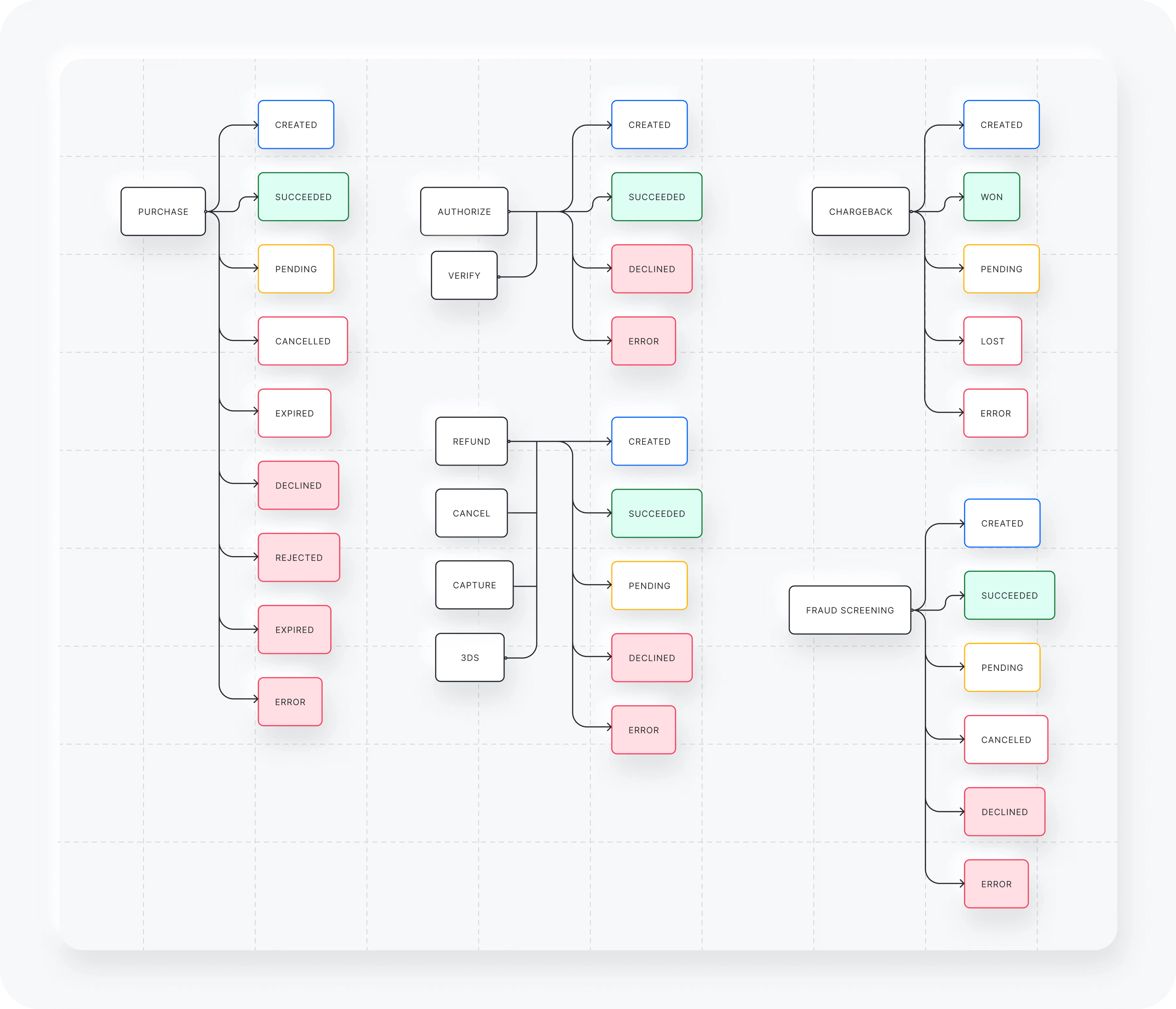 Refer to the [Transactions API reference](/reference/transaction) for more detailed information on transaction status codes and messages.
In the [Payments](/docs/payments) section of your Yuno dashboard, you will be able to view and export all the information regarding your payments and transactions with Yuno.
Refer to the [Transactions API reference](/reference/transaction) for more detailed information on transaction status codes and messages.
In the [Payments](/docs/payments) section of your Yuno dashboard, you will be able to view and export all the information regarding your payments and transactions with Yuno.